Searchyy - Find on YouTube by Right-Click
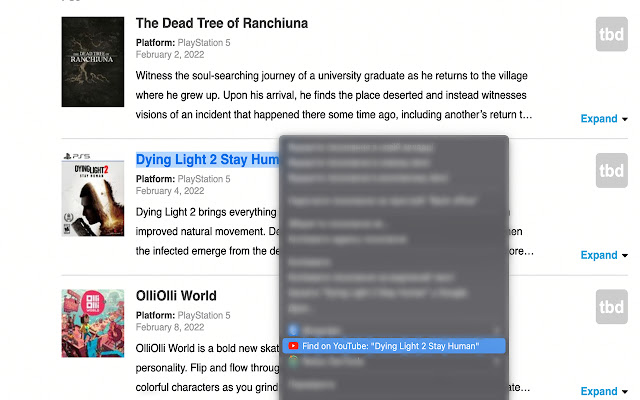
Search highlighted/selected text on YouTube with right click!
Searchyy - Find on YouTube by Right-Clickคืออะไร?
Searchyy - Find on YouTube by Right-Click เป็นส่วนขยายของ Chrome ที่พัฒนาโดย Vladyslav Bova และคุณลักษณะหลักของมันคือ "Search highlighted/selected text on YouTube with right click!"
ภาพหน้าจอของส่วนขยาย
ดาวน์โหลดไฟล์ CRX ของส่วนขยาย Searchyy - Find on YouTube by Right-Click
ดาวน์โหลดไฟล์ส่วนขยาย Searchyy - Find on YouTube by Right-Click ในรูปแบบ crx และติดตั้งส่วนขยาย Chrome ด้วยตนเองในเบราว์เซอร์หรือแชร์ไฟล์ crx กับเพื่อนๆ เพื่อติดตั้งส่วนขยาย Chrome อย่างง่ายดาย
คำแนะนำในการใช้ส่วนขยาย
                        I developed this extension for myself and I hope you will love it too.

It's pretty simple. Right click on selected text will redirect you on YouTube with the results.

It just saves a time.
ข้อมูลพื้นฐานของส่วนขยาย
| ชื่อ |  Searchyy - Find on YouTube by Right-Click Searchyy - Find on YouTube by Right-Click |
| ID | alhnhopmdlijlcdfbmlaflpfbcgfdekh |
| URL อย่างเป็นทางการ | https://chrome.google.com/webstore/detail/searchyy-find-on-youtube/alhnhopmdlijlcdfbmlaflpfbcgfdekh |
| คำอธิบาย | Search highlighted/selected text on YouTube with right click! |
| ขนาดไฟล์ | 9.2 KB |
| จำนวนการติดตั้ง | 64 |
| เวอร์ชันปัจจุบัน | 1.0 |
| อัปเดตครั้งล่าสุด | 2022-02-01 |
| วันที่เผยแพร่ | 2022-02-01 |
| คะแนน | 5.00/5 รวมทั้งหมด 3 คะแนน |
| ผู้พัฒนา | Vladyslav Bova |
| อีเมล | [email protected] |
| ประเภทการชำระเงิน | free |
| URL หน้านโยบายความเป็นส่วนตัว | https://www.termsfeed.com/live/95cf2d84-de8d-42e0-ba80-1ab7d730e04e |
| ภาษาที่รองรับ | en |
| manifest.json | |
{
    "update_url": "https:\/\/clients2.google.com\/service\/update2\/crx",
    "name": "Searchyy - Find on YouTube by Right-Click",
    "description": "Search highlighted\/selected text on YouTube with right click!",
    "version": "1.0",
    "manifest_version": 3,
    "background": {
        "service_worker": "background.js"
    },
    "permissions": [
        "contextMenus",
        "storage"
    ],
    "action": {
        "default_popup": "popup.html",
        "default_icon": {
            "16": "\/images\/16.png",
            "32": "\/images\/32.png",
            "48": "\/images\/48.png",
            "128": "\/images\/128.png"
        }
    },
    "icons": {
        "16": "\/images\/16.png",
        "32": "\/images\/32.png",
        "48": "\/images\/48.png",
        "128": "\/images\/128.png"
    }
} | |