JButton
JavaScript at your fingertips.
JButtonคืออะไร?
JButton เป็นส่วนขยายของ Chrome ที่พัฒนาโดย Drew McMurry และคุณลักษณะหลักของมันคือ "JavaScript at your fingertips."
ภาพหน้าจอของส่วนขยาย
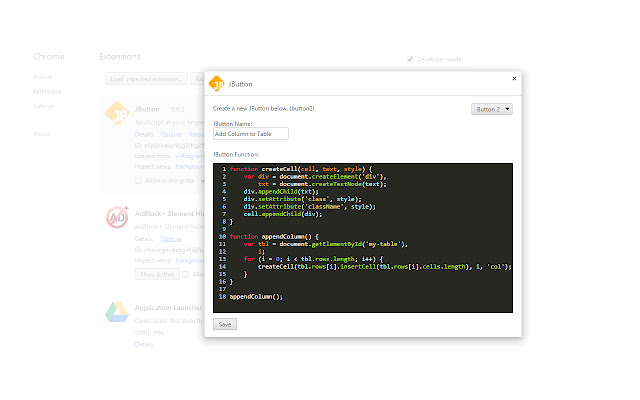
ดาวน์โหลดไฟล์ CRX ของส่วนขยาย JButton
ดาวน์โหลดไฟล์ส่วนขยาย JButton ในรูปแบบ crx และติดตั้งส่วนขยาย Chrome ด้วยตนเองในเบราว์เซอร์หรือแชร์ไฟล์ crx กับเพื่อนๆ เพื่อติดตั้งส่วนขยาย Chrome อย่างง่ายดาย
คำแนะนำในการใช้ส่วนขยาย
                        JButton is a developer tool for saving javascript into buttons for use on any website. The only limit is your ability to program.

Write your JButtons on the extension options page and they will appear in the JButton dropdown.

More features to come! Feedback and feature suggestions are always welcome! Happy interneting!

-Drew
ข้อมูลพื้นฐานของส่วนขยาย
| ชื่อ |  JButton JButton |
| ID | apggbocnogkahecnoebchhpadaijemga |
| URL อย่างเป็นทางการ | https://chrome.google.com/webstore/detail/jbutton/apggbocnogkahecnoebchhpadaijemga |
| คำอธิบาย | JavaScript at your fingertips. |
| ขนาดไฟล์ | 125 KB |
| จำนวนการติดตั้ง | 164 |
| เวอร์ชันปัจจุบัน | 0.0.5 |
| อัปเดตครั้งล่าสุด | 2019-03-08 |
| วันที่เผยแพร่ | 2019-03-08 |
| คะแนน | 5.00/5 รวมทั้งหมด 1 คะแนน |
| ผู้พัฒนา | Drew McMurry |
| อีเมล | [email protected] |
| ประเภทการชำระเงิน | free |
| ภาษาที่รองรับ | en |
| manifest.json | |
{
"update_url": "https:\/\/clients2.google.com\/service\/update2\/crx",
"name": "JButton",
"version": "0.0.5",
"manifest_version": 2,
"description": "JavaScript at your fingertips.",
"icons": {
"16": "images\/icon-16.png",
"128": "images\/icon-128.png"
},
"default_locale": "en",
"background": {
"scripts": [
"scripts\/chromereload.js",
"scripts\/background.js"
]
},
"options_ui": {
"page": "options.html",
"chrome_style": true
},
"browser_action": {
"default_icon": {
"19": "images\/icon-19.png",
"38": "images\/icon-38.png"
},
"default_title": "JButton",
"default_popup": "popup.html"
},
"content_scripts": [
{
"matches": [
" | |