ISE Assistant
An assistant extension for Cisco ISE to streamline common operational tasks.
ISE Assistantคืออะไร?
ISE Assistant เป็นส่วนขยายของ Chrome ที่พัฒนาโดย Iron Bow Technologies และคุณลักษณะหลักของมันคือ "An assistant extension for Cisco ISE to streamline common operational tasks."
ภาพหน้าจอของส่วนขยาย

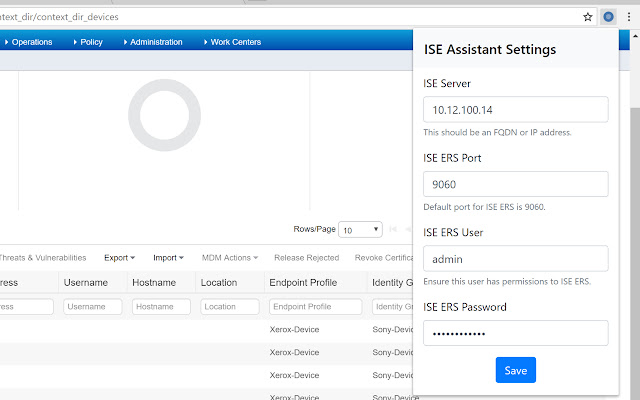
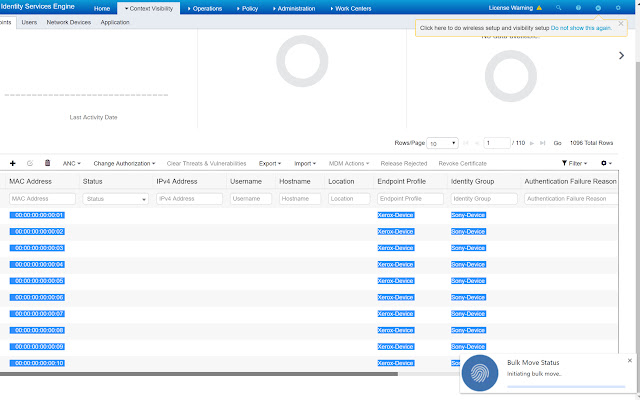
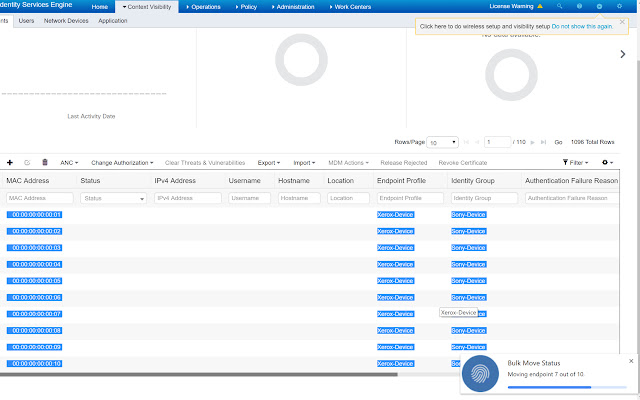

ดาวน์โหลดไฟล์ CRX ของส่วนขยาย ISE Assistant
ดาวน์โหลดไฟล์ส่วนขยาย ISE Assistant ในรูปแบบ crx และติดตั้งส่วนขยาย Chrome ด้วยตนเองในเบราว์เซอร์หรือแชร์ไฟล์ crx กับเพื่อนๆ เพื่อติดตั้งส่วนขยาย Chrome อย่างง่ายดาย
คำแนะนำในการใช้ส่วนขยาย
                        This extension aims to improve on some of the slow operational tasks that commonly need to be performed in Cisco Identity Services Engine (ISE) deployment.

The primary features include: moving endpoints to new identity groups, issuing changes of authorization (CoA) requests for active endpoints, and viewing session information in a local tab. These features are completed using the ISE REST ERS API and the Monitoring API.

Commonly, when managing a Cisco ISE deployment, I found myself staring at lines of events in the RADIUS Live Logs. I'd see an endpoint authentication come along that simply needed to be added to a particular endpoint identity group in order to successfully authenticate. Unfortunately, actually doing that simple task was quite burdensome in the ISE web interface. You would need to copy the MAC address, go to the Endpoint database (or Context Visibility), filter by the MAC address, open the endpoint, click edit, check "Static Group Assignment" and select the group you wanted to put it in. Generally speaking, this took a couple of minutes per endpoint. You could get faster by keeping a couple tabs open, and getting a good rhythm, but it just isn't efficient.

For the love of god, I just wanted to be able to right click on a MAC address and say "add to identity group XYZ"! Well, this extension does just that. You highlight a MAC address, right click to present a list of Endpoint Identity Groups, and select the one you want. It fires off some API calls and it's done! You get a nice little notification stating as much after it's done!

You can even highlight any number of addresses at once and it will handle them in bulk using the same number of clicks! Any selected text that is highlighted that is not a MAC address (in any of the common formats) will be ignored.

The ability to perform change of authorization (CoA) requests is now supported (as of v0.5.0). You can perform CoA with session rerun, port bounce, and port shutdown. You can do this for single or bulk MAC addresses. You can now view session information for active endpoints (as of v0.8).

 Please enjoy and let me know if this extension is a huge help for you or your team, or if I can add anything to it to help you out!
ข้อมูลพื้นฐานของส่วนขยาย
| ชื่อ |  ISE Assistant ISE Assistant |
| ID | bgcgpgjpecloagakaainoamfaedknpol |
| URL อย่างเป็นทางการ | https://chrome.google.com/webstore/detail/ise-assistant/bgcgpgjpecloagakaainoamfaedknpol |
| คำอธิบาย | An assistant extension for Cisco ISE to streamline common operational tasks. |
| ขนาดไฟล์ | 161 KB |
| จำนวนการติดตั้ง | 152 |
| เวอร์ชันปัจจุบัน | 0.8 |
| อัปเดตครั้งล่าสุด | 2019-03-13 |
| วันที่เผยแพร่ | 2019-03-13 |
| คะแนน | 5.00/5 รวมทั้งหมด 3 คะแนน |
| ผู้พัฒนา | Iron Bow Technologies |
| อีเมล | [email protected] |
| ประเภทการชำระเงิน | free |
| เว็บไซต์ส่วนขยาย | https://github.com/rnwolfe/cisco-ise-extension |
| ภาษาที่รองรับ | en-US |
| manifest.json | |
{
    "update_url": "https:\/\/clients2.google.com\/service\/update2\/crx",
    "manifest_version": 2,
    "name": "ISE Assistant",
    "version": "0.8",
    "options_ui": {
        "page": "options.html"
    },
    "description": "An assistant extension for Cisco ISE to streamline common operational tasks.",
    "author": "Ryan Wolfe, Iron Bow Technologies ([email protected])",
    "permissions": [
        "contextMenus",
        "storage",
        "notifications",
        "tabs",
        "https:\/\/*\/"
    ],
    "background": {
        "scripts": [
            "functions.js",
            "background.js"
        ]
    },
    "browser_action": {
        "default_popup": "options.html",
        "default_title": "ISE Assistant",
        "default_icon": {
            "16": "images\/icon16.png",
            "48": "images\/icon48.png"
        }
    },
    "icons": {
        "16": "images\/icon16.png",
        "48": "images\/icon48.png",
        "128": "images\/icon128.png"
    }
} | |