Highlighter - Web & PDF
A highlighting and organizing tool for websites and PDF's. 📝
Highlighter - Web & PDFคืออะไร?
Highlighter - Web & PDF เป็นส่วนขยายของ Chrome ที่พัฒนาโดย V & G และคุณลักษณะหลักของมันคือ "A highlighting and organizing tool for websites and PDF's. 📝"
ภาพหน้าจอของส่วนขยาย

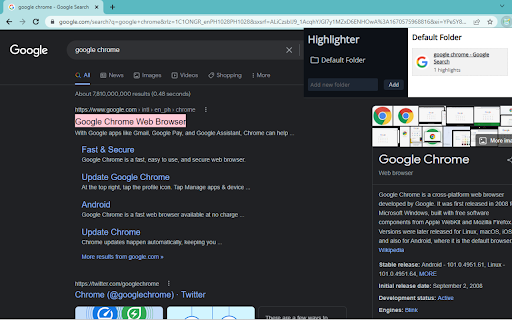
ดาวน์โหลดไฟล์ CRX ของส่วนขยาย Highlighter - Web & PDF
ดาวน์โหลดไฟล์ส่วนขยาย Highlighter - Web & PDF ในรูปแบบ crx และติดตั้งส่วนขยาย Chrome ด้วยตนเองในเบราว์เซอร์หรือแชร์ไฟล์ crx กับเพื่อนๆ เพื่อติดตั้งส่วนขยาย Chrome อย่างง่ายดาย
คำแนะนำในการใช้ส่วนขยาย
                        ⬇️Easy to set up⬇️:

1. Install the extension.
2. Enable/disable the extension’s icon through the pop-up and customize the settings for the extension in your Google Chrome settings.
3. Highlight 🎨websites and PDFs with multiple colors, and make annotations, revisit them anytime with a single click. 🔖
4. The highlights are fetched and visually rendered based on the respective URL.

✨Features ✨

1. You can highlight local PDFs, Online PDFs, or upload PDFs directly.
2. Organize your highlighted PDFs into folders and sub-folders. 📑
3. Access your highlights anywhere, your highlights and notes are synced with the Cloud.

Highlight 🖌 & organize your documents 📃with our free and super easy-to-use extension.
ข้อมูลพื้นฐานของส่วนขยาย
| ชื่อ |  Highlighter - Web & PDF Highlighter - Web & PDF |
| ID | bjacihmnpfaibndcfgonkkgioghkbhpk |
| URL อย่างเป็นทางการ | https://chromewebstore.google.com/detail/highlighter-web-pdf/bjacihmnpfaibndcfgonkkgioghkbhpk |
| คำอธิบาย | A highlighting and organizing tool for websites and PDF's. 📝 |
| ขนาดไฟล์ | 16.72 KB |
| จำนวนการติดตั้ง | 19 |
| เวอร์ชันปัจจุบัน | 1.0.0 |
| อัปเดตครั้งล่าสุด | 2022-12-10 |
| วันที่เผยแพร่ | 2022-12-10 |
| คะแนน | 3.67/5 รวมทั้งหมด 3 คะแนน |
| ผู้พัฒนา | V & G |
| อีเมล | [email protected] |
| ประเภทการชำระเงิน | free |
| ภาษาที่รองรับ | en |
| manifest.json | |
{
"update_url": "https:\/\/clients2.google.com\/service\/update2\/crx",
"manifest_version": 3,
"name": "Highlighter - Web & PDF",
"version": "1.0.0",
"description": "A highlighting and organizing tool for websites and PDF's. \u200b\u200b\ud83d\udcdd",
"action": {
"default_popup": "popup.html"
},
"icons": {
"32": "icons\/32.png",
"48": "icons\/128.png"
},
"content_scripts": [
{
"matches": [
" | |