Bitcoin Alert
Extension let user set alert for Bitcoin when price is right!
Bitcoin Alertคืออะไร?
Bitcoin Alert เป็นส่วนขยายของ Chrome ที่พัฒนาโดย vbukhari และคุณลักษณะหลักของมันคือ "Extension let user set alert for Bitcoin when price is right!"
ภาพหน้าจอของส่วนขยาย
ดาวน์โหลดไฟล์ CRX ของส่วนขยาย Bitcoin Alert
ดาวน์โหลดไฟล์ส่วนขยาย Bitcoin Alert ในรูปแบบ crx และติดตั้งส่วนขยาย Chrome ด้วยตนเองในเบราว์เซอร์หรือแชร์ไฟล์ crx กับเพื่อนๆ เพื่อติดตั้งส่วนขยาย Chrome อย่างง่ายดาย
คำแนะนำในการใช้ส่วนขยาย
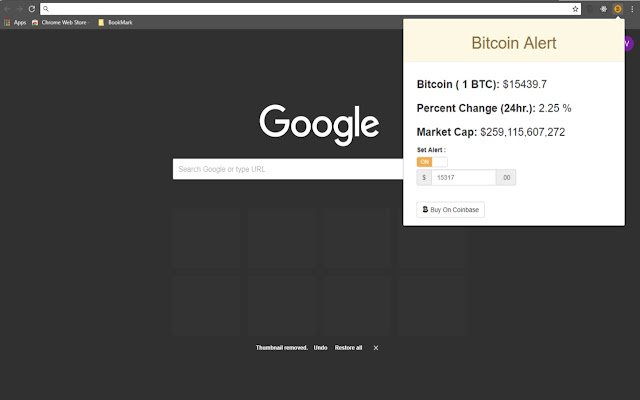
                        Bitcoin Alert is extension for as it's name suggest to alert it's user with Bitcoin price. This extension shows the price, percent change in last 24hrs., and market cap of Bitcoin.

It's very simple to use. User just need to turn on alert by clicking Set Aler and enter the price the user want to Buy/Sell Bitcoin and that's it. It will sent desktop notification when set price reached!

Updates!
v1.0.1 -> fixed background alert issue!
ข้อมูลพื้นฐานของส่วนขยาย
| ชื่อ |  Bitcoin Alert Bitcoin Alert |
| ID | caegcjlajimgnjonpdmjkfemnhjpjkli |
| URL อย่างเป็นทางการ | https://chrome.google.com/webstore/detail/bitcoin-alert/caegcjlajimgnjonpdmjkfemnhjpjkli |
| คำอธิบาย | Extension let user set alert for Bitcoin when price is right! |
| ขนาดไฟล์ | 187 KB |
| จำนวนการติดตั้ง | 327 |
| เวอร์ชันปัจจุบัน | 1.0.1 |
| อัปเดตครั้งล่าสุด | 2018-01-04 |
| วันที่เผยแพร่ | 2018-01-04 |
| คะแนน | 1.00/5 รวมทั้งหมด 1 คะแนน |
| ผู้พัฒนา | vbukhari |
| ประเภทการชำระเงิน | free |
| ภาษาที่รองรับ | en |
| manifest.json | |
{
    "update_url": "https:\/\/clients2.google.com\/service\/update2\/crx",
    "manifest_version": 2,
    "name": "Bitcoin Alert",
    "short_name": "Bit Alert",
    "version": "1.0.1",
    "description": "Extension let user set alert for Bitcoin when price is right!",
    "icons": {
        "128": "img\/bitcoin_Icon128.png",
        "48": "img\/bitcoin_Icon48.png",
        "16": "img\/bitcoin_Icon16.png"
    },
    "browser_action": {
        "default_icon": "img\/bitcoin_Icon16.png",
        "default_popup": "popup.html"
    },
    "content_security_policy": "script-src 'self' https:\/\/cdnjs.cloudflare.com https:\/\/maxcdn.bootstrapcdn.com https:\/\/ajax.googleapis.com; object-src 'self'",
    "background": {
        "persistent": true,
        "scripts": [
            "js\/jquery-3.2.1.min.js",
            "js\/background.js"
        ]
    },
    "permissions": [
        "storage",
        "notifications"
    ]
} | |