Flip Lichess Knights
Flip the direction of the knights on lichess.org
Flip Lichess Knightsคืออะไร?
Flip Lichess Knights เป็นส่วนขยายของ Chrome ที่พัฒนาโดย Sam Sweeney และคุณลักษณะหลักของมันคือ "Flip the direction of the knights on lichess.org"
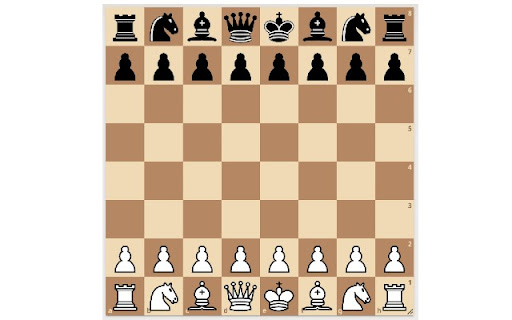
ภาพหน้าจอของส่วนขยาย
ดาวน์โหลดไฟล์ CRX ของส่วนขยาย Flip Lichess Knights
ดาวน์โหลดไฟล์ส่วนขยาย Flip Lichess Knights ในรูปแบบ crx และติดตั้งส่วนขยาย Chrome ด้วยตนเองในเบราว์เซอร์หรือแชร์ไฟล์ crx กับเพื่อนๆ เพื่อติดตั้งส่วนขยาย Chrome อย่างง่ายดาย
คำแนะนำในการใช้ส่วนขยาย
Flip Lichess Knights allows you to customize your board UI when playing chess on lichess.org. By default knights on Lichess face to the right. Flip Lichess Knights allows you to toggle their direction, so they can face either to the right or to the left. ข้อมูลพื้นฐานของส่วนขยาย
| ชื่อ |  Flip Lichess Knights Flip Lichess Knights |
| ID | cdkfpbdifpndnncjmfciiphhfjjfbpad |
| URL อย่างเป็นทางการ | https://chromewebstore.google.com/detail/flip-lichess-knights/cdkfpbdifpndnncjmfciiphhfjjfbpad |
| คำอธิบาย | Flip the direction of the knights on lichess.org |
| ขนาดไฟล์ | 30.63 KB |
| จำนวนการติดตั้ง | 38 |
| เวอร์ชันปัจจุบัน | 0.0.0.1 |
| อัปเดตครั้งล่าสุด | 2021-03-18 |
| วันที่เผยแพร่ | 2021-03-18 |
| ผู้พัฒนา | Sam Sweeney |
| อีเมล | [email protected] |
| ประเภทการชำระเงิน | free |
| ภาษาที่รองรับ | en |
| manifest.json | |
{
    "update_url": "https:\/\/clients2.google.com\/service\/update2\/crx",
    "name": "Flip Lichess Knights",
    "description": "Flip the direction of the knights on lichess.org",
    "version": "0.0.0.1",
    "manifest_version": 3,
    "background": {
        "service_worker": "background.js"
    },
    "content_scripts": [
        {
            "matches": [
                "https:\/\/*.lichess.org\/*"
            ],
            "js": [
                "flip-knights.js"
            ]
        }
    ],
    "action": {
        "default_popup": "popup.html",
        "default_icon": {
            "16": "icon16.png",
            "48": "icon48.png",
            "128": "icon128.png"
        }
    },
    "icons": {
        "16": "icon16.png",
        "48": "icon48.png",
        "128": "icon128.png"
    },
    "permissions": [
        "storage"
    ]
} | |