TwittaSave
Download Twitter Videos and Gifs to your device easily.
TwittaSaveคืออะไร?
TwittaSave เป็นส่วนขยายของ Chrome ที่พัฒนาโดย http://twittasave.net และคุณลักษณะหลักของมันคือ "Download Twitter Videos and Gifs to your device easily."
ภาพหน้าจอของส่วนขยาย
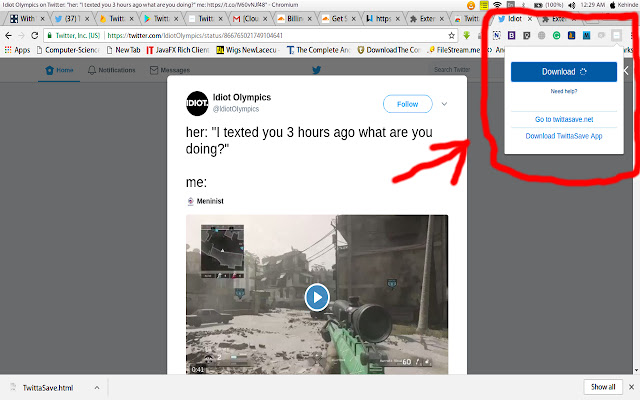
ดาวน์โหลดไฟล์ CRX ของส่วนขยาย TwittaSave
ดาวน์โหลดไฟล์ส่วนขยาย TwittaSave ในรูปแบบ crx และติดตั้งส่วนขยาย Chrome ด้วยตนเองในเบราว์เซอร์หรือแชร์ไฟล์ crx กับเพื่อนๆ เพื่อติดตั้งส่วนขยาย Chrome อย่างง่ายดาย
คำแนะนำในการใช้ส่วนขยาย
                        TwittaSave helps you to download Videos and animated Gifs from Twitter tweets to your device with just a button click.

Simply navigate your browser to the tweet containing the video or animated gif. Then click on the TwittaSave extension icon on the top right corner of your browser and then click the Download button.
ข้อมูลพื้นฐานของส่วนขยาย
| ชื่อ |  TwittaSave TwittaSave |
| ID | cgnlcidhpmgpfoeghnjddeikclplgfbe |
| URL อย่างเป็นทางการ | https://chrome.google.com/webstore/detail/twittasave/cgnlcidhpmgpfoeghnjddeikclplgfbe |
| คำอธิบาย | Download Twitter Videos and Gifs to your device easily. |
| ขนาดไฟล์ | 311 KB |
| จำนวนการติดตั้ง | 761 |
| เวอร์ชันปัจจุบัน | 1.3 |
| อัปเดตครั้งล่าสุด | 2021-01-18 |
| วันที่เผยแพร่ | 2019-11-20 |
| คะแนน | 3.27/5 รวมทั้งหมด 15 คะแนน |
| ผู้พัฒนา | http://twittasave.net |
| อีเมล | [email protected] |
| ประเภทการชำระเงิน | free |
| ภาษาที่รองรับ | en |
| manifest.json | |
{
    "update_url": "https:\/\/clients2.google.com\/service\/update2\/crx",
    "manifest_version": 2,
    "name": "TwittaSave",
    "description": "Download Twitter Videos and Gifs to your device easily.",
    "icons": {
        "16": "icon16.png",
        "48": "icon48.png",
        "128": "icon128.png"
    },
    "version": "1.3",
    "content_scripts": [
        {
            "matches": [
                "https:\/\/twitter.com\/*",
                "https:\/\/api.jublo.net\/*"
            ],
            "js": [
                "jquery-3.1.1.min.js",
                "codebird.js",
                "content.js"
            ]
        }
    ],
    "browser_action": {
        "default_popup": "popup.html",
        "default_title": "TwittaSave - Download Twitter Videos and Gifs to your device easily"
    },
    "permissions": [
        "tabs",
        "https:\/\/twitter.com\/*"
    ]
} | |