DistractBlock
Temporarily block websites - *** STUDY AID ***
DistractBlockคืออะไร?
DistractBlock เป็นส่วนขยายของ Chrome ที่พัฒนาโดย pandaDevs และคุณลักษณะหลักของมันคือ "Temporarily block websites - *** STUDY AID ***"
ภาพหน้าจอของส่วนขยาย


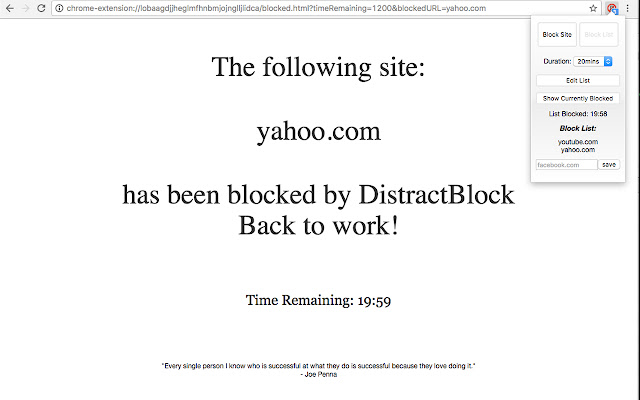
ดาวน์โหลดไฟล์ CRX ของส่วนขยาย DistractBlock
ดาวน์โหลดไฟล์ส่วนขยาย DistractBlock ในรูปแบบ crx และติดตั้งส่วนขยาย Chrome ด้วยตนเองในเบราว์เซอร์หรือแชร์ไฟล์ crx กับเพื่อนๆ เพื่อติดตั้งส่วนขยาย Chrome อย่างง่ายดาย
คำแนะนำในการใช้ส่วนขยาย
                        Be more productive and stay focused with DistractBlock.

A simple, easy to use study aid to block distracting websites.

You can block sites individually or you can create a list of sites to block in a single click.

Sites continue to be blocked until the user selected timer runs out.


Please do not hesitate to email me any issues/suggestions you have before giving negative feedback!
I will try and fix issues ASAP.
ข้อมูลพื้นฐานของส่วนขยาย
| ชื่อ |  DistractBlock DistractBlock |
| ID | chkocephofomhgkamlgndfolgpgddhnf |
| URL อย่างเป็นทางการ | https://chrome.google.com/webstore/detail/distractblock/chkocephofomhgkamlgndfolgpgddhnf |
| คำอธิบาย | Temporarily block websites - *** STUDY AID *** |
| ขนาดไฟล์ | 153 KB |
| จำนวนการติดตั้ง | 90 |
| เวอร์ชันปัจจุบัน | 1.1 |
| อัปเดตครั้งล่าสุด | 2017-03-08 |
| วันที่เผยแพร่ | 2017-03-08 |
| คะแนน | 5.00/5 รวมทั้งหมด 4 คะแนน |
| ผู้พัฒนา | pandaDevs |
| อีเมล | [email protected] |
| ประเภทการชำระเงิน | free |
| ภาษาที่รองรับ | en |
| manifest.json | |
{
    "update_url": "https:\/\/clients2.google.com\/service\/update2\/crx",
    "name": "DistractBlock",
    "short_name": "DistractBlock",
    "description": "Temporarily block websites - *** STUDY AID ***",
    "version": "1.1",
    "manifest_version": 2,
    "browser_action": {
        "default_popup": "popup.html",
        "default_icon": "img\/icons\/not_active_64.png"
    },
    "background": {
        "scripts": [
            "jquery.js",
            "background.js"
        ]
    },
    "icons": {
        "32": "img\/icons\/active_32.png",
        "64": "img\/icons\/active_64.png",
        "128": "img\/icons\/active_128.png"
    },
    "web_accessible_resources": [
        "blocked.html"
    ],
    "permissions": [
        "webNavigation",
        "tabs",
        "http:\/\/*\/*",
        "https:\/\/*\/*",
        "declarativeContent",
        "storage"
    ]
} | |