Wiki Viewer
Search entire wikipedia library with a single click.
Wiki Viewerคืออะไร?
Wiki Viewer เป็นส่วนขยายของ Chrome ที่พัฒนาโดย Scuer และคุณลักษณะหลักของมันคือ "Search entire wikipedia library with a single click."
ภาพหน้าจอของส่วนขยาย
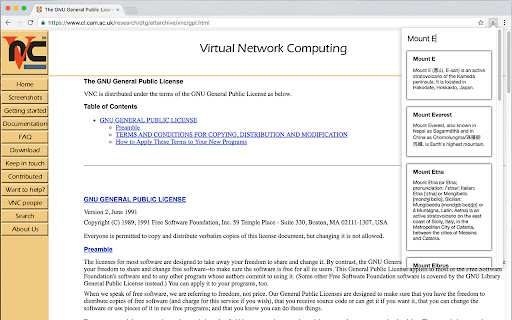

ดาวน์โหลดไฟล์ CRX ของส่วนขยาย Wiki Viewer
ดาวน์โหลดไฟล์ส่วนขยาย Wiki Viewer ในรูปแบบ crx และติดตั้งส่วนขยาย Chrome ด้วยตนเองในเบราว์เซอร์หรือแชร์ไฟล์ crx กับเพื่อนๆ เพื่อติดตั้งส่วนขยาย Chrome อย่างง่ายดาย
คำแนะนำในการใช้ส่วนขยาย
                        Wikipedia Viewer lets you search Wikipedia using a handy button in Your browser. Quickly find information you need, it's fast and lightweight. You can save a lot of time if you rely on Wikipedia in Your work, school or home. Access the biggest collection of information faster and more efficiently!

Wikipedia is a trademark of the Wikimedia Foundation and is used with the permission of the Wikimedia Foundation. We are not endorsed by or affiliated with the Wikimedia Foundation.
ข้อมูลพื้นฐานของส่วนขยาย
| ชื่อ |  Wiki Viewer Wiki Viewer |
| ID | ciddbcbjkgfcihojgjnlooihhchpdmfa |
| URL อย่างเป็นทางการ | https://chromewebstore.google.com/detail/wiki-viewer/ciddbcbjkgfcihojgjnlooihhchpdmfa |
| คำอธิบาย | Search entire wikipedia library with a single click. |
| ขนาดไฟล์ | 40.36 KB |
| จำนวนการติดตั้ง | 23 |
| เวอร์ชันปัจจุบัน | 1.2.1 |
| อัปเดตครั้งล่าสุด | 2016-12-06 |
| วันที่เผยแพร่ | 2016-12-06 |
| คะแนน | 4.50/5 รวมทั้งหมด 2 คะแนน |
| ผู้พัฒนา | Scuer |
| อีเมล | [email protected] |
| ประเภทการชำระเงิน | free |
| ภาษาที่รองรับ | en |
| manifest.json | |
{
    "update_url": "https:\/\/clients2.google.com\/service\/update2\/crx",
    "manifest_version": 2,
    "name": "Wiki Viewer",
    "description": "Search entire wikipedia library with a single click.",
    "version": "1.2.1",
    "author": "Scuer",
    "short_name": "WV",
    "content_security_policy": "script-src 'self' https:\/\/ssl.google-analytics.com; object-src 'self'",
    "browser_action": {
        "default_icon": "icon_128.png",
        "default_popup": "index.html"
    },
    "options_ui": {
        "page": "option.html"
    },
    "permissions": [
        "https:\/\/*.wikipedia.org\/w\/api.php",
        "storage"
    ]
} | |