Carmen Sandiego Search
Search with Carmen Sandiego and get the lastest Carmen Sandiego News!
Carmen Sandiego Searchคืออะไร?
Carmen Sandiego Search เป็นส่วนขยายของ Chrome ที่พัฒนาโดย Tab Design INC และคุณลักษณะหลักของมันคือ "Search with Carmen Sandiego and get the lastest Carmen Sandiego News!"
ภาพหน้าจอของส่วนขยาย

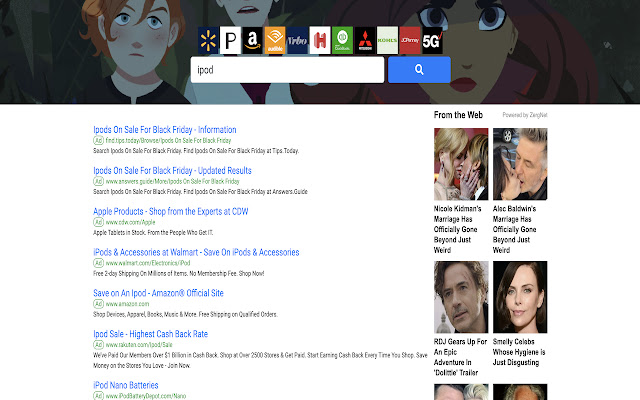
ดาวน์โหลดไฟล์ CRX ของส่วนขยาย Carmen Sandiego Search
ดาวน์โหลดไฟล์ส่วนขยาย Carmen Sandiego Search ในรูปแบบ crx และติดตั้งส่วนขยาย Chrome ด้วยตนเองในเบราว์เซอร์หรือแชร์ไฟล์ crx กับเพื่อนๆ เพื่อติดตั้งส่วนขยาย Chrome อย่างง่ายดาย
คำแนะนำในการใช้ส่วนขยาย
                        Search the Web with your Favorite Netflix Show: Carmen Sandiego!

This Search Extension gives you easy access to the best search all while having the best  Carmen Sandiego images in the background and when you click on the icon in toolbar,  the LATEST NEWS from  Carmen Sandiego!

In order to get the best-related search, this extension updates your browser Omnibox search to allow metadata search for the topic you’ve installed.
ข้อมูลพื้นฐานของส่วนขยาย
| ชื่อ |  Carmen Sandiego Search Carmen Sandiego Search |
| ID | ckflbkkgidijgpkkphiihlcckfhbmipb |
| URL อย่างเป็นทางการ | https://chrome.google.com/webstore/detail/carmen-sandiego-search/ckflbkkgidijgpkkphiihlcckfhbmipb |
| คำอธิบาย | Search with Carmen Sandiego and get the lastest Carmen Sandiego News! |
| ขนาดไฟล์ | 243 KB |
| จำนวนการติดตั้ง | 64 |
| เวอร์ชันปัจจุบัน | 0.3 |
| อัปเดตครั้งล่าสุด | 2019-10-14 |
| วันที่เผยแพร่ | 2019-10-14 |
| ผู้พัฒนา | Tab Design INC |
| ประเภทการชำระเงิน | free |
| URL หน้าช่วยเหลือ | https://www.newtabgallery.com/support |
| URL หน้านโยบายความเป็นส่วนตัว | https://newtabgallery.com/privacy |
| ภาษาที่รองรับ | en-US |
| manifest.json | |
{
    "update_url": "https:\/\/clients2.google.com\/service\/update2\/crx",
    "manifest_version": 2,
    "name": "Carmen Sandiego Search",
    "version": "0.3",
    "description": "Search with Carmen Sandiego and get the lastest Carmen Sandiego News!",
    "icons": {
        "16": "icon16.png",
        "32": "icon32.png",
        "48": "icon48.png",
        "128": "icon128.png"
    },
    "background": {
        "scripts": [
            "background.js"
        ]
    },
    "browser_action": {
        "default_title": "Carmen Sandiego Search",
        "default_icon": {
            "16": "icon16.png",
            "32": "icon32.png"
        }
    },
    "chrome_settings_overrides": {
        "search_provider": {
            "name": "Carmen Sandiego",
            "keyword": "carmens",
            "search_url": "https:\/\/search.newtabgallery.com\/omnibus-search.php?q={searchTerms}",
            "favicon_url": "https:\/\/home.newtabgallery.com\/carmens\/icon32.png",
            "encoding": "UTF-8",
            "is_default": true
        }
    }
} | |