Gitlab CI Dashboard
Manage your Gitlab pipelines in 2 clicks!
Gitlab CI Dashboardคืออะไร?
Gitlab CI Dashboard เป็นส่วนขยายของ Chrome ที่พัฒนาโดย https://pixel-perfect.dev และคุณลักษณะหลักของมันคือ "Manage your Gitlab pipelines in 2 clicks!"
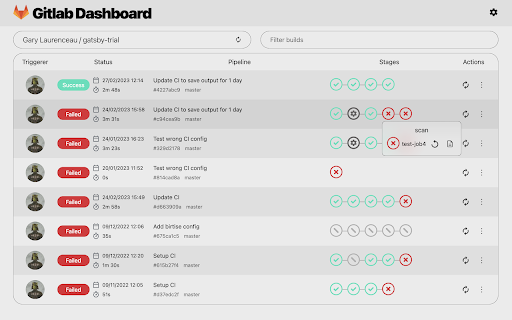
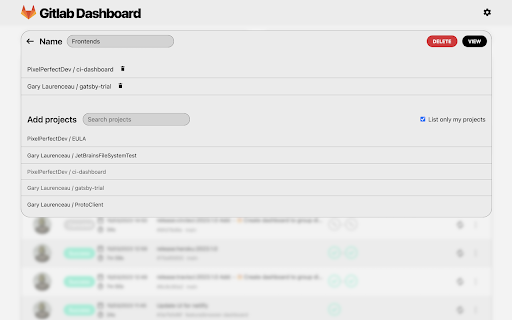
ภาพหน้าจอของส่วนขยาย
ดาวน์โหลดไฟล์ CRX ของส่วนขยาย Gitlab CI Dashboard
ดาวน์โหลดไฟล์ส่วนขยาย Gitlab CI Dashboard ในรูปแบบ crx และติดตั้งส่วนขยาย Chrome ด้วยตนเองในเบราว์เซอร์หรือแชร์ไฟล์ crx กับเพื่อนๆ เพื่อติดตั้งส่วนขยาย Chrome อย่างง่ายดาย
คำแนะนำในการใช้ส่วนขยาย
                        Features:
- 🔐️ Use your Gitlab account from gitlab.com, self-hosted GitLab Community Edition (CE) or self-hosted GitLab Enterprise Edition (EE) server.
- 🔎 Search for your personal depots and public ones.
- 🖥 Keep track of pipelines and show jobs details.
- 🛠 Trigger, abort and retry pipeline or job.

Plugin is in beta, send your feedback here: https://tally.so/r/3jebP4

Also available on your JetBrains IDE with more features: https://plugins.jetbrains.com/plugin/15457-gitlab-ci-dashboard
ข้อมูลพื้นฐานของส่วนขยาย
| ชื่อ |  Gitlab CI Dashboard Gitlab CI Dashboard |
| ID | cmemccamcgimfmellbnblebeajdfjogl |
| URL อย่างเป็นทางการ | https://chromewebstore.google.com/detail/gitlab-ci-dashboard/cmemccamcgimfmellbnblebeajdfjogl |
| คำอธิบาย | Manage your Gitlab pipelines in 2 clicks! |
| ขนาดไฟล์ | 1.27 MB |
| จำนวนการติดตั้ง | 87 |
| เวอร์ชันปัจจุบัน | 2023.0.2 |
| อัปเดตครั้งล่าสุด | 2023-04-15 |
| วันที่เผยแพร่ | 2023-03-02 |
| คะแนน | 3.00/5 รวมทั้งหมด 2 คะแนน |
| ผู้พัฒนา | https://pixel-perfect.dev |
| อีเมล | [email protected] |
| ประเภทการชำระเงิน | in_app |
| เว็บไซต์ส่วนขยาย | https://pixel-perfect.dev |
| URL หน้านโยบายความเป็นส่วนตัว | https://pixel-perfect.dev/privacy-policy.html |
| ภาษาที่รองรับ | en |
| manifest.json | |
{
    "update_url": "https:\/\/clients2.google.com\/service\/update2\/crx",
    "name": "Gitlab CI Dashboard",
    "version": "2023.0.2",
    "description": "Manage your Gitlab pipelines in 2 clicks!",
    "manifest_version": 3,
    "icons": {
        "16": "icons\/ic_plugin_gitlab_16.png",
        "48": "icons\/ic_plugin_gitlab_48.png",
        "128": "icons\/ic_plugin_gitlab_128.png"
    },
    "action": {
        "default_icon": "icons\/ic_plugin_gitlab_48.png",
        "default_popup": "index.html?popup=true",
        "default_title": "Gitlab Dashboard"
    },
    "browser_specific_settings": {
        "gecko": {
            "id": "[email protected]"
        }
    }
} | |