upStart
Bookmark Organizer
upStartคืออะไร?
upStart เป็นส่วนขยายของ Chrome ที่พัฒนาโดย Fábio Rodrigues และคุณลักษณะหลักของมันคือ "Bookmark Organizer"
ภาพหน้าจอของส่วนขยาย
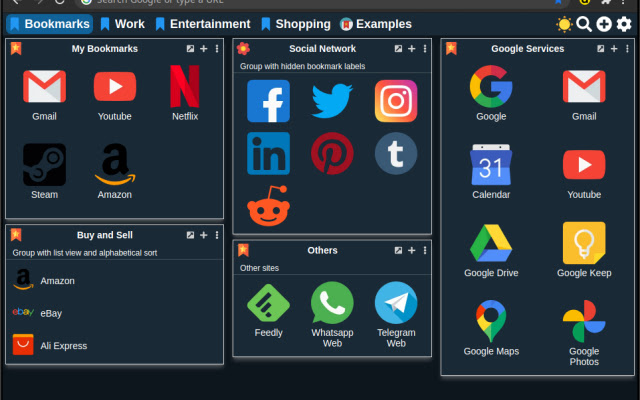


ดาวน์โหลดไฟล์ CRX ของส่วนขยาย upStart
ดาวน์โหลดไฟล์ส่วนขยาย upStart ในรูปแบบ crx และติดตั้งส่วนขยาย Chrome ด้วยตนเองในเบราว์เซอร์หรือแชร์ไฟล์ crx กับเพื่อนๆ เพื่อติดตั้งส่วนขยาย Chrome อย่างง่ายดาย
คำแนะนำในการใช้ส่วนขยาย
                        upStart is a replacement of new tab page with quick access to your bookmarked pages.

Keep your bookmarks organized into groups and pages.

• Look & Fell highly customizable.

• Easily add bookmarks from any page or save all open tabs

• Intuitive and easy to customize

• Features like check for broken links and import bookmarks from the browser

• Synchronization with other devices through Dropbox

• Easily import and export your data

• Use your own icons and images

• Create restore points to revert changes

• Search bookmarks easily

• Themes

• Made with vanilla JS for better performance


Changelog:

Version 2.1
- Minor bugfixes


Version 2.0
- Application refactored from the ground with a lot of new features.
- Some of the older options will have to be replaced
- Complete new set of icons and Backgrounds
- Multiple language support. Right now we have only English and Portuguese
- Synchronization with Dropbox
- Sorry, but there are too many changes to list

Version 1.6.1
- Fix font color when group is colored

Version 1.6
- New experimental Dark mode
- You can now use "data:image" icons
- Convert any bookmark icon into "data:image"
- Option to convert all bookmarks into "data:image"
- Convert into "data:image" new bookmarks by default
- Minor bug fixes

Version 1.5.2
- fix the database update

Version 1.5.1
- Fix the "ERR_UNKNOWN_URL_SCHEME" error again :(

Version 1.5
- Removed most of confirmation dialogues for better usability
- Added tons of icons for groups and bookmarks
- Backgrounds added and some removed
- New icon for blank and undefined bookmarks
- New option to scan broken icons and replace by a nicer one
- New dialog to update the version
- User data now is separeted from the images data. The settings backup should be considerable smaller now
- Others minor bugs corrected

Version 1.4
- Just a minor update to fix the "ERR_UNKNOWN_URL_SCHEME" error on Chrome 71 and above

Version 1.3
- added the option to make groups color transparent
- added a global font color option
- upon adding a new bookmark from the menu it tries to fetch the built-in icon. If it fails it will try to use the favicon of the page.

Source code: github.com/anfabio/upstart
ข้อมูลพื้นฐานของส่วนขยาย
| ชื่อ |  upStart upStart |
| ID | ddalpldcidoajbgohbdlelfmfmjiccga |
| URL อย่างเป็นทางการ | https://chrome.google.com/webstore/detail/upstart/ddalpldcidoajbgohbdlelfmfmjiccga |
| คำอธิบาย | Bookmark Organizer |
| ขนาดไฟล์ | 3.86 MB |
| จำนวนการติดตั้ง | 147 |
| เวอร์ชันปัจจุบัน | 2.1 |
| อัปเดตครั้งล่าสุด | 2020-11-19 |
| วันที่เผยแพร่ | 2020-02-22 |
| คะแนน | 5.00/5 รวมทั้งหมด 2 คะแนน |
| ผู้พัฒนา | Fábio Rodrigues |
| อีเมล | [email protected] |
| ประเภทการชำระเงิน | free |
| ภาษาที่รองรับ | en |
| manifest.json | |
{
"update_url": "https:\/\/clients2.google.com\/service\/update2\/crx",
"manifest_version": 2,
"name": "upStart",
"short_name": "upStart",
"description": "Bookmark Organizer",
"version": "2.1",
"browser_action": {
"default_title": "upStart",
"default_icon": "img\/icon64.png",
"default_popup": "popup.html"
},
"icons": {
"16": "img\/icon16.png",
"48": "img\/icon48.png",
"128": "img\/icon128.png"
},
"content_security_policy": "script-src 'self'; object-src 'self'",
"web_accessible_resources": [
"js\/*.json",
"newtab.html"
],
"homepage_url": "https:\/\/github.com\/anfabio\/upstart",
"permissions": [
"file:\/\/\/*\/",
"tabs",
"management",
"alarms",
"storage",
"unlimitedStorage",
"contextMenus",
" | |