Beatles new tab band HD wallpaper theme
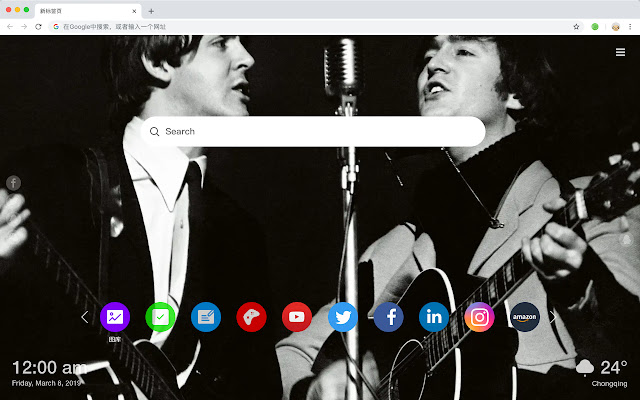
Each time you open a new tab, you will get a different HD wallpaper for the Beatles. This new theme includes clock and more.
Beatles new tab band HD wallpaper themeคืออะไร?
Beatles new tab band HD wallpaper theme เป็นส่วนขยายของ Chrome ที่พัฒนาโดย http://mytab.me และคุณลักษณะหลักของมันคือ "Each time you open a new tab, you will get a different HD wallpaper for the Beatles. This new theme includes clock and more."
ภาพหน้าจอของส่วนขยาย


ดาวน์โหลดไฟล์ CRX ของส่วนขยาย Beatles new tab band HD wallpaper theme
ดาวน์โหลดไฟล์ส่วนขยาย Beatles new tab band HD wallpaper theme ในรูปแบบ crx และติดตั้งส่วนขยาย Chrome ด้วยตนเองในเบราว์เซอร์หรือแชร์ไฟล์ crx กับเพื่อนๆ เพื่อติดตั้งส่วนขยาย Chrome อย่างง่ายดาย
คำแนะนำในการใช้ส่วนขยาย
                        In 1960, the band was founded in Liverpool, England, and its musical style originated from the rock music of the 1950s, and opened up the genre of psychedelic rock and pop rock.

You will get the following new features:
 - To-do list
 - Set your favorite wallpapers
 - Discover new hot spots
 - Bookmarks
 - Social network notifications
 - High quality wallpaper for each new label
 - Clock showing date and time
 - Weather widget
 - Open to search
ข้อมูลพื้นฐานของส่วนขยาย
| ชื่อ |  Beatles new tab band HD wallpaper theme Beatles new tab band HD wallpaper theme |
| ID | eapleppmgahdlbpknppggdaohobkabja |
| URL อย่างเป็นทางการ | https://chrome.google.com/webstore/detail/beatles-new-tab-band-hd-w/eapleppmgahdlbpknppggdaohobkabja |
| คำอธิบาย | Each time you open a new tab, you will get a different HD wallpaper for the Beatles. This new theme includes clock and more. |
| ขนาดไฟล์ | 34.71 KB |
| จำนวนการติดตั้ง | 72 |
| เวอร์ชันปัจจุบัน | 1.1.0.0 |
| อัปเดตครั้งล่าสุด | 2019-05-21 |
| วันที่เผยแพร่ | 2019-05-21 |
| ผู้พัฒนา | http://mytab.me |
| ประเภทการชำระเงิน | free |
| ภาษาที่รองรับ | en,zh-CN,zh-TW |
| manifest.json | |
{
    "name": "__MSG_ext_name__",
    "manifest_version": 2,
    "description": "__MSG_ext_desc__",
    "browser_action": {
        "default_icon": {
            "48": "icons\/48.png"
        },
        "default_title": "__MSG_ext_name__"
    },
    "chrome_url_overrides": {
        "newtab": "pages\/newtab\/index.html"
    },
    "background": {
        "scripts": [
            "app.js",
            "pages\/background\/index.js"
        ],
        "persistent": false
    },
    "default_locale": "en",
    "icons": {
        "48": "icons\/48.png",
        "128": "icons\/128.png"
    },
    "minimum_chrome_version": "57",
    "offline_enabled": true,
    "update_url": "https:\/\/clients2.google.com\/service\/update2\/crx",
    "version": "1.1.0.0"
} | |