Reddit visible arrows
Show reddit arrows regardless of subreddit style
Reddit visible arrowsคืออะไร?
Reddit visible arrows เป็นส่วนขยายของ Chrome ที่พัฒนาโดย CarlosCheddar และคุณลักษณะหลักของมันคือ "Show reddit arrows regardless of subreddit style"
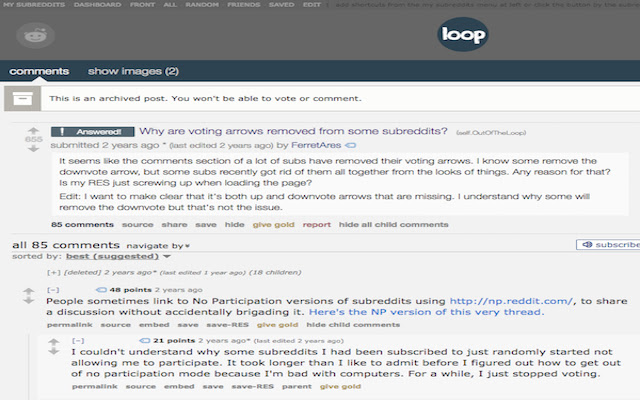
ภาพหน้าจอของส่วนขยาย

ดาวน์โหลดไฟล์ CRX ของส่วนขยาย Reddit visible arrows
ดาวน์โหลดไฟล์ส่วนขยาย Reddit visible arrows ในรูปแบบ crx และติดตั้งส่วนขยาย Chrome ด้วยตนเองในเบราว์เซอร์หรือแชร์ไฟล์ crx กับเพื่อนๆ เพื่อติดตั้งส่วนขยาย Chrome อย่างง่ายดาย
คำแนะนำในการใช้ส่วนขยาย
                        This extension enables voting arrows regardless of the CSS that the subreddit uses. This also works for subreddits that require subscriptions to enable voting.

Disclaimer: This extension resets the arrow positioning making subs like /r/ShitRedditSays seem like the arrows are inverted. This happens because some subs modify the sprites of the arrows making upvotes look like downvotes and viceversa.
ข้อมูลพื้นฐานของส่วนขยาย
| ชื่อ |  Reddit visible arrows Reddit visible arrows |
| ID | ehakajcimcpgbaebammmaaacfmnmefjd |
| URL อย่างเป็นทางการ | https://chrome.google.com/webstore/detail/reddit-visible-arrows/ehakajcimcpgbaebammmaaacfmnmefjd |
| คำอธิบาย | Show reddit arrows regardless of subreddit style |
| ขนาดไฟล์ | 9.7 KB |
| จำนวนการติดตั้ง | 223 |
| เวอร์ชันปัจจุบัน | 0.3.0 |
| อัปเดตครั้งล่าสุด | 2017-11-26 |
| วันที่เผยแพร่ | 2017-11-26 |
| คะแนน | 5.00/5 รวมทั้งหมด 3 คะแนน |
| ผู้พัฒนา | CarlosCheddar |
| ประเภทการชำระเงิน | free |
| เว็บไซต์ส่วนขยาย | https://github.com/carloscheddar/reddit_visible_arrows |
| URL หน้าช่วยเหลือ | https://github.com/carloscheddar/reddit_visible_arrows |
| ภาษาที่รองรับ | en |
| manifest.json | |
{
    "update_url": "https:\/\/clients2.google.com\/service\/update2\/crx",
    "manifest_version": 2,
    "name": "Reddit visible arrows",
    "description": "Show reddit arrows regardless of subreddit style",
    "version": "0.3.0",
    "content_scripts": [
        {
            "css": [
                "styles.css"
            ],
            "matches": [
                "*:\/\/*.reddit.com\/*"
            ]
        }
    ],
    "icons": {
        "16": "icon16.png",
        "32": "icon32.png",
        "48": "icon.png",
        "128": "icon128.png"
    }
} | |





![redd.AT - an [A]wesome [T]heme for reddit](https://lh3.googleusercontent.com/sPtma8dqc4jUEpdaHgAoUCH-TGNebKS1_MIGinMfi5566q3hdj-C9vYk6yleQHDROYYdvuyuRBozvHA-AxYNh2h-Ww)