WearWhat Fashion Shop
This extension will help you buy fashion items that you see while using the browser
WearWhat Fashion Shopคืออะไร?
WearWhat Fashion Shop เป็นส่วนขยายของ Chrome ที่พัฒนาโดย https://www.azivn.com และคุณลักษณะหลักของมันคือ "This extension will help you buy fashion items that you see while using the browser"
ภาพหน้าจอของส่วนขยาย
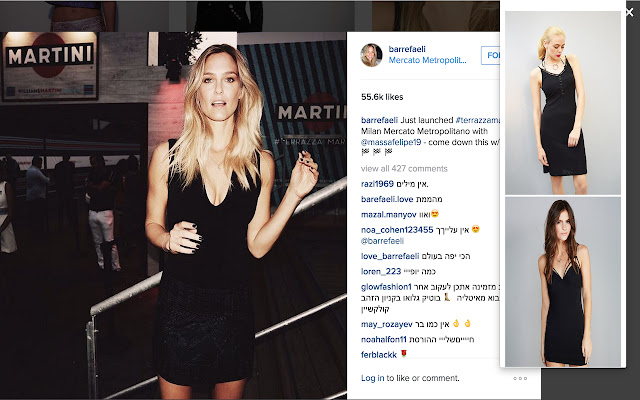
ดาวน์โหลดไฟล์ CRX ของส่วนขยาย WearWhat Fashion Shop
ดาวน์โหลดไฟล์ส่วนขยาย WearWhat Fashion Shop ในรูปแบบ crx และติดตั้งส่วนขยาย Chrome ด้วยตนเองในเบราว์เซอร์หรือแชร์ไฟล์ crx กับเพื่อนๆ เพื่อติดตั้งส่วนขยาย Chrome อย่างง่ายดาย
คำแนะนำในการใช้ส่วนขยาย
                        WearWhat, Your own personal stylist.
WearWhat stylist will capture every photo that you are viewing and will offer you similar fashion items to wear and buy.
Do you find yourself always wondering where you can buy this beautiful shirt or dress? Want to look just like this model?
WearWhat will help you do that.

1. Visit your favourite celebrity site (For example: Kim Kardashian's Instagram)
2. Click on WearWhat's Icon on the top-right
3. Choose your look

Enjoy!

Feedback -> [email protected]


**
Screenshot image taken from
instagram.com/barrefaeli/
ข้อมูลพื้นฐานของส่วนขยาย
| ชื่อ |  WearWhat Fashion Shop WearWhat Fashion Shop |
| ID | ejddfebccpicbocciobobaaccblahjie |
| URL อย่างเป็นทางการ | https://chrome.google.com/webstore/detail/wearwhat-fashion-shop/ejddfebccpicbocciobobaaccblahjie |
| คำอธิบาย | This extension will help you buy fashion items that you see while using the browser |
| ขนาดไฟล์ | 284 KB |
| จำนวนการติดตั้ง | 74 |
| เวอร์ชันปัจจุบัน | 1.8 |
| อัปเดตครั้งล่าสุด | 2015-09-24 |
| วันที่เผยแพร่ | 2015-09-24 |
| คะแนน | 5.00/5 รวมทั้งหมด 1 คะแนน |
| ผู้พัฒนา | https://www.azivn.com |
| ประเภทการชำระเงิน | free |
| ภาษาที่รองรับ | en-US |
| manifest.json | |
{
    "update_url": "https:\/\/clients2.google.com\/service\/update2\/crx",
    "manifest_version": 2,
    "name": "WearWhat Fashion Shop",
    "description": "This extension will help you buy fashion items that you see while using the browser",
    "version": "1.8",
    "browser_action": {
        "default_icon": "clothes17.png",
        "default_popup": "popup.html"
    },
    "permissions": [
        "activeTab",
        "https:\/\/www.google-analytics.com\/",
        "storage"
    ]
} | |