Grade Calculator for Blackboard Learn
Find out what your grade would be with certain assignments added.
Grade Calculator for Blackboard Learnคืออะไร?
Grade Calculator for Blackboard Learn เป็นส่วนขยายของ Chrome ที่พัฒนาโดย Rohan Mathur และคุณลักษณะหลักของมันคือ "Find out what your grade would be with certain assignments added."
ภาพหน้าจอของส่วนขยาย

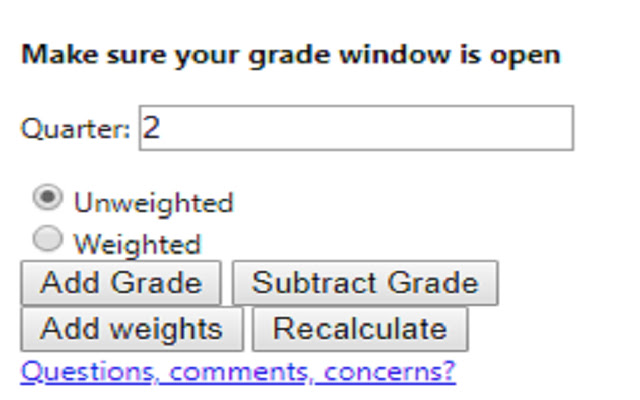
ดาวน์โหลดไฟล์ CRX ของส่วนขยาย Grade Calculator for Blackboard Learn
ดาวน์โหลดไฟล์ส่วนขยาย Grade Calculator for Blackboard Learn ในรูปแบบ crx และติดตั้งส่วนขยาย Chrome ด้วยตนเองในเบราว์เซอร์หรือแชร์ไฟล์ crx กับเพื่อนๆ เพื่อติดตั้งส่วนขยาย Chrome อย่างง่ายดาย
คำแนะนำในการใช้ส่วนขยาย
                        **MAJOR UPDATE**
I MADE AN ACTUAL GUI!! This is now an actually usable chrome extension and something I'm actually kind of proud of. I hope everyone finds it useful!

Thanks,
Rohan

This extension is meant to help you figure out what your total grade would be after an assignment is entered into the grade book.

Feedback Form:
https://goo.gl/forms/1fpCghIIhv49VfTr1
ข้อมูลพื้นฐานของส่วนขยาย
| ชื่อ |  Grade Calculator for Blackboard Learn Grade Calculator for Blackboard Learn |
| ID | eohcolhmjdncdmicjibnnjfocokolonj |
| URL อย่างเป็นทางการ | https://chrome.google.com/webstore/detail/grade-calculator-for-blac/eohcolhmjdncdmicjibnnjfocokolonj |
| คำอธิบาย | Find out what your grade would be with certain assignments added. |
| ขนาดไฟล์ | 71.73 KB |
| จำนวนการติดตั้ง | 435 |
| เวอร์ชันปัจจุบัน | 4.0.0 |
| อัปเดตครั้งล่าสุด | 2019-11-25 |
| วันที่เผยแพร่ | 2019-11-21 |
| คะแนน | 5.00/5 รวมทั้งหมด 3 คะแนน |
| ผู้พัฒนา | Rohan Mathur |
| ประเภทการชำระเงิน | free |
| URL หน้าช่วยเหลือ | https://goo.gl/forms/1fpCghIIhv49VfTr1 |
| ภาษาที่รองรับ | en |
| manifest.json | |
{
    "update_url": "https:\/\/clients2.google.com\/service\/update2\/crx",
    "name": "Grade Calculator for Blackboard Learn",
    "version": "4.0.0",
    "manifest_version": 2,
    "description": "Find out what your grade would be with certain assignments added.",
    "browser_action": {
        "default_icon": "icon.png",
        "default_popup": "index.html"
    },
    "icons": {
        "16": "icon.png",
        "48": "icon.png",
        "128": "icon.png"
    },
    "permissions": [
        "tabs",
        "activeTab"
    ]
} | |