Pointofmail.com Email Tracking & Recall
Know who opens your emails, links and attachments, where and for how long. Recall and send self-destructed emails.
Pointofmail.com Email Tracking & Recallคืออะไร?
Pointofmail.com Email Tracking & Recall เป็นส่วนขยายของ Chrome ที่พัฒนาโดย https://www.pointofmail.com และคุณลักษณะหลักของมันคือ "Know who opens your emails, links and attachments, where and for how long. Recall and send self-destructed emails."
ภาพหน้าจอของส่วนขยาย
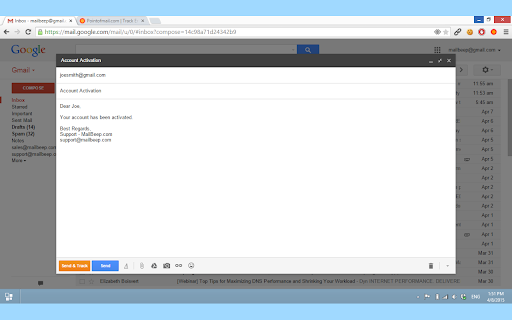
ดาวน์โหลดไฟล์ CRX ของส่วนขยาย Pointofmail.com Email Tracking & Recall
ดาวน์โหลดไฟล์ส่วนขยาย Pointofmail.com Email Tracking & Recall ในรูปแบบ crx และติดตั้งส่วนขยาย Chrome ด้วยตนเองในเบราว์เซอร์หรือแชร์ไฟล์ crx กับเพื่อนๆ เพื่อติดตั้งส่วนขยาย Chrome อย่างง่ายดาย
คำแนะนำในการใช้ส่วนขยาย
                        Know who opens your emails, links and attachments, where and for how long. Recall and send self-destructed messages.

Pointofmail.com for Gmail and other providers allows you to track and recall email, get read receipts, send self-destructed messages, fix mistakes at sent messages and more.

Features:
=========
✔✔ Know when, where and for how long have been read
✔✔ Get instant read receipts
✔✔ Schedule tracked messages with New Gmail UI
✔✔ Track when your message gets forwarded or disallow forwarding
✔✔ Know who exactly opened your email, even when sending to multiple recipients (Per-Recipient Tracking)
✔✔ Get notified when links and attachments gets opened
✔✔ Get read notifications on your mobile or SMS notifications about every event
✔✔ Recall, modify or delete sent messages
✔✔ Send self-destructed messages
✔✔ Follow-up reminder notifications for unread messages
✔✔ Send Personal Group Email at one click (Mail Merge)

How To Use:
===========
- Gmail: Click on Send&Track button inside Gmail Compose window.
- Other: Add .pointofmail.com suffix to recipients' addresses in other web services such Yahoo! Mail, Hotmail and AOL.

For more information visit http://www.pointofmail.com
Pointofmail offers free, 7 days trial.
ข้อมูลพื้นฐานของส่วนขยาย
| ชื่อ |  Pointofmail.com Email Tracking & Recall Pointofmail.com Email Tracking & Recall |
| ID | fbfenljjbahpbnpffpepeiommncfckci |
| URL อย่างเป็นทางการ | https://chromewebstore.google.com/detail/pointofmailcom-email-trac/fbfenljjbahpbnpffpepeiommncfckci |
| คำอธิบาย | Know who opens your emails, links and attachments, where and for how long. Recall and send self-destructed emails. |
| ขนาดไฟล์ | 102 KB |
| จำนวนการติดตั้ง | 1,655 |
| เวอร์ชันปัจจุบัน | 6.0.4 |
| อัปเดตครั้งล่าสุด | 2023-01-12 |
| วันที่เผยแพร่ | 2019-04-30 |
| คะแนน | 3.58/5 รวมทั้งหมด 24 คะแนน |
| ผู้พัฒนา | https://www.pointofmail.com |
| อีเมล | [email protected] |
| ประเภทการชำระเงิน | free |
| เว็บไซต์ส่วนขยาย | https://www.pointofmail.com |
| URL หน้าช่วยเหลือ | https://www.pointofmail.com/support |
| URL หน้านโยบายความเป็นส่วนตัว | http://www.pointofmail.com/About/Privacy |
| ภาษาที่รองรับ | en |
| manifest.json | |
{
    "update_url": "https:\/\/clients2.google.com\/service\/update2\/crx",
    "name": "Pointofmail.com Email Tracking & Recall",
    "version": "6.0.4",
    "manifest_version": 2,
    "short_name": "Pointofmail",
    "description": "Know who opens your emails, links and attachments, where and for how long. Recall and send self-destructed emails.",
    "icons": {
        "16": "img\/pom-16.png",
        "48": "img\/pom-48.png",
        "128": "img\/pom-128.png"
    },
    "browser_action": {
        "default_title": "Send via Pointofmail.com ",
        "default_icon": "img\/pom.png"
    },
    "background": {
        "scripts": [
            "js\/jquery-3.1.0.min.js",
            "js\/pointofmail.js",
            "js\/background.js"
        ]
    },
    "permissions": [
        "https:\/\/*\/*",
        "http:\/\/*\/*"
    ],
    "content_scripts": [
        {
            "matches": [
                "https:\/\/mail.google.com\/*"
            ],
            "js": [
                "js\/content.js"
            ],
            "run_at": "document_start"
        }
    ],
    "web_accessible_resources": [
        "js\/jquery-3.1.0.min.js",
        "js\/tooltip.min.js",
        "js\/gmail.js",
        "js\/scheduler.js",
        "js\/pointofmail.js",
        "js\/toolbar.js",
        "js\/main.js",
        "css\/pom.css",
        "css\/tooltip.css",
        "start.html"
    ]
} | |