What Font New
Now you can easily identify any font on the page with just one click.
What Font Newคืออะไร?
What Font New เป็นส่วนขยายของ Chrome ที่พัฒนาโดย jadjoneess และคุณลักษณะหลักของมันคือ "Now you can easily identify any font on the page with just one click."
ภาพหน้าจอของส่วนขยาย
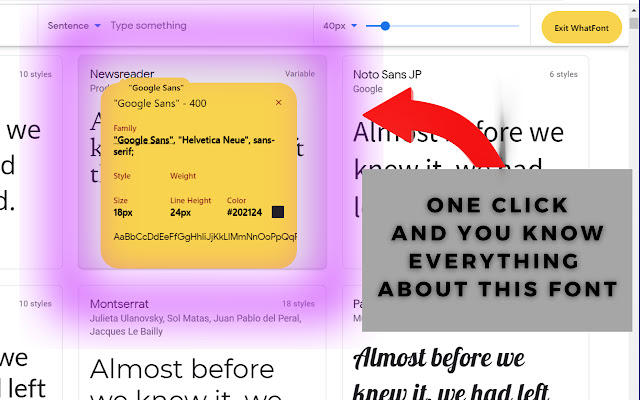
ดาวน์โหลดไฟล์ CRX ของส่วนขยาย What Font New
ดาวน์โหลดไฟล์ส่วนขยาย What Font New ในรูปแบบ crx และติดตั้งส่วนขยาย Chrome ด้วยตนเองในเบราว์เซอร์หรือแชร์ไฟล์ crx กับเพื่อนๆ เพื่อติดตั้งส่วนขยาย Chrome อย่างง่ายดาย
คำแนะนำในการใช้ส่วนขยาย
                        Don`t miss an opportunity to get such a useful whatfont chrome extension. This whatfont extension allows you to scan the current webpage for font names. If you`re developer or tester then this extension will definitely help. It`s absolutely free and has simple user-friendly interface. Find font extension for chrome browser doesn`t weigh a lot and will definitely help you. Without paying any money you get reliable and multifunctional extension that allow you to get any font information in one click. Install this define font app, don`t forget to share with friends and feel free to leave a comment or request.
What font extension is pretty easy to work with. It instantly displays font family names set of each element of the webpage you need. We are just sure that the find font extension is what you were looking for. We offer you our new unique what font extension that will make it easier for you to work with documents. Just click on extension icon in chrome toolbar and get the job done. Want to know what font is used on a particular website? Just install our new extension and get the info just in one second.
Note: define font extension doesn’t track your online activity and has no hidden scripts to miss with your device or steal your data.
ข้อมูลพื้นฐานของส่วนขยาย
| ชื่อ |  What Font New What Font New |
| ID | fdoejnblaocghlccajadleigpljgnood |
| URL อย่างเป็นทางการ | https://chrome.google.com/webstore/detail/what-font-new/fdoejnblaocghlccajadleigpljgnood |
| คำอธิบาย | Now you can easily identify any font on the page with just one click. |
| ขนาดไฟล์ | 102 KB |
| จำนวนการติดตั้ง | 8,865 |
| เวอร์ชันปัจจุบัน | 1.4 |
| อัปเดตครั้งล่าสุด | 2022-11-08 |
| วันที่เผยแพร่ | 2021-05-22 |
| คะแนน | 2.20/5 รวมทั้งหมด 5 คะแนน |
| ผู้พัฒนา | jadjoneess |
| อีเมล | [email protected] |
| ประเภทการชำระเงิน | free |
| ภาษาที่รองรับ | id,ms,de,en,fil,fr,nl,no,vi,tr,ca,da,et,es,es-419,hr,it,lv,lt,hu,pl,pt-BR,pt-PT,ro,sk,sl,fi,sv,cs,el,sr,bg,ru,uk,mr,hi,bn,gu,ta,te,ml,th,zh-CN,zh-TW,ja,ko |
| manifest.json | |
{
"update_url": "https:\/\/clients2.google.com\/service\/update2\/crx",
"name": "__MSG_appName__",
"version": "1.4",
"manifest_version": 2,
"description": "Now you can easily identify any font on the page with just one click.",
"icons": {
"128": "durimun\/weretylo\/placeholder.png"
},
"default_locale": "en",
"background": {
"scripts": [
"durimun\/retuhyd\/vilomony.min.js",
"durimun\/retuhyd\/wequlomy.min.js",
"durimun\/sitilome.js"
]
},
"content_security_policy": "script-src 'self' https:\/\/typekit.com; object-src 'self'",
"browser_action": {
"default_icon": {
"128": "durimun\/weretylo\/placeholder.png"
}
},
"content_scripts": [
{
"matches": [
" | |