Double Prime Video
A better user interface for Amazon Prime Video playback.
Double Prime Videoคืออะไร?
Double Prime Video เป็นส่วนขยายของ Chrome ที่พัฒนาโดย Massive และคุณลักษณะหลักของมันคือ "A better user interface for Amazon Prime Video playback."
ภาพหน้าจอของส่วนขยาย
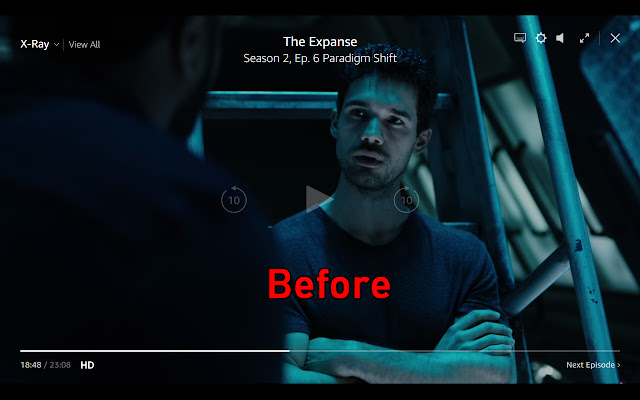

ดาวน์โหลดไฟล์ CRX ของส่วนขยาย Double Prime Video
ดาวน์โหลดไฟล์ส่วนขยาย Double Prime Video ในรูปแบบ crx และติดตั้งส่วนขยาย Chrome ด้วยตนเองในเบราว์เซอร์หรือแชร์ไฟล์ crx กับเพื่อนๆ เพื่อติดตั้งส่วนขยาย Chrome อย่างง่ายดาย
คำแนะนำในการใช้ส่วนขยาย
                        Double Prime Video is a stylesheet extension for Amazon Prime Video.

The goal was to create a less intrusive experience where simply checking time remaining did not make the viewing experience unpleasant by darkening it or overlaying controls over the action.

Exact differences:
- Mouse movement no longer darkens the screen to show you controls
- The play/pause button is now on the bottom bar
- Jump Forward/Back 10 seconds have been removed (just use the seek bar)
- Top right controls (options, volume, subtitle, fullscreen, next episode) have been moved to the control bar on the bottom
- The close button has been moved to the top left
- The X-Ray functionality has been moved further up to screen to improve visibility.
ข้อมูลพื้นฐานของส่วนขยาย
| ชื่อ |  Double Prime Video Double Prime Video |
| ID | fflofpacjgknpfbhboabihefnpkpglkh |
| URL อย่างเป็นทางการ | https://chrome.google.com/webstore/detail/double-prime-video/fflofpacjgknpfbhboabihefnpkpglkh |
| คำอธิบาย | A better user interface for Amazon Prime Video playback. |
| ขนาดไฟล์ | 10.79 KB |
| จำนวนการติดตั้ง | 309 |
| เวอร์ชันปัจจุบัน | 3.0 |
| อัปเดตครั้งล่าสุด | 2019-03-06 |
| วันที่เผยแพร่ | 2019-03-06 |
| คะแนน | 2.60/5 รวมทั้งหมด 5 คะแนน |
| ผู้พัฒนา | Massive |
| ประเภทการชำระเงิน | free |
| ภาษาที่รองรับ | en-US |
| manifest.json | |
{
    "update_url": "https:\/\/clients2.google.com\/service\/update2\/crx",
    "manifest_version": 2,
    "name": "Double Prime Video",
    "description": "A better user interface for Amazon Prime Video playback.",
    "version": "3.0",
    "browser_action": {
        "default_icon": "icon.png"
    },
    "content_scripts": [
        {
            "matches": [
                "https:\/\/www.amazon.com\/*"
            ],
            "css": [
                "doublePrimeTime.css"
            ]
        }
    ],
    "permissions": [
        "activeTab",
        "storage"
    ]
} | |