#HolidayFeeling Countdown
Watch the days to your holiday countdown each time you open up a new window with our handy countdown extension
#HolidayFeeling Countdownคืออะไร?
#HolidayFeeling Countdown เป็นส่วนขยายของ Chrome ที่พัฒนาโดย postofficeholidayfeeling และคุณลักษณะหลักของมันคือ "Watch the days to your holiday countdown each time you open up a new window with our handy countdown extension"
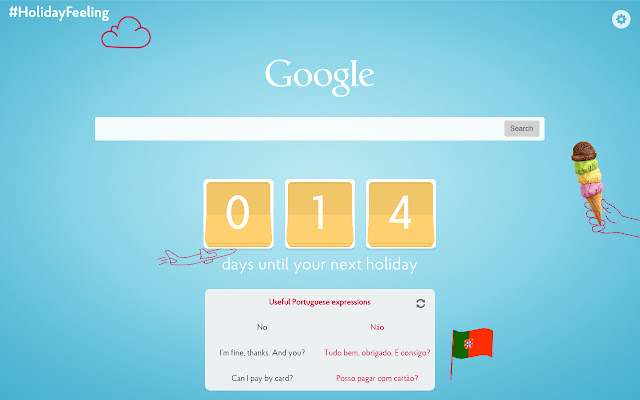
ภาพหน้าจอของส่วนขยาย

ดาวน์โหลดไฟล์ CRX ของส่วนขยาย #HolidayFeeling Countdown
ดาวน์โหลดไฟล์ส่วนขยาย #HolidayFeeling Countdown ในรูปแบบ crx และติดตั้งส่วนขยาย Chrome ด้วยตนเองในเบราว์เซอร์หรือแชร์ไฟล์ crx กับเพื่อนๆ เพื่อติดตั้งส่วนขยาย Chrome อย่างง่ายดาย
คำแนะนำในการใช้ส่วนขยาย
This countdown extension will count down the days until you finally get your #HolidayFeeling on. Simply enter the dates of your trip and watch the days pass by each time you open a new tab in Chrome. Not only that, just in case you want to brush up on the local lingo, you can do so with our translation tool below the count-down. What are you waiting for? Simply pop in your travel dates and watch the days count down until you jet off! ข้อมูลพื้นฐานของส่วนขยาย
| ชื่อ |  #HolidayFeeling Countdown #HolidayFeeling Countdown |
| ID | fgiljmabfklcdbgiflmlggfaoikpanfb |
| URL อย่างเป็นทางการ | https://chrome.google.com/webstore/detail/holidayfeeling-countdown/fgiljmabfklcdbgiflmlggfaoikpanfb |
| คำอธิบาย | Watch the days to your holiday countdown each time you open up a new window with our handy countdown extension |
| ขนาดไฟล์ | 725 KB |
| จำนวนการติดตั้ง | 541 |
| เวอร์ชันปัจจุบัน | 1.0.1 |
| อัปเดตครั้งล่าสุด | 2015-06-05 |
| วันที่เผยแพร่ | 2015-06-05 |
| คะแนน | 4.31/5 รวมทั้งหมด 13 คะแนน |
| ผู้พัฒนา | postofficeholidayfeeling |
| ประเภทการชำระเงิน | free |
| ภาษาที่รองรับ | en-GB |
| manifest.json | |
{
    "update_url": "https:\/\/clients2.google.com\/service\/update2\/crx",
    "manifest_version": 2,
    "name": "#HolidayFeeling Countdown",
    "short_name": "HolidayFeeling",
    "description": "Watch the days to your holiday countdown each time you open up a new window with our handy countdown extension",
    "version": "1.0.1",
    "icons": {
        "16": "images\/icon16.png",
        "48": "images\/icon48.png",
        "128": "images\/icon128.png"
    },
    "permissions": [
        "storage",
        "activeTab"
    ],
    "chrome_url_overrides": {
        "newtab": "newtab.html"
    }
} | |