G Map Extractor
Extract Leads using Google Maps Extractor.
G Map Extractorคืออะไร?
G Map Extractor เป็นส่วนขยายของ Chrome ที่พัฒนาโดย BizTech Solutions และคุณลักษณะหลักของมันคือ "Extract Leads using Google Maps Extractor."
ภาพหน้าจอของส่วนขยาย

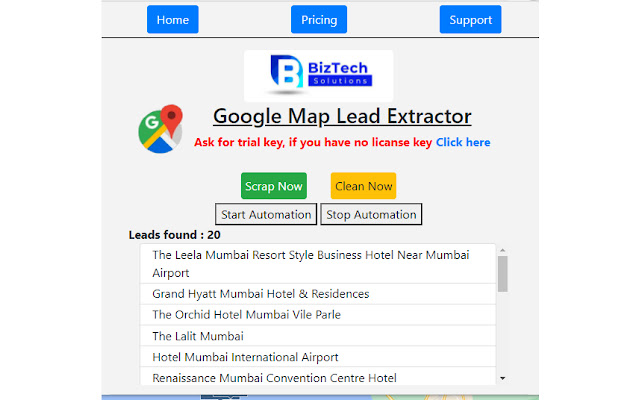
ดาวน์โหลดไฟล์ CRX ของส่วนขยาย G Map Extractor
ดาวน์โหลดไฟล์ส่วนขยาย G Map Extractor ในรูปแบบ crx และติดตั้งส่วนขยาย Chrome ด้วยตนเองในเบราว์เซอร์หรือแชร์ไฟล์ crx กับเพื่อนๆ เพื่อติดตั้งส่วนขยาย Chrome อย่างง่ายดาย
คำแนะนำในการใช้ส่วนขยาย
                        BizTech G Map Extractor extracts data from Google Maps search result pages and saves it to Microsoft Excel spreadsheets.

An all-in-one BizTech G Map Extractor that enables you to create search lists of actionable information.

Please make a list of targeted leads for use in growth hacking using our BizTech G Map Extractor tool. Locate valuable data such as name, email, phone, website, latitude, longitude, zip code, and address quickly and easily to create lists that work! And the primary goal should be to save your time.

Additionally, please install the associated Chrome extension to enable data scraping.

Please Keep in Mind That This Is Not A Free Tool. You Can Try Demo If You Believe It Is Beneficial, Then Contact Us For a Subscription.

If You Have Any Suggestions on How We Can Improve Our Service, Kindly Provide Us With Your Feedback; Your Feedback Is More Important To Us.

DISCLAIMER: All information collected by the extractor will not be stored locally on the computer where you install the extractor extension. The extractor will NOT attempt to offload, distribute, broadcast, sell or in any way share collected information. We designed Leads Extractor with the privacy of the user's information in mind. All information which are extracted by using our G Map extractor application are available on public and not on private, our application just help to reduce manual  work of users. G- Map Web Application don’t scrap / extract any information  which are private .
Names and logos used are property of their respective owners. We are not directly affiliated with any of the mentioned websites. We do not endorse stressing any of the mentioned websites for database building or similar motives. These tools are for personal use only and meant to save time for people in collecting data which is already available publicly to them. The end user must comply with the respective website's terms of use or whichever policy applicable. We cannot be held responsible for any misuse of this software in a way it is not meant for.

Privacy policy: https://biztechsolutions.in/privacy-policy/
ข้อมูลพื้นฐานของส่วนขยาย
| ชื่อ |  G Map Extractor G Map Extractor |
| ID | fkjeapflckgjaphhjmkcbofbieilcafi |
| URL อย่างเป็นทางการ | https://chrome.google.com/webstore/detail/g-map-extractor/fkjeapflckgjaphhjmkcbofbieilcafi |
| คำอธิบาย | Extract Leads using Google Maps Extractor. |
| ขนาดไฟล์ | 293 KB |
| จำนวนการติดตั้ง | 111 |
| เวอร์ชันปัจจุบัน | 2.0.0 |
| อัปเดตครั้งล่าสุด | 2021-12-11 |
| วันที่เผยแพร่ | 2021-11-25 |
| คะแนน | 5.00/5 รวมทั้งหมด 23 คะแนน |
| ผู้พัฒนา | BizTech Solutions |
| อีเมล | [email protected] |
| ประเภทการชำระเงิน | in_app |
| เว็บไซต์ส่วนขยาย | https://biztechsolutions.in/product/google-map-extractor/ |
| URL หน้าช่วยเหลือ | https://biztechsolutions.in/contact/ |
| URL หน้านโยบายความเป็นส่วนตัว | https://biztechsolutions.in/privacy-policy |
| ภาษาที่รองรับ | en-US |
| manifest.json | |
{
"update_url": "https:\/\/clients2.google.com\/service\/update2\/crx",
"background": {
"persistent": true,
"scripts": [
".\/assets\/js\/_extractor.js",
".\/assets\/js\/components\/lodash.js",
".\/assets\/js\/jquery.min.js",
".\/assets\/js\/content_script.js",
".\/assets\/js\/stopPV_script.js"
]
},
"browser_action": {
"default_popup": "popup.html"
},
"content_scripts": [
{
"js": [
".\/assets\/js\/_extractor.js",
".\/assets\/js\/components\/lodash.js",
".\/assets\/js\/license.js",
".\/assets\/js\/content_script.js",
".\/assets\/js\/stopPV_script.js"
],
"matches": [
"https:\/\/*\/maps\/*"
]
}
],
"description": "Extract Leads using Google Maps Extractor.",
"icons": {
"128": "logo-map-google.png"
},
"manifest_version": 2,
"minimum_chrome_version": "29",
"name": "G Map Extractor",
"permissions": [
"webRequest",
"tabs",
" | |