Wish’nbox
Mettez de côté toutes vos idées shopping depuis n'importe quel site.
Wish’nboxคืออะไร?
Wish’nbox เป็นส่วนขยายของ Chrome ที่พัฒนาโดย https://www.wishnbox.com และคุณลักษณะหลักของมันคือ "Mettez de côté toutes vos idées shopping depuis n'importe quel site."
ภาพหน้าจอของส่วนขยาย
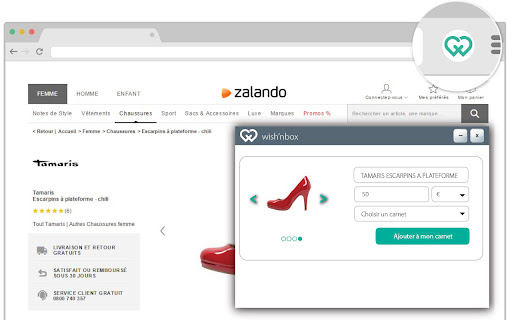
ดาวน์โหลดไฟล์ CRX ของส่วนขยาย Wish’nbox
ดาวน์โหลดไฟล์ส่วนขยาย Wish’nbox ในรูปแบบ crx และติดตั้งส่วนขยาย Chrome ด้วยตนเองในเบราว์เซอร์หรือแชร์ไฟล์ crx กับเพื่อนๆ เพื่อติดตั้งส่วนขยาย Chrome อย่างง่ายดาย
คำแนะนำในการใช้ส่วนขยาย
Wish'nbox est une application qui facilite le shopping en ligne en vous permettant de mettre de côté vos articles préférés et obtenir des réductions personnalisées. ข้อมูลพื้นฐานของส่วนขยาย
| ชื่อ |  Wish’nbox Wish’nbox |
| ID | fkopafkenbokegbihfeigejjkjagbhlk |
| URL อย่างเป็นทางการ | https://chromewebstore.google.com/detail/wish%E2%80%99nbox/fkopafkenbokegbihfeigejjkjagbhlk |
| คำอธิบาย | Mettez de côté toutes vos idées shopping depuis n'importe quel site. |
| ขนาดไฟล์ | 49.51 KB |
| จำนวนการติดตั้ง | 145 |
| เวอร์ชันปัจจุบัน | 1.0.5 |
| อัปเดตครั้งล่าสุด | 2015-03-23 |
| วันที่เผยแพร่ | 2015-03-23 |
| คะแนน | 5.00/5 รวมทั้งหมด 3 คะแนน |
| ผู้พัฒนา | https://www.wishnbox.com |
| ประเภทการชำระเงิน | free |
| เว็บไซต์ส่วนขยาย | http://www.wishnbox.com/ |
| ภาษาที่รองรับ | fr |
| manifest.json | |
{
    "update_url": "https:\/\/clients2.google.com\/service\/update2\/crx",
    "content_scripts": [
        {
            "matches": [
                "http:\/\/*\/*",
                "https:\/\/*\/*"
            ],
            "all_frames": true,
            "run_at": "document_start",
            "js": [
                "includes\/content.js"
            ]
        }
    ],
    "name": "Wish\u2019nbox",
    "icons": {
        "128": "icons\/icon128.png",
        "48": "icons\/icon48.png",
        "16": "icons\/button.png"
    },
    "web_accessible_resources": [
        "res\/*",
        "assets\/*",
        "icons\/*"
    ],
    "description": "Mettez de c\u00f4t\u00e9 toutes vos id\u00e9es shopping depuis n'importe quel site.",
    "background": {
        "page": "background.html"
    },
    "homepage_url": "http:\/\/www.wishnbox.com\/",
    "version": "1.0.5",
    "manifest_version": 2,
    "content_security_policy": "script-src 'self' 'unsafe-eval'; object-src 'self'",
    "browser_action": {
        "default_icon": "icons\/button.png",
        "default_title": "Wishnbox"
    },
    "permissions": [
        "tabs",
        "http:\/\/*\/*",
        "https:\/\/*\/*",
        "contextMenus",
        "webNavigation"
    ]
} | |