Light picture-in-picture
Lightweight picture-in-picture / floating player addon
Light picture-in-pictureคืออะไร?
Light picture-in-picture เป็นส่วนขยายของ Chrome ที่พัฒนาโดย http://picture-in-picture.com และคุณลักษณะหลักของมันคือ "Lightweight picture-in-picture / floating player addon"
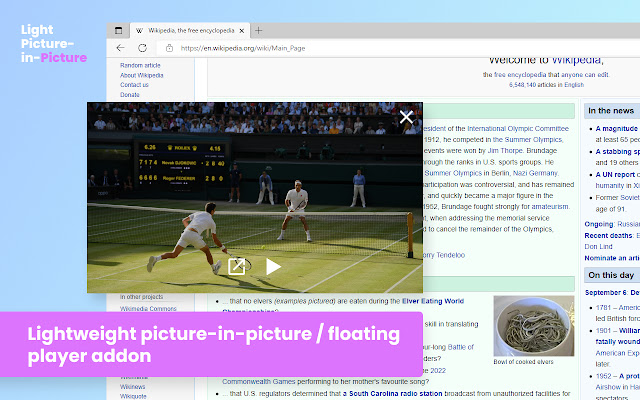
ภาพหน้าจอของส่วนขยาย
ดาวน์โหลดไฟล์ CRX ของส่วนขยาย Light picture-in-picture
ดาวน์โหลดไฟล์ส่วนขยาย Light picture-in-picture ในรูปแบบ crx และติดตั้งส่วนขยาย Chrome ด้วยตนเองในเบราว์เซอร์หรือแชร์ไฟล์ crx กับเพื่อนๆ เพื่อติดตั้งส่วนขยาย Chrome อย่างง่ายดาย
คำแนะนำในการใช้ส่วนขยาย
                        Light Picture in Picture is a simple extension that activates PiP mode in online videos.
Features:

Easy to use - no options. Activate via toolbar icon or from the video player
Works on Youtube, Vimeo, and other platforms. It also works on generic HTML5 videos.
ข้อมูลพื้นฐานของส่วนขยาย
| ชื่อ |  Light picture-in-picture Light picture-in-picture |
| ID | gcnceeflimggoamelclcbhcdggcmnglm |
| URL อย่างเป็นทางการ | https://chrome.google.com/webstore/detail/light-picture-in-picture/gcnceeflimggoamelclcbhcdggcmnglm |
| คำอธิบาย | Lightweight picture-in-picture / floating player addon |
| ขนาดไฟล์ | 133 KB |
| จำนวนการติดตั้ง | 184,161 |
| เวอร์ชันปัจจุบัน | 0.5.2.0 |
| อัปเดตครั้งล่าสุด | 2023-03-18 |
| วันที่เผยแพร่ | 2022-09-12 |
| คะแนน | 4.43/5 รวมทั้งหมด 7 คะแนน |
| ผู้พัฒนา | http://picture-in-picture.com |
| อีเมล | [email protected] |
| ประเภทการชำระเงิน | free |
| เว็บไซต์ส่วนขยาย | https://picture-in-picture.com |
| URL หน้านโยบายความเป็นส่วนตัว | https://picture-in-picture.com/privacy |
| ภาษาที่รองรับ | id,ms,de,en,en-GB,en-US,fil,fr,nl,no,vi,tr,ca,da,et,es,es-419,hr,it,lv,lt,hu,pl,pt-BR,pt-PT,ro,sk,sl,fi,sv,cs,el,sr,bg,ru,uk,mr,hi,bn,gu,ta,te,ml,th,zh-CN,zh-TW,ja,ko |
| manifest.json | |
{
"update_url": "https:\/\/clients2.google.com\/service\/update2\/crx",
"author": "__MSG_extName__",
"background": {
"service_worker": "js\/background.js"
},
"action": {
"default_icon": {
"16": "icons\/icon16.png",
"48": "icons\/icon48.png",
"128": "icons\/icon128.png",
"300": "icons\/icon300.png"
},
"default_title": "__MSG_badgeTitle__"
},
"content_scripts": [
{
"matches": [
"http:\/\/*\/*",
"https:\/\/*\/*"
],
"js": [
"js\/content.js"
],
"all_frames": true,
"match_about_blank": true,
"run_at": "document_start"
}
],
"default_locale": "en",
"description": "__MSG_extShortDesc__",
"icons": {
"16": "icons\/icon16.png",
"48": "icons\/icon48.png",
"128": "icons\/icon128.png",
"300": "icons\/icon300.png"
},
"incognito": "split",
"manifest_version": 3,
"minimum_chrome_version": "95.0",
"name": "__MSG_extName__",
"permissions": [
"storage",
"scripting",
"alarms"
],
"host_permissions": [
" | |