Claude2PDF - Convert Claude to PDF
Claude2PDF --Efficiently Convert Claude Data to PDF Reports
Claude2PDF - Convert Claude to PDFคืออะไร?
Claude2PDF - Convert Claude to PDF เป็นส่วนขยายของ Chrome ที่พัฒนาโดย carl007766 และคุณลักษณะหลักของมันคือ "Claude2PDF --Efficiently Convert Claude Data to PDF Reports"
ภาพหน้าจอของส่วนขยาย
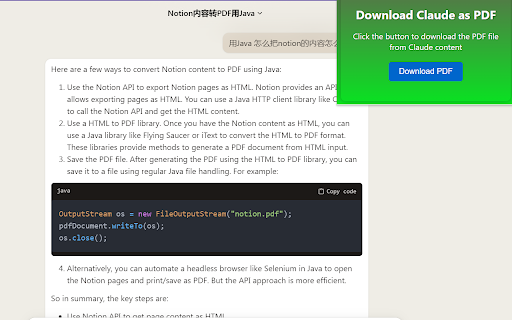
ดาวน์โหลดไฟล์ CRX ของส่วนขยาย Claude2PDF - Convert Claude to PDF
ดาวน์โหลดไฟล์ส่วนขยาย Claude2PDF - Convert Claude to PDF ในรูปแบบ crx และติดตั้งส่วนขยาย Chrome ด้วยตนเองในเบราว์เซอร์หรือแชร์ไฟล์ crx กับเพื่อนๆ เพื่อติดตั้งส่วนขยาย Chrome อย่างง่ายดาย
คำแนะนำในการใช้ส่วนขยาย
                        Firstly, you need to search and download the "Claude2PDF " Chrome extension in the Chrome web store.

After installation, visit https://claude.ai/ and find the content you want to save.

On the page where the content is located, click the "Claude2PDF " extension icon in the top right corner of your browser.

https://claude.ai/ on this site,you can save you chat content to pdf . Once done, click on the "Download PDF" button.


Wait for a few moments until the PDF file is downloaded. You can find the file by clicking the "Finished" button on the browser's download progress bar and then opening it through a PDF reader.
ข้อมูลพื้นฐานของส่วนขยาย
| ชื่อ |  Claude2PDF - Convert Claude to PDF Claude2PDF - Convert Claude to PDF |
| ID | gfecmapalmejhcjbngopmmlcbdiggikp |
| URL อย่างเป็นทางการ | https://chromewebstore.google.com/detail/claude2pdf-convert-claude/gfecmapalmejhcjbngopmmlcbdiggikp |
| คำอธิบาย | Claude2PDF --Efficiently Convert Claude Data to PDF Reports |
| ขนาดไฟล์ | 35.55 KB |
| จำนวนการติดตั้ง | 262 |
| เวอร์ชันปัจจุบัน | 0.0.2 |
| อัปเดตครั้งล่าสุด | 2023-10-18 |
| วันที่เผยแพร่ | 2023-07-14 |
| คะแนน | 4.50/5 รวมทั้งหมด 2 คะแนน |
| ผู้พัฒนา | carl007766 |
| อีเมล | [email protected] |
| ประเภทการชำระเงิน | free |
| URL หน้านโยบายความเป็นส่วนตัว | https://www.chatgpt2pdf.com/service.html |
| ภาษาที่รองรับ | en-US |
| manifest.json | |
{
    "update_url": "https:\/\/clients2.google.com\/service\/update2\/crx",
    "name": "Claude2PDF - Convert Claude to PDF",
    "description": "Claude2PDF --Efficiently Convert Claude Data to PDF Reports",
    "manifest_version": 3,
    "version": "0.0.2",
    "icons": {
        "16": "images\/16.png",
        "32": "images\/32.png",
        "48": "images\/48.png",
        "128": "images\/128.png"
    },
    "background": {
        "service_worker": "background.js"
    },
    "permissions": [
        "scripting",
        "downloads",
        "cookies"
    ],
    "action": {
        "default_popup": "jump.html",
        "default_icon": "images\/32.png"
    },
    "host_permissions": [
        "https:\/\/claude.ai\/*"
    ],
    "web_accessible_resources": [
        {
            "resources": [
                "popup.css",
                "login.js",
                "popup.js"
            ],
            "matches": [
                "https:\/\/claude.ai\/*"
            ]
        }
    ]
} | |