Check Drupal Version
This extension shows the drupal version installed in a site
Check Drupal Versionคืออะไร?
Check Drupal Version เป็นส่วนขยายของ Chrome ที่พัฒนาโดย manimjs และคุณลักษณะหลักของมันคือ "This extension shows the drupal version installed in a site"
ภาพหน้าจอของส่วนขยาย
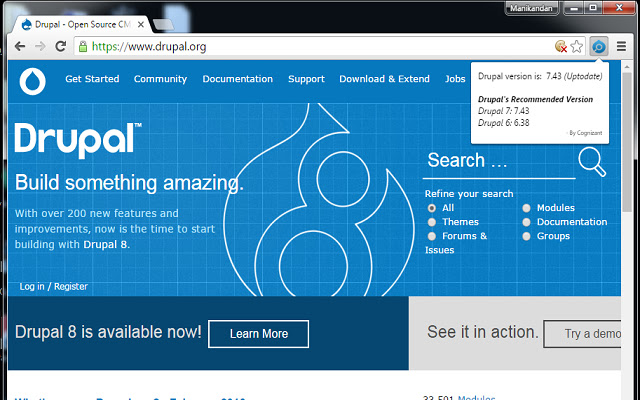
ดาวน์โหลดไฟล์ CRX ของส่วนขยาย Check Drupal Version
ดาวน์โหลดไฟล์ส่วนขยาย Check Drupal Version ในรูปแบบ crx และติดตั้งส่วนขยาย Chrome ด้วยตนเองในเบราว์เซอร์หรือแชร์ไฟล์ crx กับเพื่อนๆ เพื่อติดตั้งส่วนขยาย Chrome อย่างง่ายดาย
คำแนะนำในการใช้ส่วนขยาย
                        * The add-on will be helpful for all developers to find the current Drupal version of a particular site.

* We can easily identify, whether the site is built in D6 or D7.

* This Chrome Extension is helpful for the Drupal Developers as well as for others to identify the version in a single click.

- Owning & Maintaining by Manikandan for Cognizant Technology Solutions.
ข้อมูลพื้นฐานของส่วนขยาย
| ชื่อ |  Check Drupal Version Check Drupal Version |
| ID | gfhoiggdhkhjhokgokloaccfphldlfnf |
| URL อย่างเป็นทางการ | https://chrome.google.com/webstore/detail/check-drupal-version/gfhoiggdhkhjhokgokloaccfphldlfnf |
| คำอธิบาย | This extension shows the drupal version installed in a site |
| ขนาดไฟล์ | 49.03 KB |
| จำนวนการติดตั้ง | 1,085 |
| เวอร์ชันปัจจุบัน | 1.3 |
| อัปเดตครั้งล่าสุด | 2019-08-20 |
| วันที่เผยแพร่ | 2019-08-20 |
| คะแนน | 2.43/5 รวมทั้งหมด 7 คะแนน |
| ผู้พัฒนา | manimjs |
| ประเภทการชำระเงิน | free |
| ภาษาที่รองรับ | en |
| manifest.json | |
{
    "update_url": "https:\/\/clients2.google.com\/service\/update2\/crx",
    "manifest_version": 2,
    "name": "Check Drupal Version",
    "description": "This extension shows the drupal version installed in a site",
    "version": "1.3",
    "short_name": "DrupalVers",
    "browser_action": {
        "default_icon": "icon.png",
        "default_popup": "popup.html"
    },
    "permissions": [
        "activeTab",
        "http:\/\/*\/*",
        "https:\/\/*\/*"
    ]
} | |