Amazon Product Research Tool by Sellergyan
This extension will help an Amazon seller do research on product data and grow their business
Amazon Product Research Tool by Sellergyanคืออะไร?
Amazon Product Research Tool by Sellergyan เป็นส่วนขยายของ Chrome ที่พัฒนาโดย http://www.sellergyan.com และคุณลักษณะหลักของมันคือ "This extension will help an Amazon seller do research on product data and grow their business"
ภาพหน้าจอของส่วนขยาย

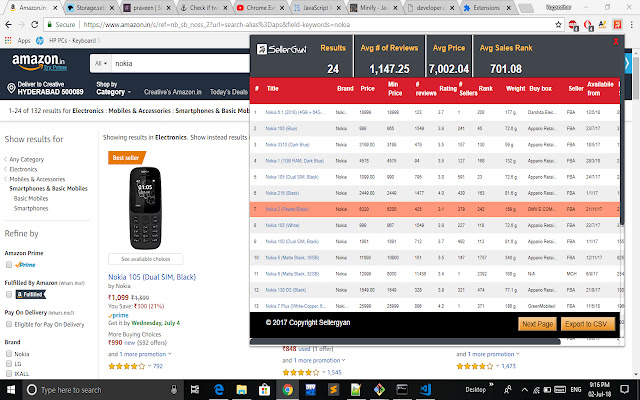
ดาวน์โหลดไฟล์ CRX ของส่วนขยาย Amazon Product Research Tool by Sellergyan
ดาวน์โหลดไฟล์ส่วนขยาย Amazon Product Research Tool by Sellergyan ในรูปแบบ crx และติดตั้งส่วนขยาย Chrome ด้วยตนเองในเบราว์เซอร์หรือแชร์ไฟล์ crx กับเพื่อนๆ เพื่อติดตั้งส่วนขยาย Chrome อย่างง่ายดาย
คำแนะนำในการใช้ส่วนขยาย
This extension will help an Amazon seller do research on product data and grow their business. This extension supports all the marketplaces of Amazon. Powered by Seller gyan ข้อมูลพื้นฐานของส่วนขยาย
| ชื่อ |  Amazon Product Research Tool by Sellergyan Amazon Product Research Tool by Sellergyan |
| ID | gjbnckfcmkgdklfglokdcmhkngmlbimm |
| URL อย่างเป็นทางการ | https://chrome.google.com/webstore/detail/amazon-product-research-t/gjbnckfcmkgdklfglokdcmhkngmlbimm |
| คำอธิบาย | This extension will help an Amazon seller do research on product data and grow their business |
| ขนาดไฟล์ | 145 KB |
| จำนวนการติดตั้ง | 87 |
| เวอร์ชันปัจจุบัน | 1.4 |
| อัปเดตครั้งล่าสุด | 2019-06-25 |
| วันที่เผยแพร่ | 2019-06-25 |
| คะแนน | 5.00/5 รวมทั้งหมด 2 คะแนน |
| ผู้พัฒนา | http://www.sellergyan.com |
| อีเมล | [email protected] |
| ประเภทการชำระเงิน | free |
| ภาษาที่รองรับ | en |
| manifest.json | |
{
    "update_url": "https:\/\/clients2.google.com\/service\/update2\/crx",
    "manifest_version": 2,
    "name": "Amazon Product Research Tool by Sellergyan",
    "short_name": "Amazon Product Research Tool",
    "page_action": {
        "default_title": "Amazon Product Research Tool by Sellergyan",
        "default_popup": "count.html"
    },
    "icons": {
        "16": ".\/images\/icon16.png",
        "48": ".\/images\/icon48.png",
        "128": ".\/images\/icon128.png"
    },
    "background": {
        "persistent": false,
        "scripts": [
            "js\/background.js"
        ]
    },
    "content_scripts": [
        {
            "matches": [
                "https:\/\/www.amazon.co.uk\/s?*",
                "https:\/\/www.amazon.es\/s?*",
                "https:\/\/www.amazon.com.mx\/s?*",
                "https:\/\/www.amazon.co.jp\/s?*",
                "https:\/\/www.amazon.it\/s?*",
                "https:\/\/www.amazon.de\/s?*",
                "https:\/\/www.amazon.fr\/s?*",
                "https:\/\/www.amazon.cn\/s?*",
                "https:\/\/www.amazon.ca\/s?*",
                "https:\/\/www.amazon.com.br\/s?*",
                "https:\/\/www.amazon.com.au\/s?*",
                "https:\/\/www.amazon.com\/s?*",
                "https:\/\/www.amazon.ae\/s?*",
                "https:\/\/www.amazon.in\/s*",
                "https:\/\/www.amazon.in\/gp\/search\/*",
                "https:\/\/www.amazon.in\/s?*"
            ],
            "js": [
                "js\/content.js",
                "js\/jquery.js"
            ],
            "run_at": "document_idle",
            "all_frames": false
        }
    ],
    "version": "1.4",
    "description": "This extension will help an Amazon seller do research on product data and grow their business",
    "permissions": [
        "https:\/\/www.amazon.co.uk\/*",
        "https:\/\/www.amazon.es\/*",
        "https:\/\/www.amazon.com.mx\/*",
        "https:\/\/www.amazon.it\/*",
        "https:\/\/www.amazon.de\/*",
        "https:\/\/www.amazon.fr\/*",
        "https:\/\/www.amazon.cn\/*",
        "https:\/\/www.amazon.in\/*",
        "https:\/\/www.amazon.ca\/*",
        "https:\/\/www.amazon.ae\/*",
        "https:\/\/www.amazon.com.br\/*",
        "https:\/\/www.amazon.com.au\/*",
        "https:\/\/www.amazon.com\/*",
        "https:\/\/www.sellergyan.com\/*",
        "https:\/\/www.googletagmanager.com\/*"
    ]
} | |