Instant Syntax
This extension will highlight the code syntax of any highlighted text
Instant Syntaxคืออะไร?
Instant Syntax เป็นส่วนขยายของ Chrome ที่พัฒนาโดย Salvador Gutierrez และคุณลักษณะหลักของมันคือ "This extension will highlight the code syntax of any highlighted text"
ภาพหน้าจอของส่วนขยาย
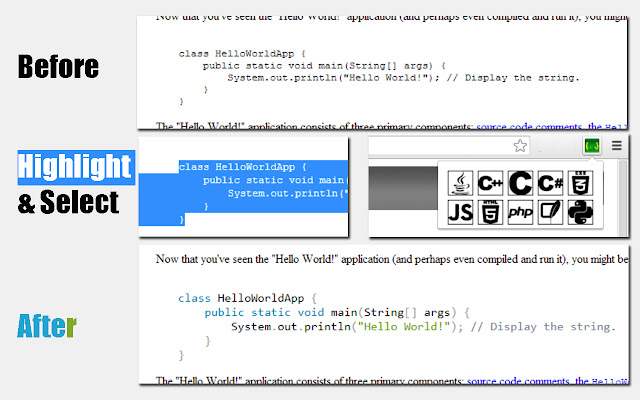


ดาวน์โหลดไฟล์ CRX ของส่วนขยาย Instant Syntax
ดาวน์โหลดไฟล์ส่วนขยาย Instant Syntax ในรูปแบบ crx และติดตั้งส่วนขยาย Chrome ด้วยตนเองในเบราว์เซอร์หรือแชร์ไฟล์ crx กับเพื่อนๆ เพื่อติดตั้งส่วนขยาย Chrome อย่างง่ายดาย
คำแนะนำในการใช้ส่วนขยาย
                        This extension allows you to perform code syntax highlighting anywhere in a webpage. Supports Java, Markup Languages , CSS, C-like languages, C#, C++,Python, SQL,PHP and JavaScript.

How to use:
1)Simply highlight the code whose syntax you wish to highlight.
2)Press action-button on toolbar and select language.
3)Watch the code magically become much more readable.
ข้อมูลพื้นฐานของส่วนขยาย
| ชื่อ |  Instant Syntax Instant Syntax |
| ID | gjoffkgdelmaodajhoncmleiamifdcgi |
| URL อย่างเป็นทางการ | https://chrome.google.com/webstore/detail/instant-syntax/gjoffkgdelmaodajhoncmleiamifdcgi |
| คำอธิบาย | This extension will highlight the code syntax of any highlighted text |
| ขนาดไฟล์ | 75.37 KB |
| จำนวนการติดตั้ง | 162 |
| เวอร์ชันปัจจุบัน | 1.1 |
| อัปเดตครั้งล่าสุด | 2014-03-02 |
| วันที่เผยแพร่ | 2014-03-02 |
| คะแนน | 4.50/5 รวมทั้งหมด 12 คะแนน |
| ผู้พัฒนา | Salvador Gutierrez |
| ประเภทการชำระเงิน | free |
| ภาษาที่รองรับ | en |
| manifest.json | |
{
    "update_url": "https:\/\/clients2.google.com\/service\/update2\/crx",
    "manifest_version": 2,
    "name": "Instant Syntax",
    "description": "This extension will highlight the code syntax of any highlighted text",
    "version": "1.1",
    "author": "Salvador Gutierrez",
    "background": {
        "css": [
            "popup_style.css"
        ],
        "scripts": [
            "simpleInsert.js"
        ],
        "persistent": false
    },
    "icons": {
        "38": "icon_38.png",
        "128": "icon_128.png"
    },
    "permissions": [
        "https:\/\/*\/*",
        "activeTab",
        "storage"
    ],
    "browser_action": {
        "default_popup": "popup.html",
        "default_icon": "icon_38.png"
    }
} | |