Unpin
Pinboard.in Unread Checker
Unpinคืออะไร?
Unpin เป็นส่วนขยายของ Chrome ที่พัฒนาโดย http://www.azulneon.com และคุณลักษณะหลักของมันคือ "Pinboard.in Unread Checker"
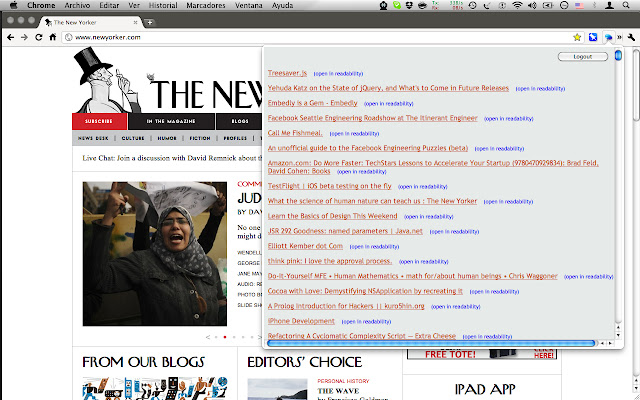
ภาพหน้าจอของส่วนขยาย

ดาวน์โหลดไฟล์ CRX ของส่วนขยาย Unpin
ดาวน์โหลดไฟล์ส่วนขยาย Unpin ในรูปแบบ crx และติดตั้งส่วนขยาย Chrome ด้วยตนเองในเบราว์เซอร์หรือแชร์ไฟล์ crx กับเพื่อนๆ เพื่อติดตั้งส่วนขยาย Chrome อย่างง่ายดาย
คำแนะนำในการใช้ส่วนขยาย
                        Unpin is an easy way to access your unread items in Pinboard.in.

We will support marking items as read as soon as it is supported by the API.

Changes in version 1.0.5.6
- Stopped using user/password for authentication in favor of the new API token.

Changes in version 1.0.5.5

- Improved error handling.

Changes in version 1.0.5.4

- Several bugs fixed

Changes in version 1.0.5.3

- Faster display of the popup menu. All items are already
  cached when the extension is loaded.

Changes in version 1.0.5.2

- Updated manifest version format

Changes in version 1.0.5

- Added unread count indicator


Changes in version 1.0.4

- Links open in background tabs so that several pages can be open in a fast way.
- Apply Readability when opening a link
- As the Readability bookmarlet is executed as a content script in the linked page the extension now has to ask for extra permissions.
ข้อมูลพื้นฐานของส่วนขยาย
| ชื่อ |  Unpin Unpin |
| ID | glpieeieaeenghbdbmagbmhlilpocgic |
| URL อย่างเป็นทางการ | https://chrome.google.com/webstore/detail/unpin/glpieeieaeenghbdbmagbmhlilpocgic |
| คำอธิบาย | Pinboard.in Unread Checker |
| ขนาดไฟล์ | 57.6 KB |
| จำนวนการติดตั้ง | 15 |
| เวอร์ชันปัจจุบัน | 1.0.5.6 |
| อัปเดตครั้งล่าสุด | 2014-12-20 |
| วันที่เผยแพร่ | 2014-12-20 |
| คะแนน | 4.33/5 รวมทั้งหมด 6 คะแนน |
| ผู้พัฒนา | http://www.azulneon.com |
| ประเภทการชำระเงิน | free |
| เว็บไซต์ส่วนขยาย | http://azulneon.com |
| ภาษาที่รองรับ | en |
| manifest.json | |
{
    "update_url": "https:\/\/clients2.google.com\/service\/update2\/crx",
    "manifest_version": 2,
    "name": "Unpin",
    "version": "1.0.5.6",
    "description": "Pinboard.in Unread Checker",
    "background": {
        "page": "background.html"
    },
    "browser_action": {
        "default_icon": "\/images\/icon.png",
        "default_popup": "popup.html"
    },
    "content_security_policy": "script-src 'self' https:\/\/ssl.google-analytics.com; object-src 'self'",
    "permissions": [
        "tabs",
        "*:\/\/*\/*"
    ]
} | |