Store Me
Store Me - offline data storage
Store Meคืออะไร?
Store Me เป็นส่วนขยายของ Chrome ที่พัฒนาโดย http://massinflux.com และคุณลักษณะหลักของมันคือ "Store Me - offline data storage"
ภาพหน้าจอของส่วนขยาย
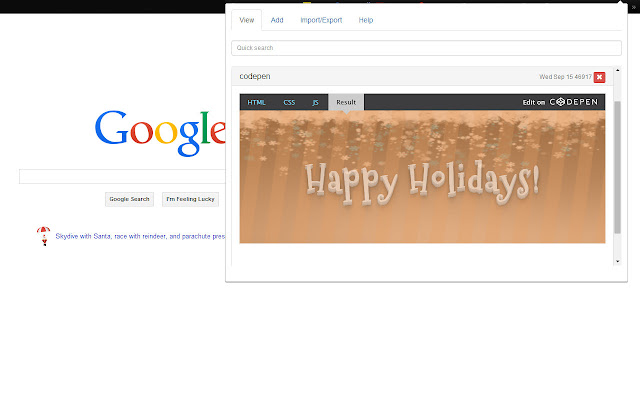


ดาวน์โหลดไฟล์ CRX ของส่วนขยาย Store Me
ดาวน์โหลดไฟล์ส่วนขยาย Store Me ในรูปแบบ crx และติดตั้งส่วนขยาย Chrome ด้วยตนเองในเบราว์เซอร์หรือแชร์ไฟล์ crx กับเพื่อนๆ เพื่อติดตั้งส่วนขยาย Chrome อย่างง่ายดาย
คำแนะนำในการใช้ส่วนขยาย
                        Store Me - offline data storage

v 0.4.0
  -- text white space fixes

v 0.3.8
  -- mac fixes

v 0.3.7
  -- added password protection
  -- edit functionality added

v 0.3.6
  -- 100% offline data storage
  -- quick search
  -- import/export feature
  -- ease of use


I made this application for my own purposes, if you find it useful please leave a review and share it with the world. If it gains traction i will add features.

For developers, get the code from https://github.com/patrioticcow/StoreMe
ข้อมูลพื้นฐานของส่วนขยาย
| ชื่อ |  Store Me Store Me |
| ID | hcbmgkjgccgcheamdaoclehiafbgpjgi |
| URL อย่างเป็นทางการ | https://chrome.google.com/webstore/detail/store-me/hcbmgkjgccgcheamdaoclehiafbgpjgi |
| คำอธิบาย | Store Me - offline data storage |
| ขนาดไฟล์ | 158 KB |
| จำนวนการติดตั้ง | 30 |
| เวอร์ชันปัจจุบัน | 0.4.0 |
| อัปเดตครั้งล่าสุด | 2015-01-26 |
| วันที่เผยแพร่ | 2015-01-26 |
| คะแนน | 5.00/5 รวมทั้งหมด 3 คะแนน |
| ผู้พัฒนา | http://massinflux.com |
| อีเมล | [email protected] |
| ประเภทการชำระเงิน | free |
| URL หน้านโยบายความเป็นส่วนตัว | http://massinflux.com |
| ภาษาที่รองรับ | en |
| manifest.json | |
{
    "update_url": "https:\/\/clients2.google.com\/service\/update2\/crx",
    "name": "Store Me",
    "version": "0.4.0",
    "manifest_version": 2,
    "description": "Store Me - offline data storage",
    "icons": {
        "16": "images\/icon-16.png",
        "19": "images\/icon-19.png",
        "38": "images\/icon-38.png",
        "128": "images\/icon-128.png"
    },
    "default_locale": "en",
    "browser_action": {
        "default_icon": {
            "16": "images\/icon-16.png",
            "19": "images\/icon-19.png",
            "38": "images\/icon-38.png",
            "128": "images\/icon-128.png"
        },
        "default_title": "Store Me",
        "default_popup": "popup.html"
    },
    "omnibox": {
        "keyword": "Store Me"
    },
    "permissions": [
        "storage",
        "tabs",
        "http:\/\/*\/*",
        "https:\/\/*\/*"
    ]
} | |