Netflix Jumpscare Notifier
It will notify you 5 seconds before jumpscare comes
Netflix Jumpscare Notifierคืออะไร?
Netflix Jumpscare Notifier เป็นส่วนขยายของ Chrome ที่พัฒนาโดย Fairuz R และคุณลักษณะหลักของมันคือ "It will notify you 5 seconds before jumpscare comes"
ภาพหน้าจอของส่วนขยาย

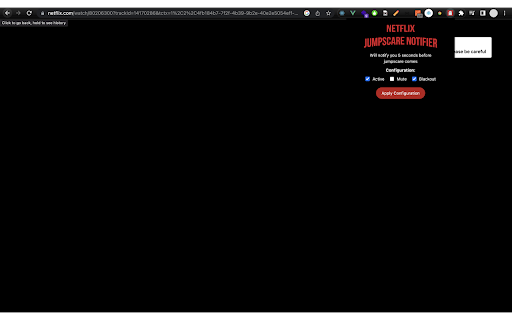

ดาวน์โหลดไฟล์ CRX ของส่วนขยาย Netflix Jumpscare Notifier
ดาวน์โหลดไฟล์ส่วนขยาย Netflix Jumpscare Notifier ในรูปแบบ crx และติดตั้งส่วนขยาย Chrome ด้วยตนเองในเบราว์เซอร์หรือแชร์ไฟล์ crx กับเพื่อนๆ เพื่อติดตั้งส่วนขยาย Chrome อย่างง่ายดาย
คำแนะนำในการใช้ส่วนขยาย
                        Features:

👀 List: See list of jumpscare in the movie or series
⚠️ Warning: will notify you 5 seconds before jumpscare comes
🙈 Blackout: instead of seeing jumpscare, the scene will be hidden and tell you what happened during the jumpscare
🔇 Mute: muted when jumpscare is coming

All jumpscare data was from https://wheresthejump.com/

NB:
- You may need to reload your browser when first installation extension
- it doesn't work in all movies and series, you can see the covered list in https://wheresthejump.com/
- There's some movie or series where the jumpscare time isn't matched. It might appear after the notification or while showing the notification, so please be careful ✌️


Made with 🌴 by Fairuz R
ข้อมูลพื้นฐานของส่วนขยาย
| ชื่อ |  Netflix Jumpscare Notifier Netflix Jumpscare Notifier |
| ID | hdomlajjnoeoloimaglmhihemhdpehok |
| URL อย่างเป็นทางการ | https://chromewebstore.google.com/detail/netflix-jumpscare-notifie/hdomlajjnoeoloimaglmhihemhdpehok |
| คำอธิบาย | It will notify you 5 seconds before jumpscare comes |
| ขนาดไฟล์ | 145 KB |
| จำนวนการติดตั้ง | 401 |
| เวอร์ชันปัจจุบัน | 0.0.2 |
| อัปเดตครั้งล่าสุด | 2023-01-03 |
| วันที่เผยแพร่ | 2023-01-02 |
| ผู้พัฒนา | Fairuz R |
| อีเมล | [email protected] |
| ประเภทการชำระเงิน | free |
| ภาษาที่รองรับ | en |
| manifest.json | |
{
    "update_url": "https:\/\/clients2.google.com\/service\/update2\/crx",
    "manifest_version": 3,
    "name": "Netflix Jumpscare Notifier",
    "description": "It will notify you 5 seconds before jumpscare comes",
    "version": "0.0.2",
    "background": {
        "service_worker": "\/background.js"
    },
    "action": {
        "default_icon": "icon.png",
        "default_popup": "popup.html"
    },
    "content_scripts": [
        {
            "matches": [
                "https:\/\/*.netflix.com\/*"
            ],
            "js": [
                "inject.js"
            ],
            "all_frames": true
        }
    ],
    "web_accessible_resources": [
        {
            "matches": [
                "https:\/\/*.netflix.com\/*"
            ],
            "resources": [
                "content-injected.js"
            ]
        }
    ],
    "host_permissions": [
        "https:\/\/*.netflix.com\/*"
    ],
    "permissions": [
        "tabs",
        "storage"
    ]
} | |