Zoom Controls
This extension adds skip/rewind, playback, picture-in-picture video controls & keyboard shortcuts to the Zoom Recorded Video player.
Zoom Controlsคืออะไร?
Zoom Controls เป็นส่วนขยายของ Chrome ที่พัฒนาโดย Rehan Ahmed และคุณลักษณะหลักของมันคือ "This extension adds skip/rewind, playback, picture-in-picture video controls & keyboard shortcuts to the Zoom Recorded Video player."
ภาพหน้าจอของส่วนขยาย

ดาวน์โหลดไฟล์ CRX ของส่วนขยาย Zoom Controls
ดาวน์โหลดไฟล์ส่วนขยาย Zoom Controls ในรูปแบบ crx และติดตั้งส่วนขยาย Chrome ด้วยตนเองในเบราว์เซอร์หรือแชร์ไฟล์ crx กับเพื่อนๆ เพื่อติดตั้งส่วนขยาย Chrome อย่างง่ายดาย
คำแนะนำในการใช้ส่วนขยาย
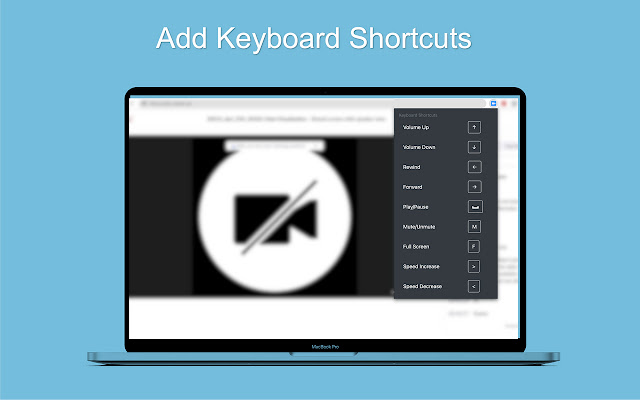
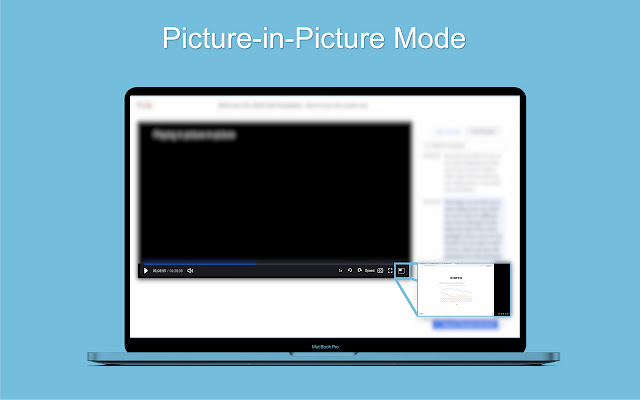
                        Zoom Controls makes the default, recorded-video player on Zoom much better by adding keyboard shortcuts, variable playback rates, option to rewind/forward video, picture-in-picture mode, and more.

NEW
- Picture-in-Picture mode (Keyboard Shortcut - P )
- Zoom added forward/rewind by default, fixed support
- Zoom added play/pause by Spacebar, fixed support

Controls
Rewind, Forward, Playback Indicator

Keyboard Shortcuts
Volume Up - Arrow ↑
Volume Down - Arrow ↓
Rewind - Arrow ←
Forward - Arrow →
Play/Pause - Spacebar
Mute/Unmute - M
Full Screen - F
Subtitles - C
Picture-In-Picture - P
Video Speed Increase (Playback) - >
Video Speed Decrease (Playback) - <
ข้อมูลพื้นฐานของส่วนขยาย
| ชื่อ |  Zoom Controls Zoom Controls |
| ID | henmmblkopelpkajjhhndaicecnccgff |
| URL อย่างเป็นทางการ | https://chrome.google.com/webstore/detail/zoom-controls/henmmblkopelpkajjhhndaicecnccgff |
| คำอธิบาย | This extension adds skip/rewind, playback, picture-in-picture video controls & keyboard shortcuts to the Zoom Recorded Video player. |
| ขนาดไฟล์ | 298 KB |
| จำนวนการติดตั้ง | 108 |
| เวอร์ชันปัจจุบัน | 1.1 |
| อัปเดตครั้งล่าสุด | 2021-11-23 |
| วันที่เผยแพร่ | 2021-09-14 |
| คะแนน | 5.00/5 รวมทั้งหมด 3 คะแนน |
| ผู้พัฒนา | Rehan Ahmed |
| อีเมล | [email protected] |
| ประเภทการชำระเงิน | free |
| เว็บไซต์ส่วนขยาย | https://github.com/reallyrehan/zoomcontrols |
| URL หน้าช่วยเหลือ | https://github.com/reallyrehan/zoomcontrols |
| ภาษาที่รองรับ | en-US |
| manifest.json | |
{
    "update_url": "https:\/\/clients2.google.com\/service\/update2\/crx",
    "manifest_version": 2,
    "name": "Zoom Controls",
    "description": "This extension adds skip\/rewind, playback, picture-in-picture video controls & keyboard shortcuts to the Zoom Recorded Video player.",
    "version": "1.1",
    "icons": {
        "128": "icon.png"
    },
    "browser_action": {
        "default_icon": "images\/icon.png",
        "default_popup": "popup.html"
    },
    "content_scripts": [
        {
            "matches": [
                "https:\/\/*.zoom.us\/*"
            ],
            "js": [
                "jquery.min.js",
                "utilities.js"
            ],
            "run_at": "document_idle"
        }
    ]
} | |