Music CAT for Google Play Music™
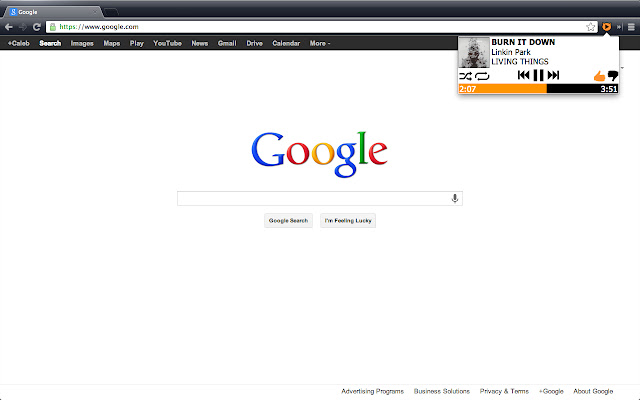
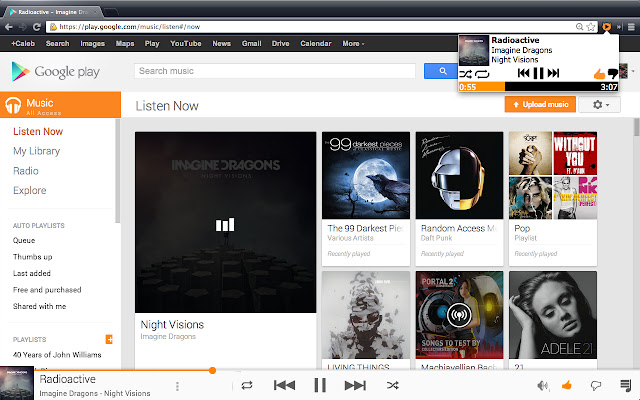
Music CAT (Control from All Tabs) gives you control of your Google Play Music™ from any tab and with your keyboard.
Music CAT for Google Play Music™คืออะไร?
Music CAT for Google Play Music™ เป็นส่วนขยายของ Chrome ที่พัฒนาโดย Krazy Kitten Inc และคุณลักษณะหลักของมันคือ "Music CAT (Control from All Tabs) gives you control of your Google Play Music™ from any tab and with your keyboard."
ภาพหน้าจอของส่วนขยาย
ดาวน์โหลดไฟล์ CRX ของส่วนขยาย Music CAT for Google Play Music™
ดาวน์โหลดไฟล์ส่วนขยาย Music CAT for Google Play Music™ ในรูปแบบ crx และติดตั้งส่วนขยาย Chrome ด้วยตนเองในเบราว์เซอร์หรือแชร์ไฟล์ crx กับเพื่อนๆ เพื่อติดตั้งส่วนขยาย Chrome อย่างง่ายดาย
คำแนะนำในการใช้ส่วนขยาย
                        Compatible with Google Play Music™ including the new All Access service!

Keyboard Controls (extension must be open)
Pause/Play - Space
Skip - Right Arrow
Previous - Left Arrow
Thumb Up - Up Arrow
Thumb Down - Down Arrow
Shuffle - S
Repeat - R

To avoid the mouse entirely, you can set a shortcut to open the extension by going to Chrome -> Settings/Preferences -> Extensions -> Keyboard Shortcuts (scroll to the bottom)

Change Logs:

Update 1.3:
- Fixed the album art issue
- Fixed other small fixes

Update 1.2:
-Random fixes

Update 1.1:
-Added new keyboard shortcuts
-Progress Bar is now scrollable
-Other Bug fixes

Initial Version 1.0

If you find any issues, please tell us here: https://github.com/calebgomer/Music-CAT/issues or email (look on github)
Ryan McNamee
Chinmay Ghotkar
Caleb Gomer
ข้อมูลพื้นฐานของส่วนขยาย
| ชื่อ |  Music CAT for Google Play Music™ Music CAT for Google Play Music™ |
| ID | hfmgndgkfjenffplhbcaaacnodoichdo |
| URL อย่างเป็นทางการ | https://chrome.google.com/webstore/detail/music-cat-for-google-play/hfmgndgkfjenffplhbcaaacnodoichdo |
| คำอธิบาย | Music CAT (Control from All Tabs) gives you control of your Google Play Music™ from any tab and with your keyboard. |
| ขนาดไฟล์ | 648 KB |
| จำนวนการติดตั้ง | 53 |
| เวอร์ชันปัจจุบัน | 1.3 |
| อัปเดตครั้งล่าสุด | 2014-11-05 |
| วันที่เผยแพร่ | 2014-11-05 |
| คะแนน | 5.00/5 รวมทั้งหมด 7 คะแนน |
| ผู้พัฒนา | Krazy Kitten Inc |
| ประเภทการชำระเงิน | free |
| ภาษาที่รองรับ | en-US |
| manifest.json | |
{
    "update_url": "https:\/\/clients2.google.com\/service\/update2\/crx",
    "manifest_version": 2,
    "name": "Music CAT for Google Play Music\u2122",
    "description": "Music CAT (Control from All Tabs) gives you control of your Google Play Music\u2122 from any tab and with your keyboard.",
    "version": "1.3",
    "browser_action": {
        "default_icon": "images\/icon128V2.png",
        "default_popup": "popup.html"
    },
    "content_scripts": [
        {
            "matches": [
                "https:\/\/play.google.com\/music\/*"
            ],
            "run_at": "document_end",
            "js": [
                "scripts\/jquery.js",
                "scripts\/music.js"
            ]
        }
    ],
    "permissions": [
        "tabs",
        "https:\/\/play.google.com\/music\/*"
    ],
    "icons": {
        "16": "images\/icon16V2.png",
        "48": "images\/icon48V2.png",
        "128": "images\/icon128V2.png",
        "256": "images\/icon256V2.png",
        "512": "images\/icon512V2.png"
    }
} | |