UMN Classes to Calendar
Add your UMN classes to your Google Calendar through MyU
UMN Classes to Calendarคืออะไร?
UMN Classes to Calendar เป็นส่วนขยายของ Chrome ที่พัฒนาโดย http://brodenwanner.com และคุณลักษณะหลักของมันคือ "Add your UMN classes to your Google Calendar through MyU"
ภาพหน้าจอของส่วนขยาย

ดาวน์โหลดไฟล์ CRX ของส่วนขยาย UMN Classes to Calendar
ดาวน์โหลดไฟล์ส่วนขยาย UMN Classes to Calendar ในรูปแบบ crx และติดตั้งส่วนขยาย Chrome ด้วยตนเองในเบราว์เซอร์หรือแชร์ไฟล์ crx กับเพื่อนๆ เพื่อติดตั้งส่วนขยาย Chrome อย่างง่ายดาย
คำแนะนำในการใช้ส่วนขยาย
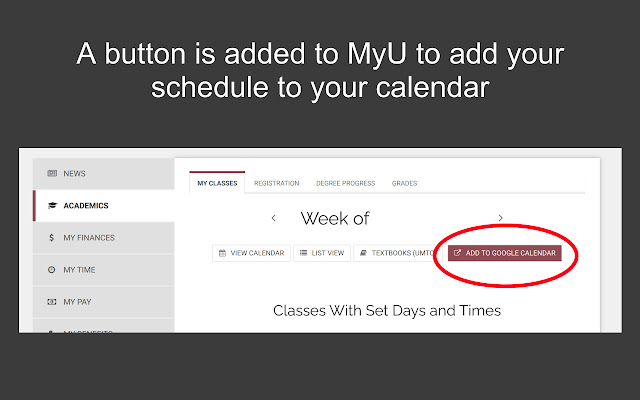
No more meticulously adding your class schedule to your calendar manually! This extension adds a button to your UMN MyU class calendar that allows you to quickly add your class schedule to your Google Calendar or export it to any other calendar. Simply install the extension, go to the "Academics" tab in MyU, and click on the "Add to Google Calendar" button. You can then choose to add it to a new or existing calendar, and you're done! ข้อมูลพื้นฐานของส่วนขยาย
| ชื่อ |  UMN Classes to Calendar UMN Classes to Calendar |
| ID | hgdfmecgpajmoeionaieooohpbkibaen |
| URL อย่างเป็นทางการ | https://chrome.google.com/webstore/detail/hgdfmecgpajmoeionaieooohpbkibaen |
| คำอธิบาย | Add your UMN classes to your Google Calendar through MyU |
| ขนาดไฟล์ | 108 KB |
| จำนวนการติดตั้ง | 540 |
| เวอร์ชันปัจจุบัน | 1.1.2 |
| อัปเดตครั้งล่าสุด | 2021-08-23 |
| วันที่เผยแพร่ | 2020-09-07 |
| คะแนน | 5.00/5 รวมทั้งหมด 1 คะแนน |
| ผู้พัฒนา | http://brodenwanner.com |
| อีเมล | [email protected] |
| ประเภทการชำระเงิน | free |
| เว็บไซต์ส่วนขยาย | https://umnclassestocalendar.com |
| URL หน้าช่วยเหลือ | https://github.com/broden-wanner/classes-to-calendar/issues |
| URL หน้านโยบายความเป็นส่วนตัว | https://classestocalendar.brodenwanner.com/privacy-policy |
| ภาษาที่รองรับ | en-US |
| manifest.json | |
{
    "update_url": "https:\/\/clients2.google.com\/service\/update2\/crx",
    "short_name": "UMN Classes to Calendar",
    "name": "UMN Classes to Calendar",
    "description": "Add your UMN classes to your Google Calendar through MyU",
    "version": "1.1.2",
    "manifest_version": 2,
    "icons": {
        "16": "icons\/favicon-16x16.png",
        "32": "icons\/favicon-32x32.png",
        "48": "icons\/icon48.png",
        "128": "icons\/icon128.png",
        "192": "icons\/android-chrome-192x192.png",
        "512": "icons\/android-chrome-512x512.png"
    },
    "permissions": [
        "declarativeContent",
        "activeTab",
        "*:\/\/*.myu.umn.edu\/*",
        "*:\/\/classestocalendar.brodenwanner.com\/*",
        "*:\/\/*.umnclassestocalendar.com\/*"
    ],
    "background": {
        "scripts": [
            "background.js"
        ]
    },
    "content_scripts": [
        {
            "matches": [
                "*:\/\/www.myu.umn.edu\/*"
            ],
            "js": [
                "content.js"
            ]
        }
    ],
    "browser_action": []
} | |