Glance Back
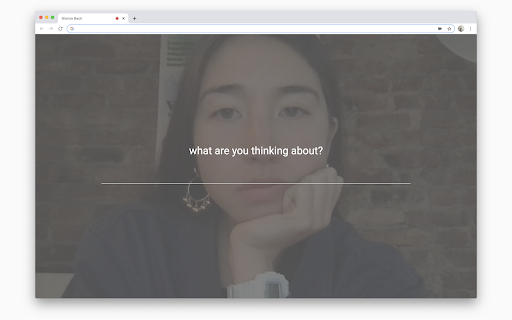
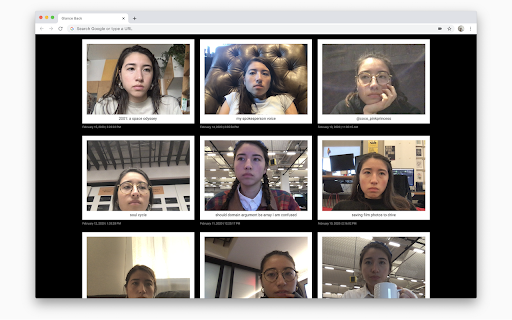
You spend so much time staring at your computer... doesn't your computer deserve a chance to glance back at you?
Glance Backคืออะไร?
Glance Back เป็นส่วนขยายของ Chrome ที่พัฒนาโดย https://glanceback.info และคุณลักษณะหลักของมันคือ "You spend so much time staring at your computer... doesn't your computer deserve a chance to glance back at you?"
ภาพหน้าจอของส่วนขยาย
ดาวน์โหลดไฟล์ CRX ของส่วนขยาย Glance Back
ดาวน์โหลดไฟล์ส่วนขยาย Glance Back ในรูปแบบ crx และติดตั้งส่วนขยาย Chrome ด้วยตนเองในเบราว์เซอร์หรือแชร์ไฟล์ crx กับเพื่อนๆ เพื่อติดตั้งส่วนขยาย Chrome อย่างง่ายดาย
คำแนะนำในการใช้ส่วนขยาย
Glance Back is a daily photo diary, capturing the moments shared between you and your computer. Once a day, when you open a new tab, Glance Back will take your photo, ask you what you’re thinking about, and save both the photo and written thought to its locally stored archive. ข้อมูลพื้นฐานของส่วนขยาย
| ชื่อ |  Glance Back Glance Back |
| ID | hgickafobcmcfffbjiamhhejkockfccm |
| URL อย่างเป็นทางการ | https://chromewebstore.google.com/detail/glance-back/hgickafobcmcfffbjiamhhejkockfccm |
| คำอธิบาย | You spend so much time staring at your computer... doesn't your computer deserve a chance to glance back at you? |
| ขนาดไฟล์ | 158 KB |
| จำนวนการติดตั้ง | 9,687 |
| เวอร์ชันปัจจุบัน | 0.1.7 |
| อัปเดตครั้งล่าสุด | 2022-08-20 |
| วันที่เผยแพร่ | 2020-05-23 |
| คะแนน | 4.62/5 รวมทั้งหมด 29 คะแนน |
| ผู้พัฒนา | https://glanceback.info |
| อีเมล | [email protected] |
| ประเภทการชำระเงิน | free |
| เว็บไซต์ส่วนขยาย | https://glanceback.info/ |
| URL หน้าช่วยเหลือ | https://glanceback.info/about/ |
| URL หน้านโยบายความเป็นส่วนตัว | https://glanceback.info/privacy |
| ภาษาที่รองรับ | en |
| manifest.json | |
{
    "update_url": "https:\/\/clients2.google.com\/service\/update2\/crx",
    "name": "Glance Back",
    "version": "0.1.7",
    "description": "You spend so much time staring at your computer...\u00a0doesn't your computer deserve a chance to glance back at you?",
    "permissions": [
        "storage",
        "unlimitedStorage"
    ],
    "icons": {
        "16": "assets\/logo_black_16x16.png",
        "48": "assets\/logo_black_48x48.png",
        "128": "assets\/logo_black_128x128.png"
    },
    "browser_action": {
        "default_title": "Glance Back",
        "default_icon": {
            "16": "assets\/logo_black_16x16.png",
            "48": "assets\/logo_black_48x48.png",
            "128": "assets\/logo_black_128x128.png"
        }
    },
    "chrome_url_overrides": {
        "newtab": "index.html"
    },
    "manifest_version": 2
} | |