Voxnote : Record and share audio messages
Record voice notes and save them as links to your favorite apps
Voxnote : Record and share audio messagesคืออะไร?
Voxnote : Record and share audio messages เป็นส่วนขยายของ Chrome ที่พัฒนาโดย TalkTalkMe และคุณลักษณะหลักของมันคือ "Record voice notes and save them as links to your favorite apps"
ภาพหน้าจอของส่วนขยาย
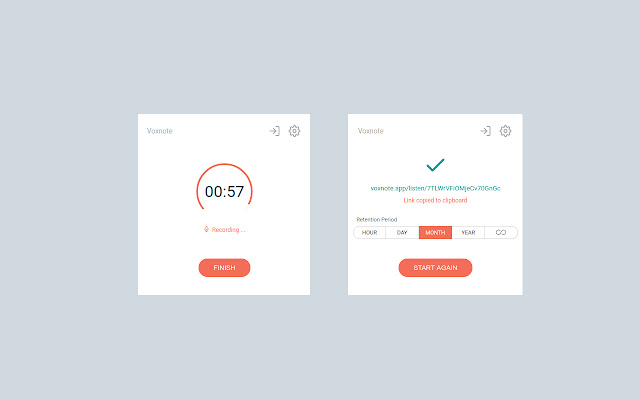
ดาวน์โหลดไฟล์ CRX ของส่วนขยาย Voxnote : Record and share audio messages
ดาวน์โหลดไฟล์ส่วนขยาย Voxnote : Record and share audio messages ในรูปแบบ crx และติดตั้งส่วนขยาย Chrome ด้วยตนเองในเบราว์เซอร์หรือแชร์ไฟล์ crx กับเพื่อนๆ เพื่อติดตั้งส่วนขยาย Chrome อย่างง่ายดาย
คำแนะนำในการใช้ส่วนขยาย
                        Record voice notes and save them as links to your favorite apps: Gmail, Trello, Jira, Slack, anywhere you want! Be more productive with async audio communications!

A focus on secure communications:
We encrypt all messages and you can customize the retention to as low as one hour
ข้อมูลพื้นฐานของส่วนขยาย
| ชื่อ |  Voxnote : Record and share audio messages Voxnote : Record and share audio messages |
| ID | hhioebinfndnigmghmjfhhkfopejbgfl |
| URL อย่างเป็นทางการ | https://chrome.google.com/webstore/detail/voxnote-record-and-share/hhioebinfndnigmghmjfhhkfopejbgfl |
| คำอธิบาย | Record voice notes and save them as links to your favorite apps |
| ขนาดไฟล์ | 453 KB |
| จำนวนการติดตั้ง | 173 |
| เวอร์ชันปัจจุบัน | 1.0.1 |
| อัปเดตครั้งล่าสุด | 2020-10-01 |
| วันที่เผยแพร่ | 2020-10-01 |
| คะแนน | 5.00/5 รวมทั้งหมด 2 คะแนน |
| ผู้พัฒนา | TalkTalkMe |
| อีเมล | [email protected] |
| ประเภทการชำระเงิน | free |
| เว็บไซต์ส่วนขยาย | https://voxnote.app |
| URL หน้าช่วยเหลือ | https://voxnote.app/contact |
| URL หน้านโยบายความเป็นส่วนตัว | https://talk-talk.me/privacy |
| ภาษาที่รองรับ | en-US |
| manifest.json | |
{
"update_url": "https:\/\/clients2.google.com\/service\/update2\/crx",
"name": "Voxnote : Record and share audio messages",
"short_name": "Voxnote",
"author": "Voxnote INC",
"version": "1.0.1",
"manifest_version": 2,
"minimum_chrome_version": "49",
"description": "Record voice notes and save them as links to your favorite apps",
"homepage_url": "https:\/\/github.com",
"background": {
"scripts": [
"background.bundle.js",
"OpusMediaRecorder.umd.js",
"encoderWorker.umd.js"
],
"persistent": false
},
"content_scripts": [
{
"matches": [
" | |