CloudTempo
Fast & Smart Command Bar for AWS Console.
CloudTempoคืออะไร?
CloudTempo เป็นส่วนขยายของ Chrome ที่พัฒนาโดย https://cloudtempo.dev และคุณลักษณะหลักของมันคือ "Fast & Smart Command Bar for AWS Console."
ภาพหน้าจอของส่วนขยาย

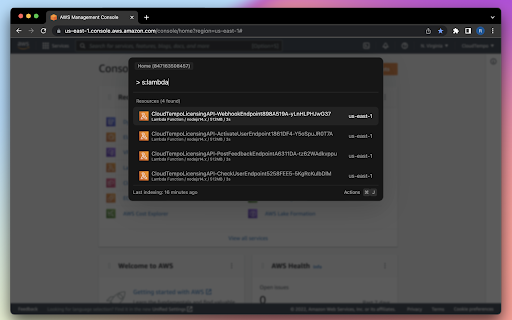
ดาวน์โหลดไฟล์ CRX ของส่วนขยาย CloudTempo
ดาวน์โหลดไฟล์ส่วนขยาย CloudTempo ในรูปแบบ crx และติดตั้งส่วนขยาย Chrome ด้วยตนเองในเบราว์เซอร์หรือแชร์ไฟล์ crx กับเพื่อนๆ เพื่อติดตั้งส่วนขยาย Chrome อย่างง่ายดาย
คำแนะนำในการใช้ส่วนขยาย
                        Fast & Smart Command Bar for AWS Console - Navigate through AWS (Amazon Web Services) Console with speed. Easily find resources cross-region, perform actions with single keystrokes. Designed for power users.

Key Features:
- Quickly find and navigate to AWS resources cross-region
- Find resources by ARN, get ARNs of your resources fast
- Use query languages to locate resources precisely
- Enhance AWS Console experience by shortcuts, skip using mouse
- Navigate to and through AWS Services with ease
ข้อมูลพื้นฐานของส่วนขยาย
| ชื่อ |  CloudTempo CloudTempo |
| ID | hnjemcffliolmflachhfoeaojlomanph |
| URL อย่างเป็นทางการ | https://chromewebstore.google.com/detail/cloudtempo/hnjemcffliolmflachhfoeaojlomanph |
| คำอธิบาย | Fast & Smart Command Bar for AWS Console. |
| ขนาดไฟล์ | 1.23 MB |
| จำนวนการติดตั้ง | 62 |
| เวอร์ชันปัจจุบัน | 0.2.0 |
| อัปเดตครั้งล่าสุด | 2022-10-20 |
| วันที่เผยแพร่ | 2022-09-29 |
| คะแนน | 5.00/5 รวมทั้งหมด 1 คะแนน |
| ผู้พัฒนา | https://cloudtempo.dev |
| อีเมล | [email protected] |
| ประเภทการชำระเงิน | in_app |
| เว็บไซต์ส่วนขยาย | https://cloudtempo.dev |
| URL หน้าช่วยเหลือ | https://cloudtempo.dev/faq |
| URL หน้านโยบายความเป็นส่วนตัว | https://cloudtempo.dev/privacy |
| ภาษาที่รองรับ | en-US |
| manifest.json | |
{
    "update_url": "https:\/\/clients2.google.com\/service\/update2\/crx",
    "name": "CloudTempo",
    "description": "Fast & Smart Command Bar for AWS Console.",
    "version": "0.2.0",
    "manifest_version": 3,
    "permissions": [],
    "homepage_url": "https:\/\/cloudtempo.dev",
    "icons": {
        "16": "img\/icon16.png",
        "32": "img\/icon32.png",
        "48": "img\/icon48.png",
        "128": "img\/icon128.png"
    },
    "background": {
        "service_worker": "background.js"
    },
    "host_permissions": [
        "https:\/\/*.aws.amazon.com\/*",
        "https:\/\/*.amazonaws.com\/*",
        "https:\/\/*.amazonaws.com.cn\/*",
        "https:\/\/developer.amazon.com\/*",
        "https:\/\/*.console.aws.amazon.com\/*"
    ],
    "content_scripts": [
        {
            "js": [
                "content.js"
            ],
            "matches": [
                "https:\/\/*.console.aws.amazon.com\/*"
            ]
        }
    ],
    "web_accessible_resources": [
        {
            "resources": [
                "dist\/*"
            ],
            "matches": [
                "https:\/\/*.console.aws.amazon.com\/*"
            ]
        }
    ],
    "externally_connectable": {
        "ids": [
            "dfdbbkddkbcggkpdkgnogjhpijiahcep"
        ],
        "matches": [
            "https:\/\/*.console.aws.amazon.com\/*"
        ]
    },
    "content_security_policy": {
        "extension_pages": "script-src 'self'; object-src 'self'"
    }
} | |