RTC Recorder (Beta)
RTC Recorder
RTC Recorder (Beta)คืออะไร?
RTC Recorder (Beta) เป็นส่วนขยายของ Chrome ที่พัฒนาโดย https://fang-svr.just.edu.tw และคุณลักษณะหลักของมันคือ "RTC Recorder"
ภาพหน้าจอของส่วนขยาย


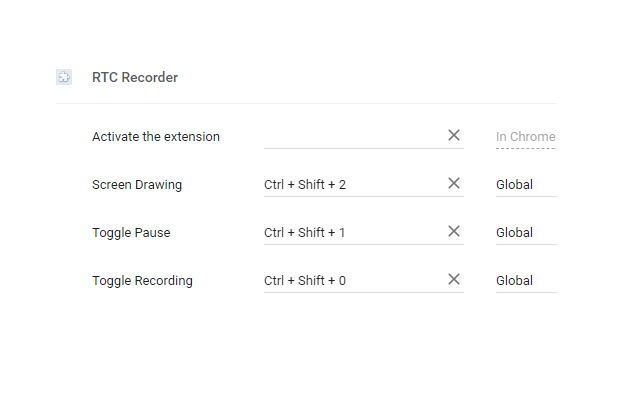
ดาวน์โหลดไฟล์ CRX ของส่วนขยาย RTC Recorder (Beta)
ดาวน์โหลดไฟล์ส่วนขยาย RTC Recorder (Beta) ในรูปแบบ crx และติดตั้งส่วนขยาย Chrome ด้วยตนเองในเบราว์เซอร์หรือแชร์ไฟล์ crx กับเพื่อนๆ เพื่อติดตั้งส่วนขยาย Chrome อย่างง่ายดาย
คำแนะนำในการใช้ส่วนขยาย
                        Screen Recorder
Features:
1.record screen with system and microphone audio sources,
2.a simple screen drawing,
3.store the recorded video on cloud or local.

Hot keys:
Ctrl+Shift+0 -> start/stop recording
Ctrl+Shift+1 -> pause/resume recording
Ctrl+Shift+2 -> screen drawing
ข้อมูลพื้นฐานของส่วนขยาย
| ชื่อ |  RTC Recorder (Beta) RTC Recorder (Beta) |
| ID | ibfgdcbgcjdpabkcbmkjijejfknbjfeg |
| URL อย่างเป็นทางการ | https://chrome.google.com/webstore/detail/rtc-recorder-beta/ibfgdcbgcjdpabkcbmkjijejfknbjfeg |
| คำอธิบาย | RTC Recorder |
| ขนาดไฟล์ | 372 KB |
| จำนวนการติดตั้ง | 1,000 |
| เวอร์ชันปัจจุบัน | 0.9.918 |
| อัปเดตครั้งล่าสุด | 2020-12-19 |
| วันที่เผยแพร่ | 2019-09-29 |
| คะแนน | 2.00/5 รวมทั้งหมด 4 คะแนน |
| ผู้พัฒนา | https://fang-svr.just.edu.tw |
| อีเมล | [email protected] |
| ประเภทการชำระเงิน | free |
| ภาษาที่รองรับ | en |
| manifest.json | |
{
    "update_url": "https:\/\/clients2.google.com\/service\/update2\/crx",
    "name": "RTC Recorder (Beta)",
    "description": "RTC Recorder",
    "version": "0.9.918",
    "manifest_version": 2,
    "minimum_chrome_version": "65",
    "icons": {
        "32": "images\/logo32.png"
    },
    "browser_action": {
        "default_icon": "images\/vrec_normal.png",
        "default_popup": "popup.html"
    },
    "permissions": [
        "background",
        "clipboardRead",
        "downloads",
        "desktopCapture",
        "tabs",
        "storage",
        "notifications",
        "http:\/\/*\/*",
        "https:\/\/*\/*",
        "*:\/\/*\/*"
    ],
    "commands": {
        "toggleRecording": {
            "suggested_key": {
                "default": "Ctrl+Shift+0"
            },
            "description": "Toggle Recording",
            "global": true
        },
        "togglePause": {
            "suggested_key": {
                "default": "Ctrl+Shift+1"
            },
            "description": "Toggle Pause",
            "global": true
        },
        "screenDrawing": {
            "suggested_key": {
                "default": "Ctrl+Shift+2"
            },
            "description": "Screen Drawing",
            "global": true
        },
        "screenShot": {
            "suggested_key": {
                "default": "Ctrl+Shift+3"
            },
            "description": "Screen Shot for whiteboard",
            "global": true
        }
    },
    "background": {
        "scripts": [
            "thirdParty\/DetectRTC.min.js",
            "thirdParty\/jquery.min.js",
            "thirdParty\/jquery.xmpp.js",
            "thirdParty\/binary.min.js",
            "libs\/adapter.min.js",
            "libs\/util.js",
            "background.js"
        ]
    },
    "content_scripts": [
        {
            "js": [
                "content.js"
            ],
            "matches": [
                "*:\/\/*.just.edu.tw\/*",
                "https:\/\/*.hinet-ip.hinet.net\/wm2\/*"
            ]
        }
    ]
} | |