e-load
Descarga Automatica de Documentos Electronicos del sitio web del SRI.
e-loadคืออะไร?
e-load เป็นส่วนขยายของ Chrome ที่พัฒนาโดย Ing. Javier Veliz N. และคุณลักษณะหลักของมันคือ "Descarga Automatica de Documentos Electronicos del sitio web del SRI."
ภาพหน้าจอของส่วนขยาย
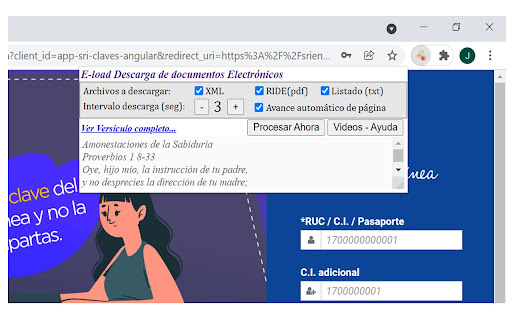

ดาวน์โหลดไฟล์ CRX ของส่วนขยาย e-load
ดาวน์โหลดไฟล์ส่วนขยาย e-load ในรูปแบบ crx และติดตั้งส่วนขยาย Chrome ด้วยตนเองในเบราว์เซอร์หรือแชร์ไฟล์ crx กับเพื่อนๆ เพื่อติดตั้งส่วนขยาย Chrome อย่างง่ายดาย
คำแนะนำในการใช้ส่วนขยาย
GRATIS - Herramienta para descarga automática de documentos electrónicos (XML/PDF, listado TXT) del sitio web del SRI ข้อมูลพื้นฐานของส่วนขยาย
| ชื่อ |  e-load e-load |
| ID | ikihljikchccgnbgnhjhipbfjlballip |
| URL อย่างเป็นทางการ | https://chromewebstore.google.com/detail/e-load/ikihljikchccgnbgnhjhipbfjlballip |
| คำอธิบาย | Descarga Automatica de Documentos Electronicos del sitio web del SRI. |
| ขนาดไฟล์ | 31.63 KB |
| จำนวนการติดตั้ง | 2,392 |
| เวอร์ชันปัจจุบัน | 0.1 |
| อัปเดตครั้งล่าสุด | 2021-12-01 |
| วันที่เผยแพร่ | 2021-12-01 |
| คะแนน | 4.67/5 รวมทั้งหมด 3 คะแนน |
| ผู้พัฒนา | Ing. Javier Veliz N. |
| อีเมล | [email protected] |
| ประเภทการชำระเงิน | free |
| URL หน้าช่วยเหลือ | https://www.multiempresarios.com/Plantillas/SRIeload/Videos/index.html |
| ภาษาที่รองรับ | es-419 |
| manifest.json | |
{
"update_url": "https:\/\/clients2.google.com\/service\/update2\/crx",
"manifest_version": 3,
"name": "e-load",
"description": "Descarga Automatica de Documentos Electronicos del sitio web del SRI.",
"version": "0.1",
"content_scripts": [
{
"matches": [
" | |