Supercharge
Supercharge your omnibox (addressbar) with many features.
Superchargeคืออะไร?
Supercharge เป็นส่วนขยายของ Chrome ที่พัฒนาโดย http://bjorn.wikkeling.com และคุณลักษณะหลักของมันคือ "Supercharge your omnibox (addressbar) with many features."
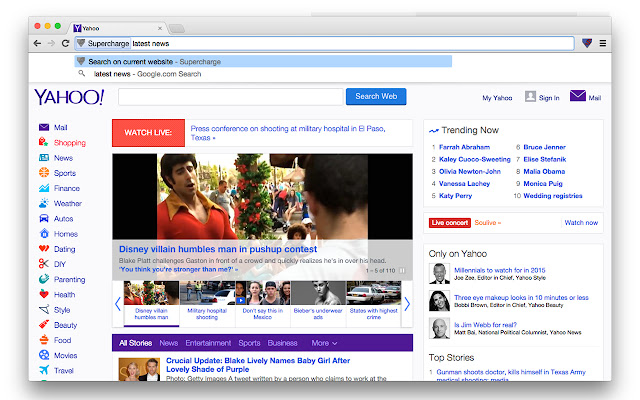
ภาพหน้าจอของส่วนขยาย

ดาวน์โหลดไฟล์ CRX ของส่วนขยาย Supercharge
ดาวน์โหลดไฟล์ส่วนขยาย Supercharge ในรูปแบบ crx และติดตั้งส่วนขยาย Chrome ด้วยตนเองในเบราว์เซอร์หรือแชร์ไฟล์ crx กับเพื่อนๆ เพื่อติดตั้งส่วนขยาย Chrome อย่างง่ายดาย
คำแนะนำในการใช้ส่วนขยาย
                        Supercharge your omnibox (addressbar) with this extension. By typing `s` (without the quotes) followed by a space, in the address bar you start the Supercharge extension. Then you can feed it several commands.

Tip: the keyboard shortcut CTRL+L (Windows/Linux) or CMD+L (OSX) highlights the URL.

These commands are currently available:

* Search current website
Type `s` (without the quotes) in the address bar followed by a space then type your search query and hit enter. You will now search within the website you are  currently visiting.

* Display IP adress
Type `s` (without the quotes) in the address bar followed by a space then type `ip` or just `i` (without the quotes) and hit enter. This will display your current IP address.

Features currently in development:
- search bookmarks
- search history
- switch to tab
- and many, many more...
ข้อมูลพื้นฐานของส่วนขยาย
| ชื่อ |  Supercharge Supercharge |
| ID | imjaflpheokfhbbmdohmmpabecjfigem |
| URL อย่างเป็นทางการ | https://chrome.google.com/webstore/detail/supercharge/imjaflpheokfhbbmdohmmpabecjfigem |
| คำอธิบาย | Supercharge your omnibox (addressbar) with many features. |
| ขนาดไฟล์ | 48.56 KB |
| จำนวนการติดตั้ง | 56 |
| เวอร์ชันปัจจุบัน | 0.0.3 |
| อัปเดตครั้งล่าสุด | 2015-01-07 |
| วันที่เผยแพร่ | 2015-01-07 |
| คะแนน | 5.00/5 รวมทั้งหมด 1 คะแนน |
| ผู้พัฒนา | http://bjorn.wikkeling.com |
| อีเมล | [email protected] |
| ประเภทการชำระเงิน | free |
| ภาษาที่รองรับ | en |
| manifest.json | |
{
    "update_url": "https:\/\/clients2.google.com\/service\/update2\/crx",
    "name": "__MSG_appName__",
    "short_name": "__MSG_appShortName__",
    "version": "0.0.3",
    "manifest_version": 2,
    "description": "__MSG_appDescription__",
    "icons": {
        "16": "images\/icon-16.png",
        "19": "images\/icon-19.png",
        "24": "images\/icon-24.png",
        "32": "images\/icon-32.png",
        "38": "images\/icon-38.png",
        "48": "images\/icon-48.png",
        "64": "images\/icon-64.png",
        "96": "images\/icon-96.png",
        "128": "images\/icon-128.png",
        "256": "images\/icon-256.png"
    },
    "default_locale": "en",
    "background": {
        "persistent": false,
        "scripts": [
            "scripts\/background.js"
        ]
    },
    "browser_action": {
        "default_icon": {
            "19": "images\/icon-19.png",
            "38": "images\/icon-38.png"
        },
        "default_title": "supercharge"
    },
    "omnibox": {
        "keyword": "s"
    },
    "permissions": [
        "tabs",
        "http:\/\/*\/*",
        "https:\/\/*\/*"
    ]
} | |