smartMart: Ecwid custom invoice print
print invoice with customizable template
smartMart: Ecwid custom invoice printคืออะไร?
smartMart: Ecwid custom invoice print เป็นส่วนขยายของ Chrome ที่พัฒนาโดย http://smartmart.com.ua และคุณลักษณะหลักของมันคือ "print invoice with customizable template"
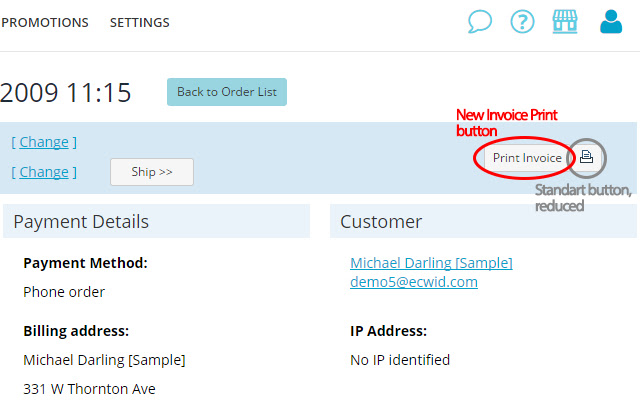
ภาพหน้าจอของส่วนขยาย


ดาวน์โหลดไฟล์ CRX ของส่วนขยาย smartMart: Ecwid custom invoice print
ดาวน์โหลดไฟล์ส่วนขยาย smartMart: Ecwid custom invoice print ในรูปแบบ crx และติดตั้งส่วนขยาย Chrome ด้วยตนเองในเบราว์เซอร์หรือแชร์ไฟล์ crx กับเพื่อนๆ เพื่อติดตั้งส่วนขยาย Chrome อย่างง่ายดาย
คำแนะนำในการใช้ส่วนขยาย
                        For e-stores based on Ecwid Shoppping Cart (http://www.ecwid.com/).

Ability to change the design and content of Merchant Invoice, which is printed from Order page in store Control Panel.

Invoice template is editable HTML-code, so you can add, remove or swap information and layout from extension Options.
-------
Template debug mode: will open a window with its layout, instead of sending to print.
-------
This is a beta, so share your comments and suggestions to Chrome Web Store "Comments", or Ecwid forum:
http://www.ecwid.com/forums/showthread.php?t=31040

Permissions:
-------
Permission to "read and change your data on my.ecwid.com" required for: 1) read your store data and order details, and 2) to add a new button to store control panel.

Extension has no access to other things, no data is transmitted to any server, everything is processed in your browser.
ข้อมูลพื้นฐานของส่วนขยาย
| ชื่อ |  smartMart: Ecwid custom invoice print smartMart: Ecwid custom invoice print |
| ID | jggfpgilgenpfinnjgfdkhbfjimgkimk |
| URL อย่างเป็นทางการ | https://chrome.google.com/webstore/detail/smartmart-ecwid-custom-in/jggfpgilgenpfinnjgfdkhbfjimgkimk |
| คำอธิบาย | print invoice with customizable template |
| ขนาดไฟล์ | 114 KB |
| จำนวนการติดตั้ง | 171 |
| เวอร์ชันปัจจุบัน | 0.3.5 |
| อัปเดตครั้งล่าสุด | 2015-02-21 |
| วันที่เผยแพร่ | 2015-02-21 |
| คะแนน | 5.00/5 รวมทั้งหมด 3 คะแนน |
| ผู้พัฒนา | http://smartmart.com.ua |
| ประเภทการชำระเงิน | free |
| ภาษาที่รองรับ | en,ru |
| manifest.json | |
{
    "update_url": "https:\/\/clients2.google.com\/service\/update2\/crx",
    "manifest_version": 2,
    "version": "0.3.5",
    "default_locale": "ru",
    "name": "__MSG_epiExtensionName__",
    "short_name": "__MSG_epiExtensionShortName__",
    "description": "__MSG_epiExtensionDescription__",
    "options_page": "options.html",
    "icons": {
        "16": "images\/icon-16.png",
        "48": "images\/icon-48.png",
        "128": "images\/icon-128.png"
    },
    "browser_action": {
        "default_icon": "images\/icon-48.png",
        "default_title": "__MSG_epiDefaultTitle__",
        "default_popup": "popup.html"
    },
    "permissions": [
        "storage",
        "cookies",
        "https:\/\/my.ecwid.com\/cp\/*",
        "https:\/\/my.ecwid.com\/print_invoice\/*"
    ],
    "content_scripts": [
        {
            "matches": [
                "https:\/\/my.ecwid.com\/cp\/*"
            ],
            "run_at": "document_start",
            "css": [
                "content_script.css"
            ],
            "js": [
                "lib\/jquery-1.10.2.min.js",
                "lib\/doT.min.js",
                "content_script.js"
            ]
        },
        {
            "matches": [
                "https:\/\/my.ecwid.com\/print_invoice\/*"
            ],
            "run_at": "document_start",
            "js": [
                "lib\/jquery-1.10.2.min.js",
                "content_script.js"
            ],
            "all_frames": true
        }
    ],
    "web_accessible_resources": [
        "content_script.css"
    ],
    "content_security_policy": "script-src 'self' 'unsafe-eval'; object-src 'self'"
} | |