GoHam - Pig Latin Translator
Automatically translates the Internet to Pig Latin.
GoHam - Pig Latin Translatorคืออะไร?
GoHam - Pig Latin Translator เป็นส่วนขยายของ Chrome ที่พัฒนาโดย samscode และคุณลักษณะหลักของมันคือ "Automatically translates the Internet to Pig Latin."
ภาพหน้าจอของส่วนขยาย
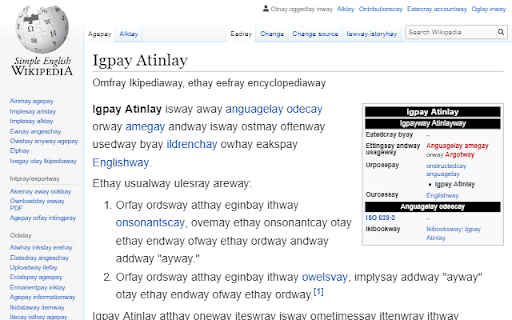
ดาวน์โหลดไฟล์ CRX ของส่วนขยาย GoHam - Pig Latin Translator
ดาวน์โหลดไฟล์ส่วนขยาย GoHam - Pig Latin Translator ในรูปแบบ crx และติดตั้งส่วนขยาย Chrome ด้วยตนเองในเบราว์เซอร์หรือแชร์ไฟล์ crx กับเพื่อนๆ เพื่อติดตั้งส่วนขยาย Chrome อย่างง่ายดาย
คำแนะนำในการใช้ส่วนขยาย
Compatible with the Teen Titans Go! Pig Latin dialect. Optionally displays pronunciation hints for beginners. Select from several suffix variations. ข้อมูลพื้นฐานของส่วนขยาย
| ชื่อ |  GoHam - Pig Latin Translator GoHam - Pig Latin Translator |
| ID | jiimmjfenbblcaobnamplnepkehmeepm |
| URL อย่างเป็นทางการ | https://chromewebstore.google.com/detail/goham-pig-latin-translato/jiimmjfenbblcaobnamplnepkehmeepm |
| คำอธิบาย | Automatically translates the Internet to Pig Latin. |
| ขนาดไฟล์ | 12.41 KB |
| จำนวนการติดตั้ง | 72 |
| เวอร์ชันปัจจุบัน | 1.2.1 |
| อัปเดตครั้งล่าสุด | 2019-07-26 |
| วันที่เผยแพร่ | 2019-07-23 |
| คะแนน | 5.00/5 รวมทั้งหมด 1 คะแนน |
| ผู้พัฒนา | samscode |
| ประเภทการชำระเงิน | free |
| URL หน้านโยบายความเป็นส่วนตัว | https://www.google.com/chrome/privacy |
| ภาษาที่รองรับ | en |
| manifest.json | |
{
    "update_url": "https:\/\/clients2.google.com\/service\/update2\/crx",
    "manifest_version": 2,
    "name": "GoHam - Pig Latin Translator",
    "short_name": "GoHam",
    "description": "Automatically translates the Internet to Pig Latin.",
    "version": "1.2.1",
    "icons": {
        "16": "logo16.png",
        "48": "logo48.png",
        "128": "logo.png"
    },
    "browser_action": {
        "default_icon": "logo.png",
        "default_popup": "popup.html"
    },
    "options_ui": {
        "page": "options.html",
        "open_in_tab": false
    },
    "content_scripts": [
        {
            "matches": [
                "*:\/\/*\/*"
            ],
            "js": [
                "doit.js"
            ]
        }
    ],
    "permissions": [
        "storage",
        "*:\/\/*\/*",
        "activeTab"
    ]
} | |