gDrivePrint - Google Drive Print Folder
Google Drive's missing feature to print all documents in one folder!
gDrivePrint - Google Drive Print Folderคืออะไร?
gDrivePrint - Google Drive Print Folder เป็นส่วนขยายของ Chrome ที่พัฒนาโดย matedon และคุณลักษณะหลักของมันคือ "Google Drive's missing feature to print all documents in one folder!"
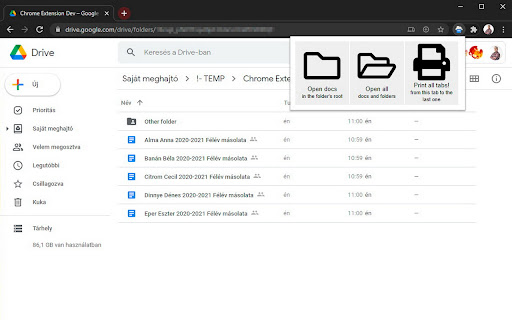
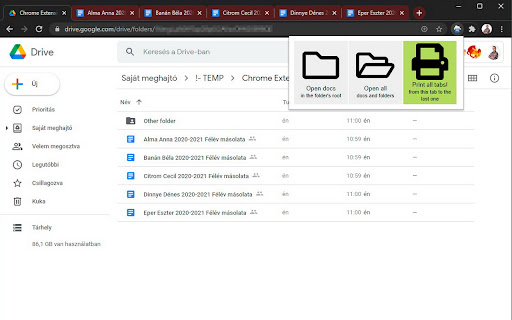
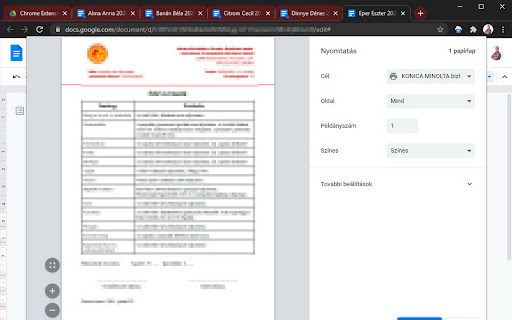
ภาพหน้าจอของส่วนขยาย

ดาวน์โหลดไฟล์ CRX ของส่วนขยาย gDrivePrint - Google Drive Print Folder
ดาวน์โหลดไฟล์ส่วนขยาย gDrivePrint - Google Drive Print Folder ในรูปแบบ crx และติดตั้งส่วนขยาย Chrome ด้วยตนเองในเบราว์เซอร์หรือแชร์ไฟล์ crx กับเพื่อนๆ เพื่อติดตั้งส่วนขยาย Chrome อย่างง่ายดาย
คำแนะนำในการใช้ส่วนขยาย
                        gDrivePrint
Google Drive Print Folder

This extension is good for:

Open more documents at once in a Google Drive Folder
Invoke Print dialog on all opened tabs
This extension doesn't use Google API just css selectors.

Sources

Button svg icons are Font Awesome Free icons (c) https://fontawesome.com/
Background scripts are using jQuery v3.3.1 minified https://jquery.com/
Extension based on https://github.com/MahbbRah/chrome_extension_boilerplate
The tab switch method based on the code of Auto Tab Switch by [email protected] https://chrome.google.com/webstore/detail/auto-tab-switch/iagkccjmbfoijhedememehigdjocdkhd
ข้อมูลพื้นฐานของส่วนขยาย
| ชื่อ |  gDrivePrint - Google Drive Print Folder gDrivePrint - Google Drive Print Folder |
| ID | jimnnpmaanbiglfmjaheajeehclekjoc |
| URL อย่างเป็นทางการ | https://chromewebstore.google.com/detail/gdriveprint-google-drive/jimnnpmaanbiglfmjaheajeehclekjoc |
| คำอธิบาย | Google Drive's missing feature to print all documents in one folder! |
| ขนาดไฟล์ | 45.31 KB |
| จำนวนการติดตั้ง | 104 |
| เวอร์ชันปัจจุบัน | 0.993 |
| อัปเดตครั้งล่าสุด | 2021-06-17 |
| วันที่เผยแพร่ | 2021-06-16 |
| คะแนน | 5.00/5 รวมทั้งหมด 1 คะแนน |
| ผู้พัฒนา | matedon |
| อีเมล | [email protected] |
| ประเภทการชำระเงิน | free |
| เว็บไซต์ส่วนขยาย | https://github.com/matedon/chrome_google_drive_print_folder |
| ภาษาที่รองรับ | en |
| manifest.json | |
{
    "update_url": "https:\/\/clients2.google.com\/service\/update2\/crx",
    "manifest_version": 2,
    "version": "0.993",
    "name": "gDrivePrint - Google Drive Print Folder",
    "description": "Google Drive's missing feature to print all documents in one folder!",
    "browser_action": {
        "default_icon": "icon.png",
        "default_popup": "popup.html"
    },
    "permissions": [
        "activeTab"
    ],
    "background": {
        "page": "background.html"
    },
    "content_security_policy": "script-src 'self' https:\/\/www.google-analytics.com https:\/\/s3.amazonaws.com; object-src 'self'"
} | |