MemeX
MemeX is a chrome extension which retrieves a gif based on your current Chrome tab and occasionally retrieves a random meme from…
MemeXคืออะไร?
MemeX เป็นส่วนขยายของ Chrome ที่พัฒนาโดย sevenseasofbri และคุณลักษณะหลักของมันคือ "MemeX is a chrome extension which retrieves a gif based on your current Chrome tab and occasionally retrieves a random meme from…"
ภาพหน้าจอของส่วนขยาย

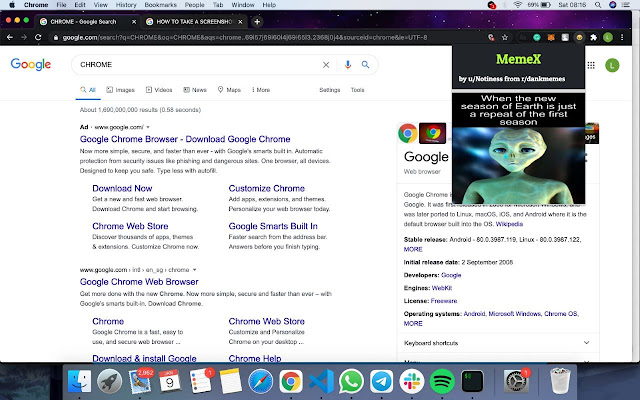
ดาวน์โหลดไฟล์ CRX ของส่วนขยาย MemeX
ดาวน์โหลดไฟล์ส่วนขยาย MemeX ในรูปแบบ crx และติดตั้งส่วนขยาย Chrome ด้วยตนเองในเบราว์เซอร์หรือแชร์ไฟล์ crx กับเพื่อนๆ เพื่อติดตั้งส่วนขยาย Chrome อย่างง่ายดาย
คำแนะนำในการใช้ส่วนขยาย
                        MemeX is a chrome extension which retrieves a gif based on your current Chrome tab and occasionally retrieves a random meme from reddit for you to enjoy!

Simply install  the extension and pin it to the toolbar. To obtain a gif/random meme, simply click on the extension or use the following keyboard shortcuts:

- Windows: "Ctrl+Shift+Y",
- Mac: "Command+Shift+Y",
- Chromeos: "Ctrl+Shift+U",
- Linux: "Ctrl+Shift+J"

This was made  by our team (comprising of students) for Singapore's largest student run hackathon, Hack&Roll 2021.

This wouldn't have been possible without the following APIs and their extensive documentation:

- Meme API by D3vd: https://github.com/D3vd/Meme_Api
- Giphy API: https://developers.giphy.com/docs/api
ข้อมูลพื้นฐานของส่วนขยาย
| ชื่อ |  MemeX MemeX |
| ID | jmejlldkplipfacidogapfoemeponabf |
| URL อย่างเป็นทางการ | https://chrome.google.com/webstore/detail/memex/jmejlldkplipfacidogapfoemeponabf |
| คำอธิบาย | MemeX is a chrome extension which retrieves a gif based on your current Chrome tab and occasionally retrieves a random meme from… |
| ขนาดไฟล์ | 130 KB |
| จำนวนการติดตั้ง | 20 |
| เวอร์ชันปัจจุบัน | 1.0 |
| อัปเดตครั้งล่าสุด | 2021-01-10 |
| วันที่เผยแพร่ | 2021-01-10 |
| ผู้พัฒนา | sevenseasofbri |
| อีเมล | [email protected] |
| ประเภทการชำระเงิน | free |
| ภาษาที่รองรับ | en |
| manifest.json | |
{
    "update_url": "https:\/\/clients2.google.com\/service\/update2\/crx",
    "name": "MemeX",
    "version": "1.0",
    "manifest_version": 2,
    "browser_action": {
        "default_icon": "icon.png",
        "default_popup": "popup.html",
        "default_title": "My custom google Extension"
    },
    "commands": {
        "_execute_browser_action": {
            "suggested_key": {
                "windows": "Ctrl+Shift+Y",
                "mac": "Command+Shift+Y",
                "chromeos": "Ctrl+Shift+U",
                "linux": "Ctrl+Shift+J"
            }
        }
    },
    "permissions": [
        "activeTab"
    ],
    "content_security_policy": "script-src 'self' https:\/\/ajax.googleapis.com; object-src 'self'"
} | |