LeetTab - Leetcode Dashboard
Have all your upcoming interviews and Leetcode stats in one place. Stay on the grind and land your dream software engineering job.
LeetTab - Leetcode Dashboardคืออะไร?
LeetTab - Leetcode Dashboard เป็นส่วนขยายของ Chrome ที่พัฒนาโดย bora-7 และคุณลักษณะหลักของมันคือ "Have all your upcoming interviews and Leetcode stats in one place. Stay on the grind and land your dream software engineering job."
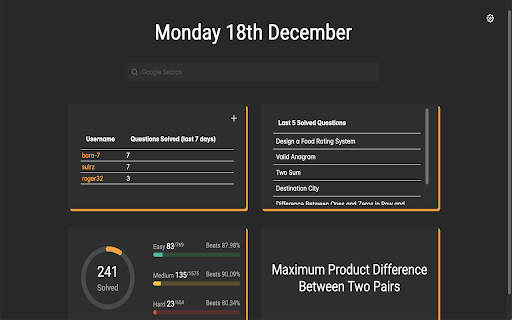
ภาพหน้าจอของส่วนขยาย


ดาวน์โหลดไฟล์ CRX ของส่วนขยาย LeetTab - Leetcode Dashboard
ดาวน์โหลดไฟล์ส่วนขยาย LeetTab - Leetcode Dashboard ในรูปแบบ crx และติดตั้งส่วนขยาย Chrome ด้วยตนเองในเบราว์เซอร์หรือแชร์ไฟล์ crx กับเพื่อนๆ เพื่อติดตั้งส่วนขยาย Chrome อย่างง่ายดาย
คำแนะนำในการใช้ส่วนขยาย
                        Features:
- Keep track of your upcoming interviews during interview season.
- See questions done by difficulty, tag and language.
- Today's daily.
- Leaderboard (up to 4 people).
- Recent submissions.

LeetTab does not collect any personal data.
ข้อมูลพื้นฐานของส่วนขยาย
| ชื่อ |  LeetTab - Leetcode Dashboard LeetTab - Leetcode Dashboard |
| ID | jmpkpppaflhbbghfbdbcabgjkfmemklo |
| URL อย่างเป็นทางการ | https://chromewebstore.google.com/detail/leettab-leetcode-dashboar/jmpkpppaflhbbghfbdbcabgjkfmemklo |
| คำอธิบาย | Have all your upcoming interviews and Leetcode stats in one place. Stay on the grind and land your dream software engineering job. |
| ขนาดไฟล์ | 2.26 MB |
| จำนวนการติดตั้ง | 63 |
| เวอร์ชันปัจจุบัน | 4.1 |
| อัปเดตครั้งล่าสุด | 2024-01-10 |
| วันที่เผยแพร่ | 2023-12-20 |
| คะแนน | 5.00/5 รวมทั้งหมด 14 คะแนน |
| ผู้พัฒนา | bora-7 |
| อีเมล | [email protected] |
| ประเภทการชำระเงิน | free |
| เว็บไซต์ส่วนขยาย | https://leettab.boraakyuz.me/ |
| URL หน้านโยบายความเป็นส่วนตัว | https://boraakyuz.me/leettabprivacypolicy |
| ภาษาที่รองรับ | en |
| manifest.json | |
{
    "update_url": "https:\/\/clients2.google.com\/service\/update2\/crx",
    "name": "LeetTab - Leetcode Dashboard",
    "description": "Have all your upcoming interviews and Leetcode stats in one place. Stay on the grind and land your dream software engineering job.",
    "version": "4.1",
    "permissions": [],
    "icons": {
        "16": ".\/favicon-16x16.png",
        "32": ".\/favicon-32x32.png",
        "192": ".\/android-chrome-192x192.png",
        "512": ".\/android-chrome-512x512.png"
    },
    "manifest_version": 3,
    "chrome_url_overrides": {
        "newtab": "index.html"
    },
    "browser_specific_settings": {
        "gecko": {
            "id": "[email protected]"
        }
    },
    "content_security_policy": {
        "extension_pages": "script-src 'self'; object-src 'self'"
    }
} | |