Batch Links Opener
Open links from a website in batches
Batch Links Openerคืออะไร?
Batch Links Opener เป็นส่วนขยายของ Chrome ที่พัฒนาโดย nickweeds85 และคุณลักษณะหลักของมันคือ "Open links from a website in batches"
ภาพหน้าจอของส่วนขยาย

ดาวน์โหลดไฟล์ CRX ของส่วนขยาย Batch Links Opener
ดาวน์โหลดไฟล์ส่วนขยาย Batch Links Opener ในรูปแบบ crx และติดตั้งส่วนขยาย Chrome ด้วยตนเองในเบราว์เซอร์หรือแชร์ไฟล์ crx กับเพื่อนๆ เพื่อติดตั้งส่วนขยาย Chrome อย่างง่ายดาย
คำแนะนำในการใช้ส่วนขยาย
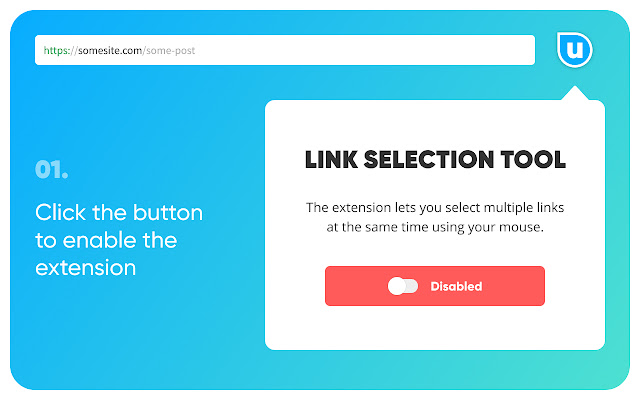
                        Open links from a page in batches.

If you have ever encountered the situation where there are many links from a page that you want to open but you have to go one by one opening them, this extension will facilitate your workflows.

- Allows to select many links from a page
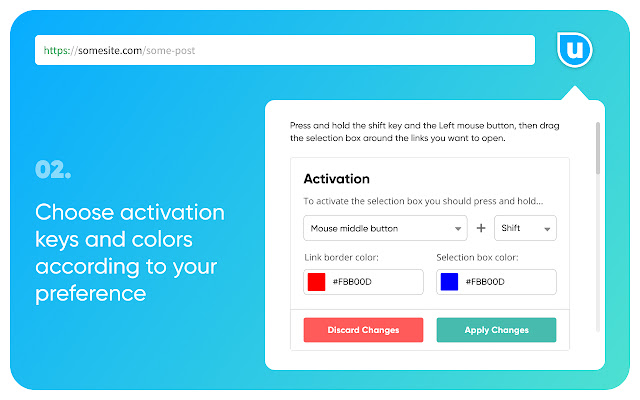
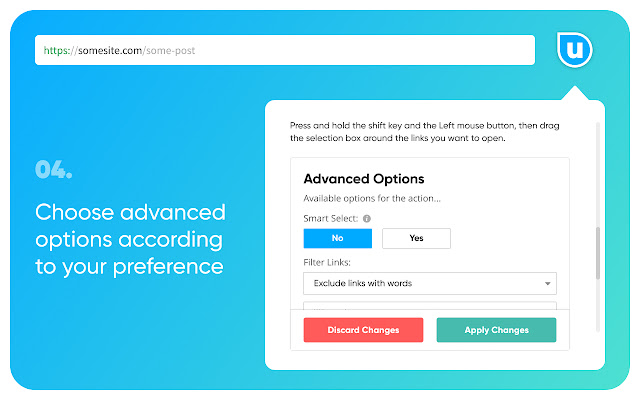
- Completely customizable
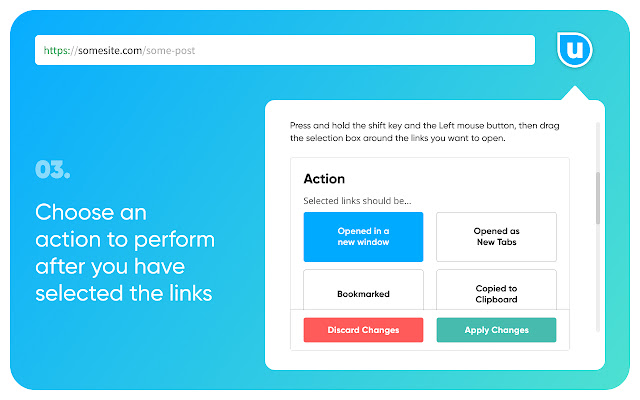
- Open in new window
- Open in new tab
- Avoid link from opening
- Custom shortcuts
- Save links to bookmarks
ข้อมูลพื้นฐานของส่วนขยาย
| ชื่อ |  Batch Links Opener Batch Links Opener |
| ID | jnidcaddmolngplnpoloipnmhpmbgikn |
| URL อย่างเป็นทางการ | https://chrome.google.com/webstore/detail/jnidcaddmolngplnpoloipnmhpmbgikn |
| คำอธิบาย | Open links from a website in batches |
| ขนาดไฟล์ | 480 KB |
| จำนวนการติดตั้ง | 3,800 |
| เวอร์ชันปัจจุบัน | 1.2.0 |
| อัปเดตครั้งล่าสุด | 2022-07-19 |
| วันที่เผยแพร่ | 2021-06-17 |
| คะแนน | 4.40/5 รวมทั้งหมด 5 คะแนน |
| ผู้พัฒนา | nickweeds85 |
| อีเมล | [email protected] |
| ประเภทการชำระเงิน | free |
| ภาษาที่รองรับ | en |
| manifest.json | |
{
    "update_url": "https:\/\/clients2.google.com\/service\/update2\/crx",
    "manifest_version": 2,
    "name": "Batch Links Opener",
    "description": "Open links from a website in batches",
    "version": "1.2.0",
    "icons": {
        "16": "icons\/icon16.png",
        "19": "icons\/icon19.png",
        "32": "icons\/icon32.png",
        "38": "icons\/icon38.png",
        "48": "icons\/icon48.png",
        "96": "icons\/icon96.png",
        "128": "icons\/icon128.png",
        "256": "icons\/icon256.png"
    },
    "background": {
        "persistent": true,
        "scripts": [
            "javascripts\/settings.js",
            "javascripts\/background.js"
        ]
    },
    "browser_action": {
        "default_title": "Popup",
        "default_popup": "popup\/popup.html"
    },
    "web_accessible_resources": [
        "javascripts\/page.zIndex.js",
        "libraries\/vue-files\/vue.esm-browser.js",
        "styles\/selection.css"
    ],
    "permissions": [
        "*:\/\/*\/*",
        "storage",
        "bookmarks",
        "tabs",
        "activeTab",
        "webRequest",
        "webRequestBlocking"
    ],
    "content_scripts": [
        {
            "matches": [
                "*:\/\/*\/*"
            ],
            "js": [
                "javascripts\/scroll.js",
                "javascripts\/settings.js",
                "javascripts\/content-compiled.js"
            ],
            "css": [
                "styles\/content.css",
                "styles\/fonts.css"
            ],
            "run_at": "document_start",
            "all_frames": true
        },
        {
            "matches": [
                "*:\/\/*\/*"
            ],
            "js": [
                "content-scripts\/idle.js"
            ],
            "all_frames": true,
            "run_at": "document_idle"
        },
        {
            "matches": [
                "*:\/\/*\/*"
            ],
            "js": [
                "content-scripts\/start.js"
            ],
            "all_frames": true,
            "run_at": "document_start"
        }
    ],
    "commands": {
        "reload-extension": {
            "description": "Reloads extension"
        }
    }
} | |