NojimaLogin Extension
SSO Chrome Extension
NojimaLogin Extensionคืออะไร?
NojimaLogin Extension เป็นส่วนขยายของ Chrome ที่พัฒนาโดย ntq_upload และคุณลักษณะหลักของมันคือ "SSO Chrome Extension"
ภาพหน้าจอของส่วนขยาย
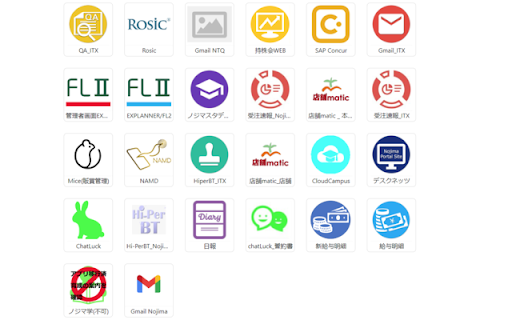


ดาวน์โหลดไฟล์ CRX ของส่วนขยาย NojimaLogin Extension
ดาวน์โหลดไฟล์ส่วนขยาย NojimaLogin Extension ในรูปแบบ crx และติดตั้งส่วนขยาย Chrome ด้วยตนเองในเบราว์เซอร์หรือแชร์ไฟล์ crx กับเพื่อนๆ เพื่อติดตั้งส่วนขยาย Chrome อย่างง่ายดาย
คำแนะนำในการใช้ส่วนขยาย
                        In Nojima company, there are many apps to serve work.
Because of there are so many apps, it is difficult for users to remember login information of each app.
They want to login to apps without remembering login information.
This extension will support users automatic login into company apps.

The main functions on the extension include:
- Show list of user apps
- Automatically log into apps when the user clicks on the app icon.
ข้อมูลพื้นฐานของส่วนขยาย
| ชื่อ |  NojimaLogin Extension NojimaLogin Extension |
| ID | joeloeifimkfbnifgnhaiedbnmfflhoo |
| URL อย่างเป็นทางการ | https://chromewebstore.google.com/detail/nojimalogin-extension/joeloeifimkfbnifgnhaiedbnmfflhoo |
| คำอธิบาย | SSO Chrome Extension |
| ขนาดไฟล์ | 670 KB |
| จำนวนการติดตั้ง | 6,679 |
| เวอร์ชันปัจจุบัน | 0.1.9 |
| อัปเดตครั้งล่าสุด | 2023-05-23 |
| วันที่เผยแพร่ | 2023-05-22 |
| ผู้พัฒนา | ntq_upload |
| อีเมล | [email protected] |
| ประเภทการชำระเงิน | free |
| เว็บไซต์ส่วนขยาย | https://sso.nojima.co.jp/ |
| URL หน้านโยบายความเป็นส่วนตัว | https://www.nojima.co.jp/corporation/privacy |
| ภาษาที่รองรับ | ja |
| manifest.json | |
{
    "update_url": "https:\/\/clients2.google.com\/service\/update2\/crx",
    "manifest_version": 3,
    "name": "NojimaLogin Extension",
    "version": "0.1.9",
    "background": {
        "service_worker": "background.bundle.js"
    },
    "action": {
        "default_popup": "popup.html"
    },
    "content_scripts": [
        {
            "matches": [
                "http:\/\/*\/*",
                "https:\/\/*\/*"
            ],
            "js": [
                "content.bundle.js"
            ]
        }
    ],
    "permissions": [
        "cookies",
        "storage",
        "activeTab",
        "webRequest"
    ],
    "host_permissions": [
        "https:\/\/*.nojima.co.jp\/"
    ],
    "icons": {
        "16": "icon16.png",
        "24": "icon24.png",
        "32": "icon32.png",
        "64": "icon64.png",
        "128": "icon128.png"
    },
    "content_security_policy": {
        "extension_pages": "script-src 'self'; object-src 'self'"
    },
    "description": "SSO Chrome Extension"
} | |