My Cloud Bookmarks
Search your bookmarks while searching for information in search engines. Save bookmarks with details for future reference
My Cloud Bookmarksคืออะไร?
My Cloud Bookmarks เป็นส่วนขยายของ Chrome ที่พัฒนาโดย http://www.prophecy.co.in และคุณลักษณะหลักของมันคือ "Search your bookmarks while searching for information in search engines. Save bookmarks with details for future reference"
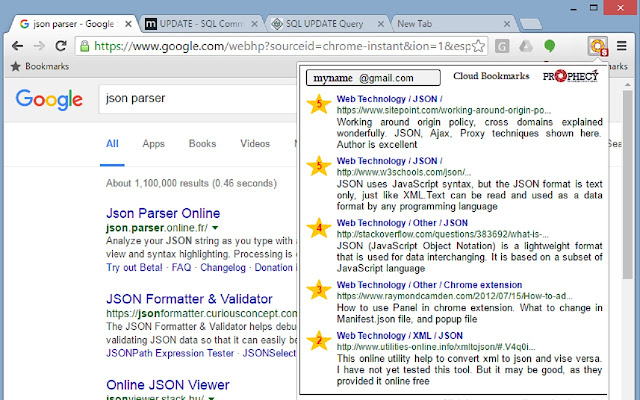
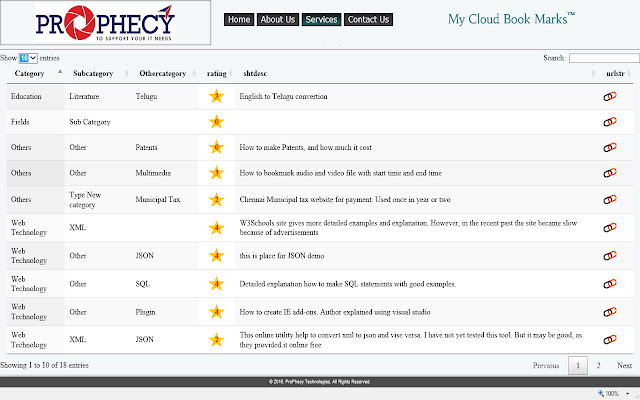
ภาพหน้าจอของส่วนขยาย



ดาวน์โหลดไฟล์ CRX ของส่วนขยาย My Cloud Bookmarks
ดาวน์โหลดไฟล์ส่วนขยาย My Cloud Bookmarks ในรูปแบบ crx และติดตั้งส่วนขยาย Chrome ด้วยตนเองในเบราว์เซอร์หรือแชร์ไฟล์ crx กับเพื่อนๆ เพื่อติดตั้งส่วนขยาย Chrome อย่างง่ายดาย
คำแนะนำในการใช้ส่วนขยาย
                        Automatically Search your own bookmarks too, while searching for information in Google, Bing, Yahoo search engines.

Save your own bookmarks, with proper categorization, short notes and star rating for your future reference at Prophecy stores for free.

These bookmarks also made available over cloud for your editing.

Use Alt+B (Alternate Bookmark) anytime to bookmark a page.
ข้อมูลพื้นฐานของส่วนขยาย
| ชื่อ |  My Cloud Bookmarks My Cloud Bookmarks |
| ID | lccennflakcnjjgfobablnapdcmjeoin |
| URL อย่างเป็นทางการ | https://chrome.google.com/webstore/detail/lccennflakcnjjgfobablnapdcmjeoin |
| คำอธิบาย | Search your bookmarks while searching for information in search engines. Save bookmarks with details for future reference |
| ขนาดไฟล์ | 115 KB |
| จำนวนการติดตั้ง | 43 |
| เวอร์ชันปัจจุบัน | 1.0.1.4 |
| อัปเดตครั้งล่าสุด | 2016-09-29 |
| วันที่เผยแพร่ | 2016-09-29 |
| ผู้พัฒนา | http://www.prophecy.co.in |
| อีเมล | [email protected] |
| ประเภทการชำระเงิน | free |
| เว็บไซต์ส่วนขยาย | http://www.prophecy.co.in |
| URL หน้าช่วยเหลือ | http://www.prophecy.co.in/services/mycloudbookmarks/help/help.html |
| ภาษาที่รองรับ | en-US |
| manifest.json | |
{
    "update_url": "https:\/\/clients2.google.com\/service\/update2\/crx",
    "name": "My Cloud Bookmarks",
    "short_name": "My Cloud Bookmarks",
    "description": "Search your bookmarks while searching for information in search engines. \n\nSave bookmarks with details for future reference",
    "version": "1.0.1.4",
    "manifest_version": 2,
    "browser_action": {
        "default_icon": "images\/ppred.png",
        "default_popup": "bookmarks.html",
        "default_title": "Want to bookmark this page?"
    },
    "icons": {
        "10": "images\/ppgreen.png",
        "16": "images\/ppred16.png",
        "20": "images\/ppgold.png",
        "30": "images\/ppblue.png",
        "32": "images\/ppred32.png",
        "40": "images\/ppred.png",
        "48": "images\/ppred48.png",
        "128": "images\/ppred128.png"
    },
    "background": {
        "scripts": [
            "js\/jquery-min.js",
            "js\/client_platform.js",
            "js\/chkbrowser.js",
            "js\/key.js",
            "js\/pplogin.js",
            "js\/background.js"
        ],
        "persistent": false
    },
    "content_security_policy": "script-src  https:\/\/*.google.com 'unsafe-eval' ; object-src 'self'",
    "oauth2": {
        "client_id": "174325550089-ojcvkigdf0cp0lt184rt6e3q5m3pupat.apps.googleusercontent.com",
        "scopes": [
            "https:\/\/www.googleapis.com\/auth\/gmail.readonly"
        ]
    },
    "commands": {
        "_execute_browser_action": {
            "suggested_key": {
                "default": "Alt+B",
                "windows": "Alt+B",
                "mac": "Alt+Shift+B"
            }
        }
    },
    "incognito": "spanning",
    "permissions": [
        "webNavigation",
        "identity",
        "identity.email",
        "tabs",
        "activeTab",
        "http:\/\/www.prophecy.co.in\/*",
        "https:\/\/www.prophecy.co.in\/*",
        "alarms"
    ]
} | |