HKUL Search Assistant
Search the HKU Libraries Catalogue without leaving your current page
HKUL Search Assistantคืออะไร?
HKUL Search Assistant เป็นส่วนขยายของ Chrome ที่พัฒนาโดย HKU Libraries และคุณลักษณะหลักของมันคือ "Search the HKU Libraries Catalogue without leaving your current page"
ภาพหน้าจอของส่วนขยาย

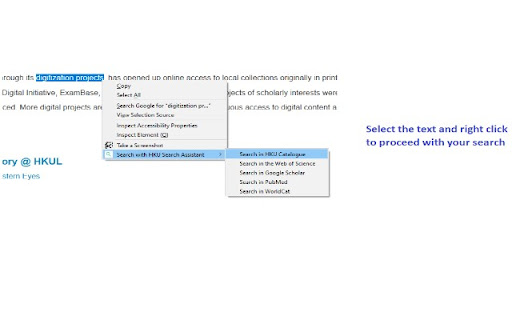
ดาวน์โหลดไฟล์ CRX ของส่วนขยาย HKUL Search Assistant
ดาวน์โหลดไฟล์ส่วนขยาย HKUL Search Assistant ในรูปแบบ crx และติดตั้งส่วนขยาย Chrome ด้วยตนเองในเบราว์เซอร์หรือแชร์ไฟล์ crx กับเพื่อนๆ เพื่อติดตั้งส่วนขยาย Chrome อย่างง่ายดาย
คำแนะนำในการใช้ส่วนขยาย
                        HKUL Search Assistant helps you to search HKU Libraries Catalogue and other popular search engines within your current page.

Access from a non-HKUL website, such as a Publisher’s website, would not trigger the HKUL login page, and you will be asked to pay for access. HKUL Search Assistant identifies your affiliation with HKUL, you will need to route via the EZProxy server.
ข้อมูลพื้นฐานของส่วนขยาย
| ชื่อ |  HKUL Search Assistant HKUL Search Assistant |
| ID | lfjmkaiddobaebgokockcncpchpbnoad |
| URL อย่างเป็นทางการ | https://chromewebstore.google.com/detail/hkul-search-assistant/lfjmkaiddobaebgokockcncpchpbnoad |
| คำอธิบาย | Search the HKU Libraries Catalogue without leaving your current page |
| ขนาดไฟล์ | 2.01 MB |
| จำนวนการติดตั้ง | 4,000 |
| เวอร์ชันปัจจุบัน | 3.0.16 |
| อัปเดตครั้งล่าสุด | 2024-02-15 |
| วันที่เผยแพร่ | 2020-08-03 |
| คะแนน | 5.00/5 รวมทั้งหมด 2 คะแนน |
| ผู้พัฒนา | HKU Libraries |
| อีเมล | [email protected] |
| ประเภทการชำระเงิน | free |
| เว็บไซต์ส่วนขยาย | https://lib.hku.hk/ |
| ภาษาที่รองรับ | en |
| manifest.json | |
{
    "update_url": "https:\/\/clients2.google.com\/service\/update2\/crx",
    "manifest_version": 3,
    "name": "HKUL Search Assistant",
    "description": "Search the HKU Libraries Catalogue without leaving your current page",
    "version": "3.0.16",
    "author": "HKU Libraries",
    "content_security_policy": {
        "extension_pages": "script-src 'self'; object-src 'self';"
    },
    "action": {
        "default_icon": "images\/icons\/icon128.png",
        "default_popup": "popup.html",
        "default_title": "HKUL Search Assistant"
    },
    "icons": {
        "16": "images\/icons\/icon16.png",
        "48": "images\/icons\/icon48.png",
        "128": "images\/icons\/icon128.png"
    },
    "background": {
        "service_worker": "background.js"
    },
    "permissions": [
        "contextMenus",
        "activeTab",
        "tabs",
        "storage"
    ]
} | |