YouTube video length
Shows video length next to YouTube video links
YouTube video lengthคืออะไร?
YouTube video length เป็นส่วนขยายของ Chrome ที่พัฒนาโดย Brian และคุณลักษณะหลักของมันคือ "Shows video length next to YouTube video links"
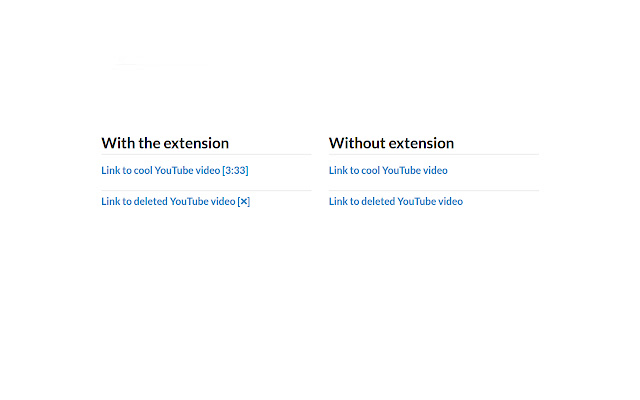
ภาพหน้าจอของส่วนขยาย

ดาวน์โหลดไฟล์ CRX ของส่วนขยาย YouTube video length
ดาวน์โหลดไฟล์ส่วนขยาย YouTube video length ในรูปแบบ crx และติดตั้งส่วนขยาย Chrome ด้วยตนเองในเบราว์เซอร์หรือแชร์ไฟล์ crx กับเพื่อนๆ เพื่อติดตั้งส่วนขยาย Chrome อย่างง่ายดาย
คำแนะนำในการใช้ส่วนขยาย
                        Shows video duration next to YouTube links. For example "Cool video [2:30]".

Also a tooltip showing additional video information appears when your mouse hovers over a YouTube link showing.


More information:
 - Shows when a video is unavailable - [❌]
 - Shows when a video is blocked in your region - [❌ country blocked]
 - Shows when a video is age restricted - [18+]
 - Works on text and image links
 - Accounts for videos with an offset. A 2 minute video with a 1 minute offset is shown as having a 1 minute duration.

If you have any issues please leave a comment here or log them on Github.

Code available on Github: https://github.com/Brian-Gaffney/YouTube-video-length-Chrome-extension
ข้อมูลพื้นฐานของส่วนขยาย
| ชื่อ |  YouTube video length YouTube video length |
| ID | lfkbfhglojdeoebdkpmgmphplhanchff |
| URL อย่างเป็นทางการ | https://chrome.google.com/webstore/detail/youtube-video-length/lfkbfhglojdeoebdkpmgmphplhanchff |
| คำอธิบาย | Shows video length next to YouTube video links |
| ขนาดไฟล์ | 120 KB |
| จำนวนการติดตั้ง | 482 |
| เวอร์ชันปัจจุบัน | 2.1.1 |
| อัปเดตครั้งล่าสุด | 2017-07-30 |
| วันที่เผยแพร่ | 2017-07-30 |
| คะแนน | 4.20/5 รวมทั้งหมด 10 คะแนน |
| ผู้พัฒนา | Brian |
| ประเภทการชำระเงิน | free |
| เว็บไซต์ส่วนขยาย | https://github.com/Brian-Gaffney/YouTube-video-length-Chrome-extension |
| ภาษาที่รองรับ | en-US |
| manifest.json | |
{
"update_url": "https:\/\/clients2.google.com\/service\/update2\/crx",
"manifest_version": 2,
"name": "YouTube video length",
"description": "Shows video length next to YouTube video links",
"version": "2.1.1",
"permissions": [
"https:\/\/api.youtube.com\/"
],
"background": {
"scripts": [
"background.js"
],
"persistent": false
},
"icons": {
"48": "48.png",
"128": "128.png"
},
"browser_action": {
"default_title": "Shows video length next to YouTube video links",
"default_icon": {
"19": "icon.png"
}
},
"content_scripts": [
{
"matches": [
" | |