Launcher (for Chrome™)
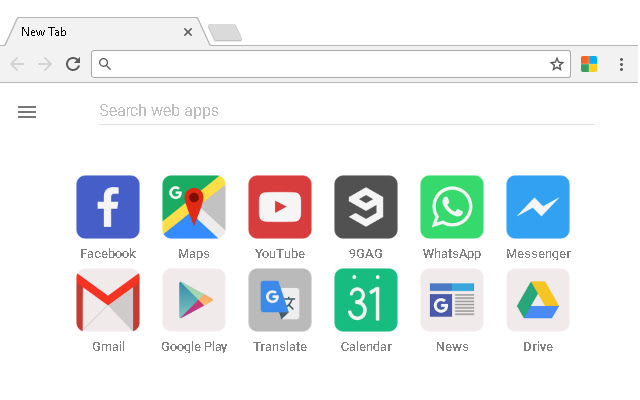
This extension replaces your default new tab page with a minimal, yet powerful launcher for web apps.
Launcher (for Chrome™)คืออะไร?
Launcher (for Chrome™) เป็นส่วนขยายของ Chrome ที่พัฒนาโดย http://wauncher.com และคุณลักษณะหลักของมันคือ "This extension replaces your default new tab page with a minimal, yet powerful launcher for web apps."
ภาพหน้าจอของส่วนขยาย
ดาวน์โหลดไฟล์ CRX ของส่วนขยาย Launcher (for Chrome™)
ดาวน์โหลดไฟล์ส่วนขยาย Launcher (for Chrome™) ในรูปแบบ crx และติดตั้งส่วนขยาย Chrome ด้วยตนเองในเบราว์เซอร์หรือแชร์ไฟล์ crx กับเพื่อนๆ เพื่อติดตั้งส่วนขยาย Chrome อย่างง่ายดาย
คำแนะนำในการใช้ส่วนขยาย
                        Web App Launcher provides quick and intuitive personalized access to your favourite websites.

Features:
✔ Automatically generated personalized grid of your most opened and recently visited sites;
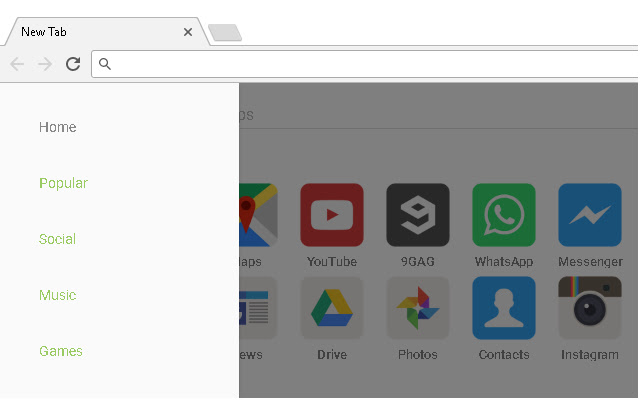
✔ Well-organized sidebar to browse through a growing collection of web apps and games;
✔ An ultra-fast live search that displays the results as you type;
✔ Simple and clean user interface based on Google's Material Design principles;
✔ Fast loading and lightweight, with responsive design to accommodate iOS, Android, Windows etc;
✔ No signup or registration required;
✔ Completely FREE, NO ADS!

Have any questions?

Twitter: @wauncher
Facebook: fb.com/wauncher
Email: [email protected]
ข้อมูลพื้นฐานของส่วนขยาย
| ชื่อ |  Launcher (for Chrome™) Launcher (for Chrome™) |
| ID | lfkpbadaihhpflkblbecdmdhkeofgona |
| URL อย่างเป็นทางการ | https://chrome.google.com/webstore/detail/launcher-for-chrome/lfkpbadaihhpflkblbecdmdhkeofgona |
| คำอธิบาย | This extension replaces your default new tab page with a minimal, yet powerful launcher for web apps. |
| ขนาดไฟล์ | 15.5 KB |
| จำนวนการติดตั้ง | 2,007 |
| เวอร์ชันปัจจุบัน | 2019.07.24 |
| อัปเดตครั้งล่าสุด | 2020-08-13 |
| วันที่เผยแพร่ | 2020-08-13 |
| คะแนน | 4.08/5 รวมทั้งหมด 39 คะแนน |
| ผู้พัฒนา | http://wauncher.com |
| อีเมล | [email protected] |
| ประเภทการชำระเงิน | free |
| ภาษาที่รองรับ | en |
| manifest.json | |
{
    "update_url": "https:\/\/clients2.google.com\/service\/update2\/crx",
    "manifest_version": 2,
    "icons": {
        "16": "images\/icon16.png",
        "19": "images\/icon19.png",
        "32": "images\/icon32.png",
        "38": "images\/icon38.png",
        "48": "images\/icon48.png",
        "128": "images\/icon.png"
    },
    "browser_action": {
        "default_icon": "images\/icon.png"
    },
    "background": {
        "scripts": [
            "js\/background.js"
        ]
    },
    "chrome_url_overrides": {
        "newtab": "html\/redirect.html"
    },
    "permissions": [
        "tabs"
    ],
    "name": "Launcher (for Chrome\u2122)",
    "version": "2",
    "version_name": "2019.07.24",
    "description": "This extension replaces your default new tab page with a minimal, yet powerful launcher for web apps."
} | |